Home > Escape From Tarkov > Learn How To Use The Compass In EFT

How To Use Compass In Escape From Tarkov (EFT)

Updated Date :

Escape from Tarkov is a multiplayer tactical first-person shooter that is in development by Battlestate Games. It is definitely not the kindest game for beginners as it takes a really long time to get used to. Players often find themselves lost in the enormous maps. At such times, a compass can be extremely useful to navigate your way out of any confusion. In this guide, we will show you how to use a Compass in Escape from Tarkov.

How to Use Compass in Escape from Tarkov

Considering that you have already found the compass, you might be wondering how to use it. Well, it’s quite straightforward to say the least. You just need to follow these steps to learn how to use the Compass in Escape from Tarkov:

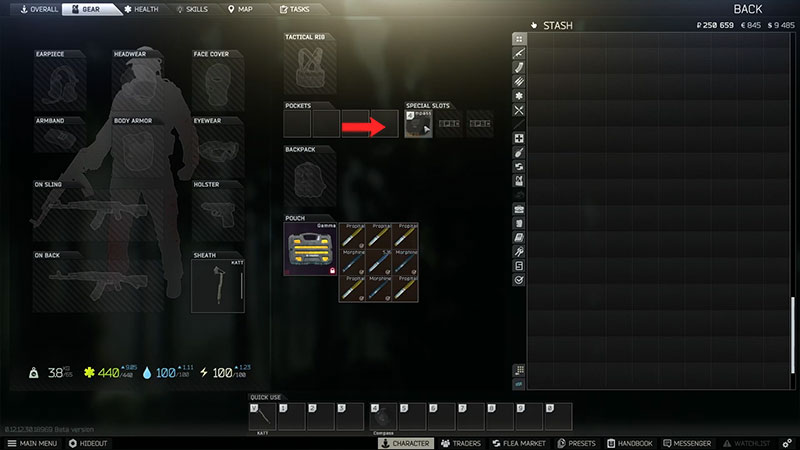
  • First, head to “Character” from the main menu of EFT.
  • You will be able to find three Special Slots here.
Compass in Escape from Tarkov

  • Simply drag your compass from “Stash” to a vacant “Special Slot”
  • Now, you will have to select a “Hotkey” to be able to use the compass.
  • You can choose from 0 to 4, this will create a quick key for the compass.

That’s all, you have successfully equipped the compass. To use it during a Raid, all you need to do is press the hotkey that you had chosen. The compass will appear on your left. The red arrow will help you navigate towards the North while the green arrow will direct you to the South. You will be able to walk and even aim with your gun while the compass is in your hand. But as soon as you sprint or shoot, the compass will be put away.

The compass is extremely vital whether you’re a newbie or an experienced player. You will be able to understand the maps in Escape from Tarkov better. So, it’s important that you find and start using it as soon as you can.

That’s everything covered on how to use the Compass in Escape from Tarkov. For more tips & tricks on the game, head over to our Escape from Tarkov page.

  • Spin a Car Codes (July 2026)

    Spin a Car Codes (July 2026)

    Published Date :

    Spinning games are pretty popular on Roblox and rightly so, because they’re very addictive! Spin a Car is where you roll dice to unlock various cars and upgrades – the rarer your vehicle, the more money it makes! Since free rewards are always welcome, the developers share codes that provide Gasoline, Coin Potion, cash and… Read More

  • Build Your Butterfly Garden Codes (July 2026)

    Build Your Butterfly Garden Codes (July 2026)

    Published Date :

    Build Your Butterfly Garden codes let you grow your butterfly sanctuary even faster by rewarding you with useful items like Eggs, Flowerbeds, and Luck Boosts. As you hatch new butterflies, expand your collection, and decorate your peaceful garden, these freebies can give your progress quite a boost! Here are the latest rewards you don’t want… Read More

  • Paint or Die Codes (July 2026)

    Paint or Die Codes (July 2026)

    Published Date :

    Paint or Die Codes can help you build up your Cash balance before you jump back into another round of hiding in plain sight. In this Roblox game, your goal is to blend perfectly with the environment by painting yourself while avoiding the Seeker (similar to the viral Meccha Chameleon). And if unlocking certain character… Read More

  • Monkey Soccer Codes (June 2026)

    Monkey Soccer Codes (June 2026)

    Published Date :

    Monkey Soccer codes can give you plenty of free Bananas and Lucky Spins, making it easier to get a much better experience on the pitch. Since new codes are usually released alongside major updates and milestones, here’s a complete list of rewards to ensure you don’t miss out. Last checked for new codes on June… Read More