While batting you can get an edge if you can guess the pitch. And you can easily do that when you turn on the guess pitch option in MLB The Show 22. The game gives you 4 different options to guess pitch. This setting might not feel very useful on easier levels but as you play on higher difficulties it will start to come in handy. So in this guide let us quickly learn how to turn on guess pitch in MLB The Show 22 and how the different options work.
How to Turn On Guess Pitch in MLB The Show 22
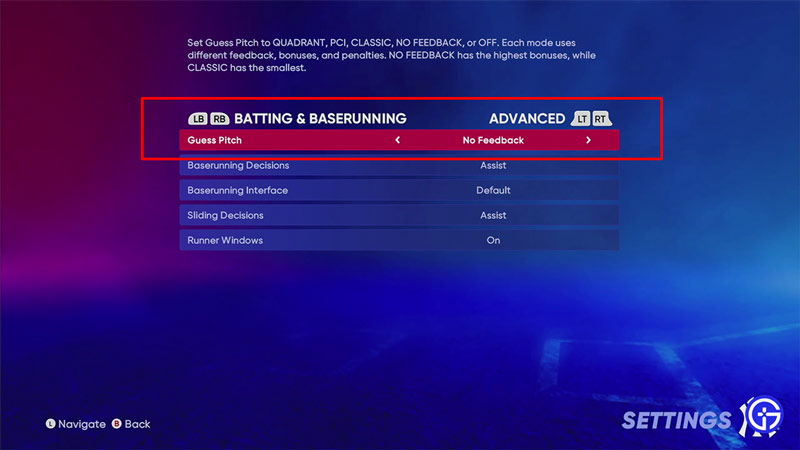
You can turn on the Guess Pitch from the Advanced Batting & Baserunning settings. There are a total of four guess pitch options that the game gives you.
- From the main screen click on the settings button. It should look like a cogwheel gear icon on the top right corner of the screen.
- Once in settings, click on Gameplay.
- Next, press the RT button on your Xbox Controller. PlayStation players can do that by pressing the R2 button, and Nintendo players can do the same by pressing the ZR button. This brings up the advanced Gameplay settings.
- Here, the first option is Guess Pitch. You can set it as one of these 5 options.
- Off: Turns of the Guess Pitch.
- Quadrant: It lets you guess the pitch using the batter’s box. As the name suggests, it splits it into four quadrants to make it easier to guess the pitch style and location. The penalties aren’t very harsh but the bonus is also mediocre.
- No Feedback: It uses the same technique as Quadrant but gives you no feedback. The bonus you get for this guess pitch is high and penalities aren’t as punishing.
- PCI: You can move your Pitch Coverage Indicator (PCI) freely even after you have guessed the Pitch.
- Classic: It lets you know the exact location of the pitch if you guess it correctly. While the bonus for it isn’t anything grand, the penalties are quite harsh.
That covers everything you should know about how to turn on Guess Pitch in MLB The Show 22 and how the options work. Since you are interested in this game also check our other guides on the best pitching style and best batting stances for this game.