The gameplay of Palworld is quite simple on the surface, you catch Pals and use their help to build and run your base. This is something you would expect in a standard survival game. However, one of the game’s features is raids which you should turn off before it’s too late.
When someone raids you they come for your base, depending on the Pals you have, you may or may not be able to defend yourself. The problem is they can simply ignore you and leave behind your base destroyed which you spent hours making. In case you are already a victim of such an accident then here is something that you can do to revert or minimize the damage.
How to Turn Off Raids in Palworld
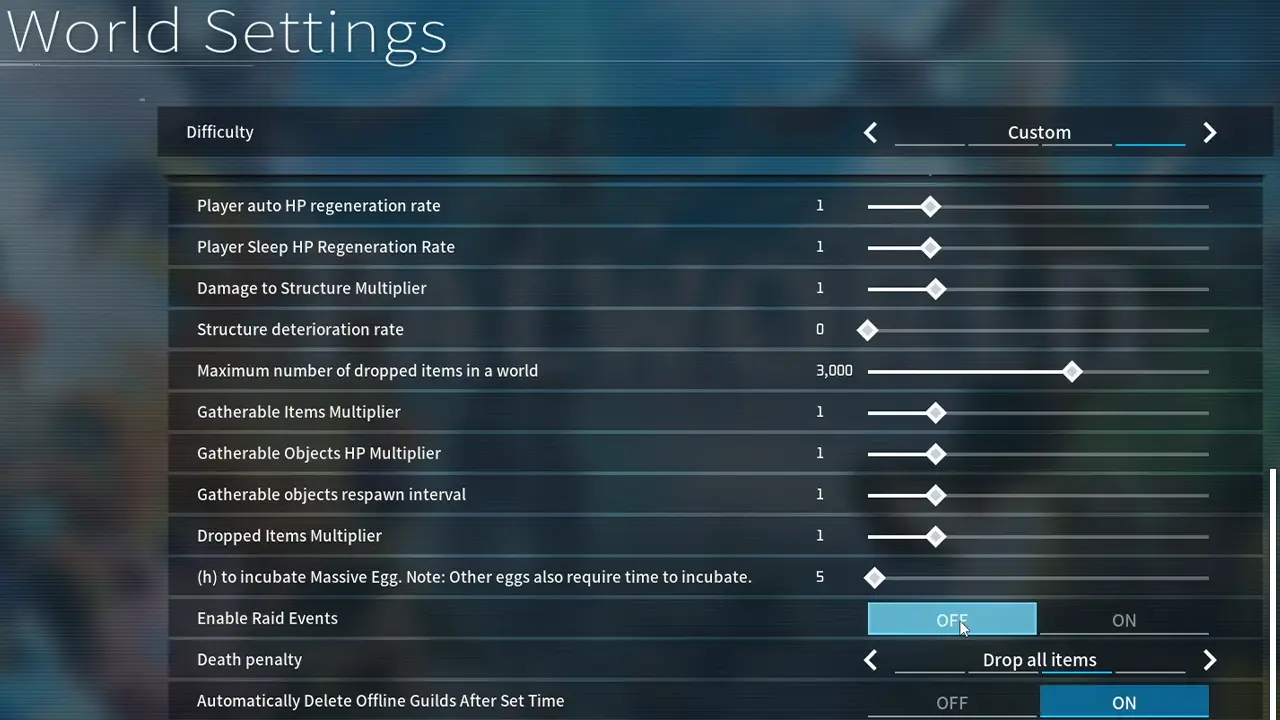
You can disable raids from the World Settings. Do note that not everyone can turn off raids, you need to be the host of the world or ask the person who is to do it for you. Another thing is you cannot do is disable it in the middle of the game, so if you are already in a session then return to the title screen.
- Click on Start Game from the game’s main menu.
- Next, on the World Select screen, choose the world where you want to disable this option.
- Now, click on the Change World Settings button.
- Under the Difficulty options, click on Custom.
- Scroll down and you will find the Enable Raid Events option.
- By default, it should be set to on. Set it as off.
- Now, click the OK button and the game will ask you to “Saving settings. Proceed?”.
- Choose the Confirm button.
Now, others won’t be able to raid your world.
How to Get Your Old World Back Before It Was Raided
In case you have already been attacked then there is a way you could still possibly get back your base. Sadly, this option isn’t available on Xbox and is only for PC players at least for now. In this method, you restore your save data from backup. Here is a quick summary of what you have to do:
- Go to this location: C:\Users\UserName\AppData\Local\Pal\Saved\SaveGames\steamID\
- Inside you will find backup folders for local and world files.
- Simply find the LocalData.sav and world save data files before you were raided and restore them. You should have your base back.
That is all on how you can disable raids to protect your base in Palworld. For more on this game, also check our other guides on how to fix the infinite loading error, build a sphere assembly line, and rename pals.