
Fire Emblem Heroes is one of the many games that allow you to transfer your save data to play on another device. This makes things better as you aren’t just restricted to one platform. You can play on your Android device then transfer your save to your iOS device or vice versa and continue playing. And the process is also quite simple. So without further ado let us check how to backup, transfer, and restore save data in Fire Emblem Heroes (FEH).
How to Transfer Save Data in Fire Emblem Heroes
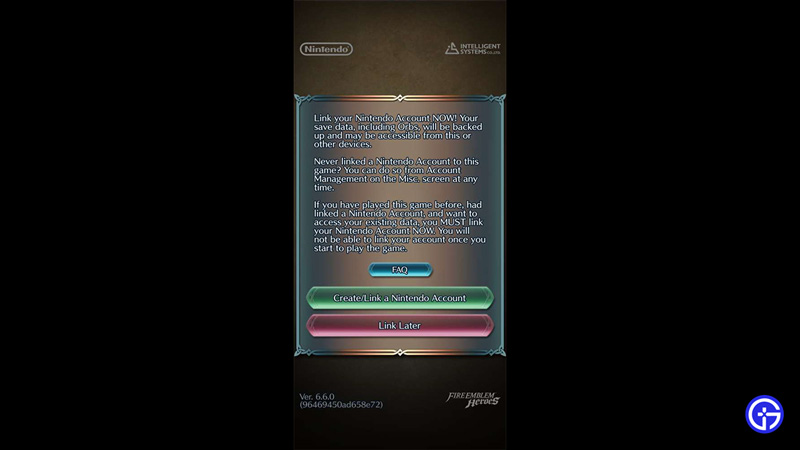
You can transfer your save data in this game with the help of a Nintendo Account. Here is what you need to do:
- Link your Nintendo Account to the game on the device you have made progress on.
- Now, take the new device to which you want the saved data to be transferred.
- Install the game on the secondary device and choose to link Nintendo Account.
- Once it is done you will successfully transfer your save data between the two devices in FEH.
In case you decided to link your account later then you can also manually link your account. Here are the steps for it:
- Tap on the Menu button.
- Next, tap on Account Management.
- Here, tap on Create/Link a Nintendo Account.
- This will redirect you to the Nintendo Account page on your phone’s browser.
- If you already have a Nintendo Account then use Sign in else proceed to create a Nintendo Account.
How to Backup and Restore Data in FEH
The process of backing and restoring is the same as transferring.
- To backup your save data you log in using your Nintendo Account on the device which has your progress.
- To restore your data you log in to your Nintendo Account on your other device. This can be a new device or the same device if you uninstalled the game.
Once you have the account linked you get the following benefits:
- Your progress is backed up.
- You can play across multiple devices as the same user.
That covers this guide on how to transfer Save data in Fire Emblem Heroes (FEH) and how to backup and restore it. If you found this guide useful and need help on similar topics for this game then check our guides on how to merge allies and how to get sacred seals in this game.











