Managing your inventory in Baldur’s Gate 3 can become challenging as you explore the world and acquire new weapons, armor, and treasures. With Patch 3, the developer, Larian Studios, introduced an important quality-of-life improvement – the shared stash. We’ll explain using shared stash in Baldur’s Gate 3 (BG3).
Shared Stash in BG3 Explained
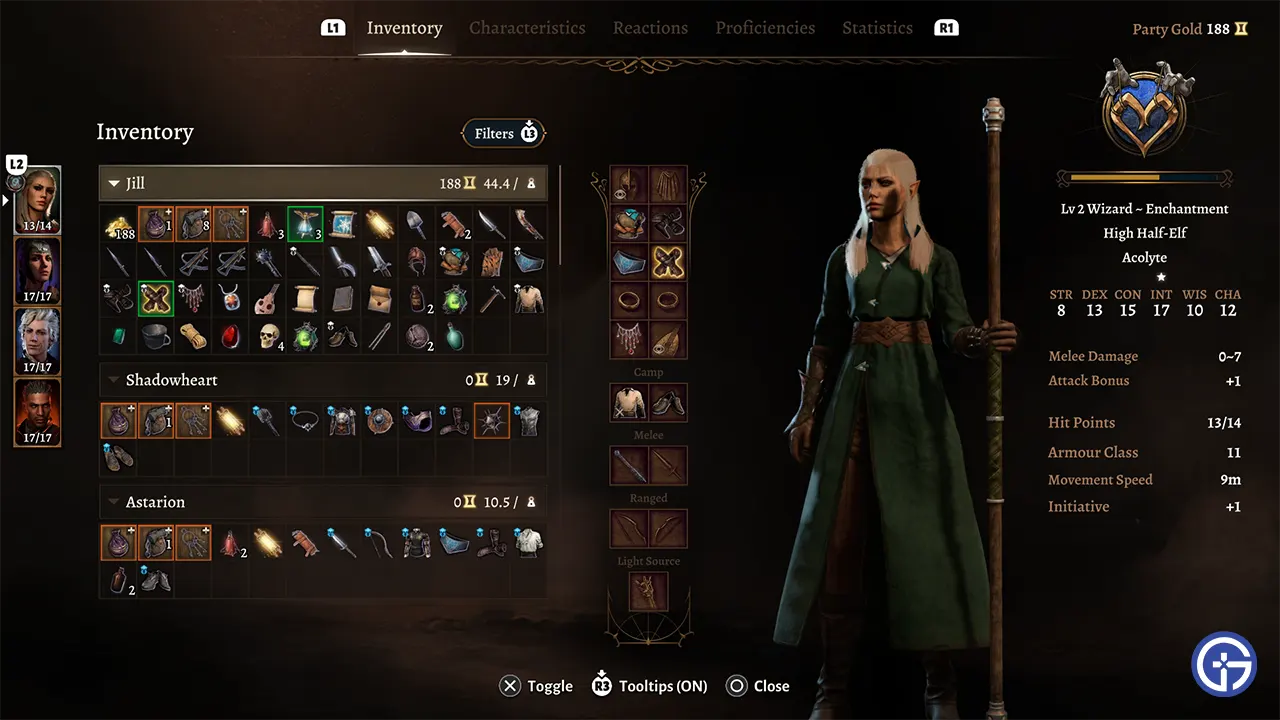
Shared stash is a feature introduced in recent patches that allows party members to share key items with the main character when they leave the active party. The goal is to prevent players from losing access to important items if a companion departs.
However, some players have expressed frustration with how it functions. Every time a party member leaves, key items like Camp Supply Packs and tools are automatically added to the player’s inventory. This can overload the carrying capacity quickly and make inventory management more tedious.
How Does Shared Stash Work in Baldur’s Gate 3?
When dismissing a companion from the active party, a notification will inform you which stash items they have contributed. This includes only a few select crucial aid items. Though not a large quantity, ferrying multiple companions’ stashes around can become bothersome, especially for players who regularly exceed their carry weight.
Can You Disable Shared Stash?
At this point, there is no option to turn off the shared stash mechanic in BG3. Whenever sending a character back to camp, their shared items will be unattributed regardless of the player’s preference. The only way to avoid it currently is by reloading previous saves.
Although players desire the inclusion of a setting that allows them to deactivate this feature, Larian Studios has not yet implemented a toggle for this feature.
There are plenty of such important decisions to make in this game. That’s why, I suggest you take a look at our BG3 Choices & Consequences Guide for help. We have mentioned outcomes for all the choices you can make on different occasions.