If you’re looking for The Seven Deadly Sins: Origin codes, you’re in luck because the developers will be releasing new rewards for players regularly. These codes grant freebies like Regular Hero Draw Tickets, Supreme Master EXP, Supreme Enhancement, and Refinement stones, etc. Since they are available for a limited time and released during updates or special events, you need to claim them as soon as possible! Here’s the complete list.
All New Seven Deadly Sins Origin Codes
Here are the latest active 7DSO codes:
- WELCOMEORIGIN: 5 Hero Draw Tickets, 10 Mastery EXP, 10 Enhancement Stones, 10 Refinement Stones, 50,000 Gold
- ORIGINSTEAM: 1 Hero Draw Ticket, EXP
- ORIGINX: 1 Hero Draw Ticket, 50,000 Gold
- ORIGINDISCORD: 1 Hero Draw Ticket, 3 Small Cube Key Bundle
Expired Codes
- None at the moment
Also Read | Kuroko Basketball Street Rivals Codes
How to Redeem Seven Deadly Sins Origin Codes
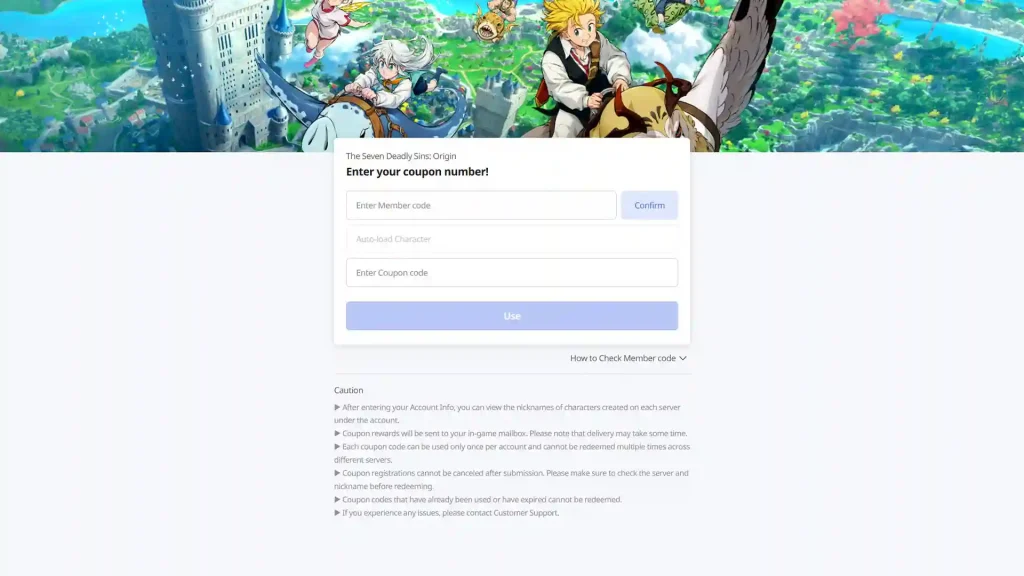
- First, make sure you know your member code (PID). You can find it in-game by going to the Menu > Settings > Account tab. You can copy your PID from the Account Info section.
- Head to the official code redemption site.
- Type the Coupon code and click on Use.
- You should see your rewards in your in-game mail.
Redeem 7DSO codes on Android and PC
You can also redeem codes from the game itself if you’re playing on Android or PC. Follow these steps:
- Launch the game and go to the Menu by clicking on the button at the top right corner of the screen.
- Head to Settings indicated by the gear icon.
- Click on the Account tab at the bottom left.
- Look for the Redeem Coupon section.
- Click on the Use button to add your code and claim the rewards.
How to Find New Codes
New codes are usually released during major updates, launch celebrations, or collaboration events. Developers typically share them through official channels such as Discord, Twitter, and patch notes. Since many codes are time-limited and not always highlighted inside the game, checking this guide regularly or following community platforms is the most reliable way to stay updated.
FAQs
It may have expired or been entered incorrectly. Make sure there are no extra spaces and check capitalization.
They are usually added during updates, events, or milestones.
Rewards are sent to your in-game mailbox.