Set to live your best farm life in Friends of Mineral Town? Then it is important to know how to save your progress in the game. Especially since milestones like marrying the Harvest Goddess need a lot (and we mean a LOT) of grinding for items. Don’t worry, though, because in this guide, we will explain how to save the game in Story Of Seasons: Friends Of Mineral Town easily.
Story Of Seasons: Friends Of Mineral Town – How To Save
What makes saving all the more crucial in this game is the hard work you have to put in. Raising chickens, finding a diamond, growing crops, upgrading tools – it’s not an easy task at all. So, let’s take a look at all the ways your game can be saved.
There is an autosave feature in the game, so you don’t have to worry about losing progress. But it is always better to be sure that your farming adventures are being saved. What if something goes wrong with your Computer or Switch? You can never predict those moments. That’s why you need to manually save the game In Story Of Seasons: Friends Of Mineral Town. Here’s how:
Inside your house, you will see a journal right beside your bed. All you have to do is interact with the journal and choose between Write in Journal and Read Journal. Write in Journal is basically giving you the option to save a game while Read Journal is the option to load a game.
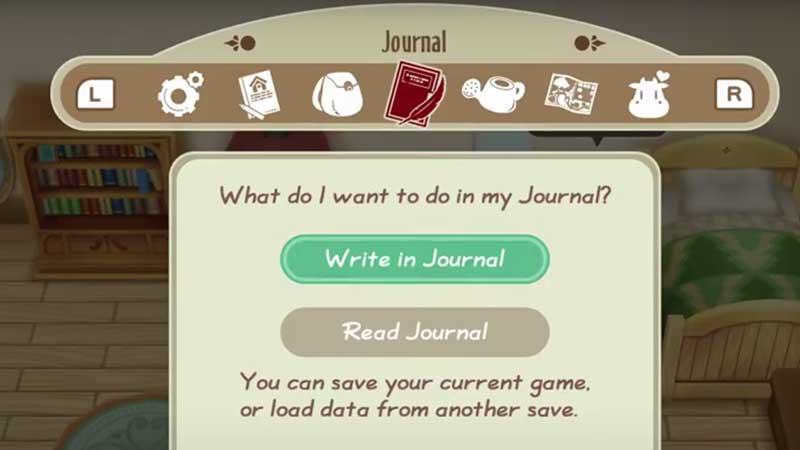
When you choose Write in Journal, you can pick a slot to put your save in. Just to be safe, you can utilize multiple save slots. If you pick Read Journal, you can load any saved game of your choice.
Now, in case you are not at your farmhouse but you want to save the game, there’s an option for that too. Simply press the X button on your Nintendo Switch which will show you the menu. There, you can locate the Journal and then pick between the aforementioned options.
This is everything about saving your game in Friends of Mineral Town. For more tips about this game, be sure to read our guides.