
Home > Gaming Guides > How to Save in Friends of Mineral Town

How To Save The Game In Story Of Seasons: Friends Of Mineral Town?

Published Date :

Set to live your best farm life in Friends of Mineral Town? Then it is important to know how to save your progress in the game. Especially since milestones like marrying the Harvest Goddess need a lot (and we mean a LOT) of grinding for items. Don’t worry, though, because in this guide, we will explain how to save the game in Story Of Seasons: Friends Of Mineral Town easily.

Story Of Seasons: Friends Of Mineral Town – How To Save

What makes saving all the more crucial in this game is the hard work you have to put in. Raising chickens, finding a diamond, growing crops, upgrading tools – it’s not an easy task at all. So, let’s take a look at all the ways your game can be saved.

There is an autosave feature in the game, so you don’t have to worry about losing progress. But it is always better to be sure that your farming adventures are being saved. What if something goes wrong with your Computer or Switch? You can never predict those moments. That’s why you need to manually save the game In Story Of Seasons: Friends Of Mineral Town. Here’s how:

Inside your house, you will see a journal right beside your bed. All you have to do is interact with the journal and choose between Write in Journal and Read Journal. Write in Journal is basically giving you the option to save a game while Read Journal is the option to load a game.
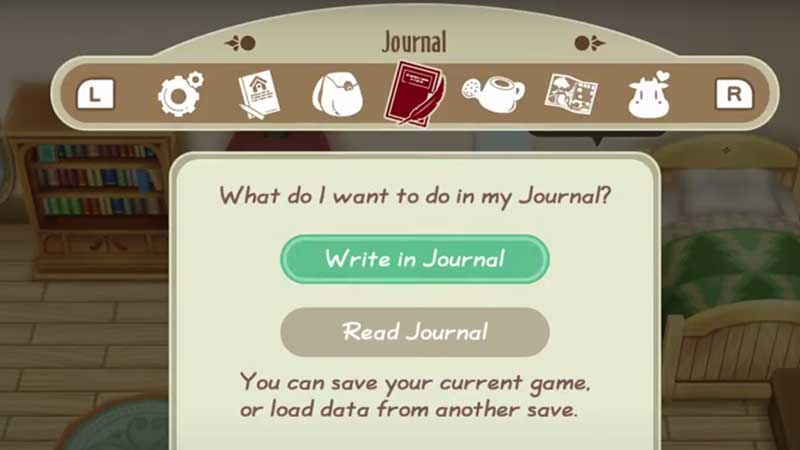
Story-Of-Seasons-Friends-Of-Mineral-Town-journal

When you choose Write in Journal, you can pick a slot to put your save in. Just to be safe, you can utilize multiple save slots. If you pick Read Journal, you can load any saved game of your choice.

Now, in case you are not at your farmhouse but you want to save the game, there’s an option for that too. Simply press the X button on your Nintendo Switch which will show you the menu. There, you can locate the Journal and then pick between the aforementioned options.

This is everything about saving your game in Friends of Mineral Town. For more tips about this game, be sure to read our guides.


  • Dog Race Codes (July 2026)

    Dog Race Codes (July 2026)

    Published Date :

    For those who enjoy fast-paced clicker and racing simulators on Roblox, Dog Race gives you quite a fun experience! Training your strength, hatching cute pets to boost your stats, and collecting wins to climb into the top 50 leaderboard takes plenty of effort and to help you rack up trophies much faster, redeeming free potion… Read More

  • Knife Duels Codes (July 2026)

    Knife Duels Codes (July 2026)

    Published Date :

    Knife Duels provides a refreshing spin on the FPS genre by putting pure melee combat front and center. You can step onto duel pads to challenge other players in 1v1 through 4v4 matches, battling it out to see who can score six wins first. Outplaying opponents on the leaderboard requires sharp reactions, but if you… Read More

  • My Greenhouse Codes (July 2026)

    My Greenhouse Codes (July 2026)

    Published Date :

    If you’re looking for a cozy alternative to standard Roblox farming simulators, My Greenhouse is a relaxed take on the genre. Built by a solo student developer, this game combines classic plant-and-sell farming mechanics with tycoon building, foraging mini-games, character customization, and more. Exploring different regions, unlocking hidden NPCs, and decorating your greenhouse takes extra… Read More

  • TR Legacy Codes (July 2026)

    TR Legacy Codes (July 2026)

    Published Date :

    If you’re a fan of motorcycles and how cool they look, TR Legacy is definitely worth checking out. It brings in some good core motorcycle racing concepts and mixes it with better graphics, nice UI, and also added actual manual gear controls if you want to shift gears yourself. And the best part is that… Read More







