Tired of using a picker for changing color? Use this Armored Core 6 guide and save the color set. Creating your own color set will not only make your work easier but will also ensure that colors stay the same. You might get a slightly different color every time you pick with the picker. Players can also share their custom color sets, so you can take ideas from your friends or give them some color ideas. So read along and customize your machine to look the way you want them to.
How to Save Custom Paint Colors in Armored Core 6
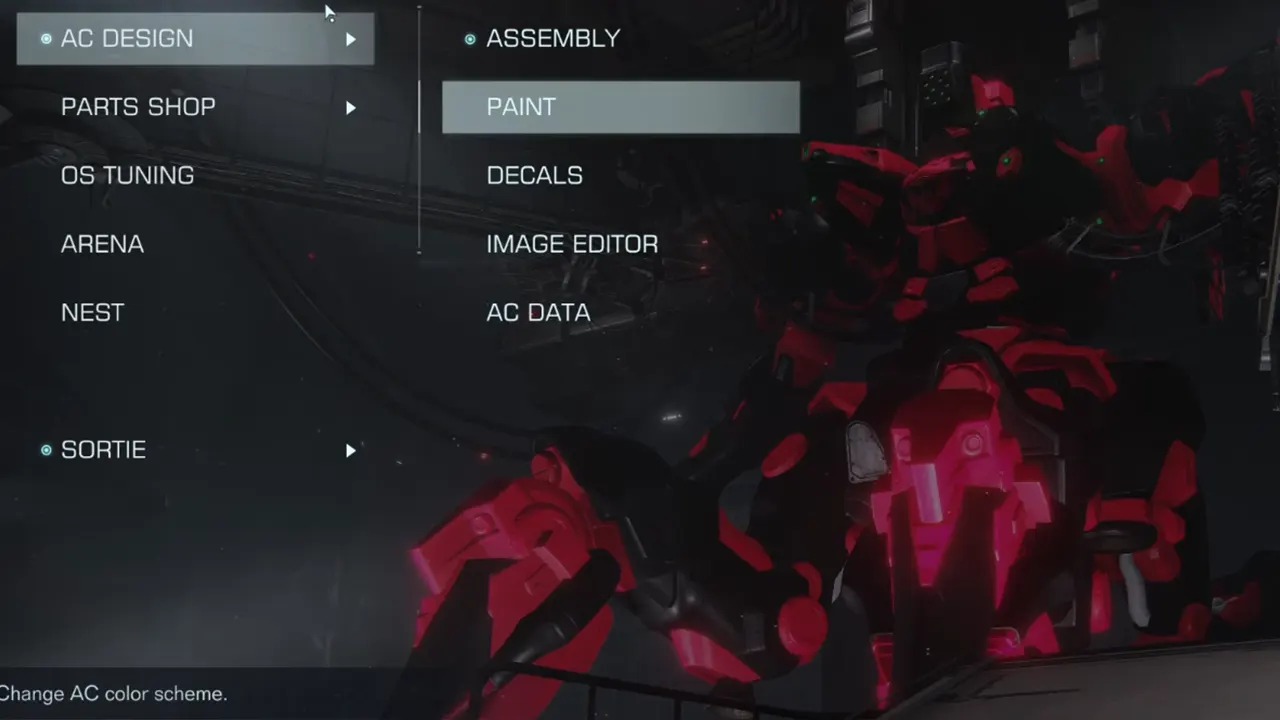
You can change and save the color set from the Garage. The Garage is unlocked after you have defeated HC Helicopter during your first Campaign. Finish the mission, unlock, and go into the Garage.
- Select the AC Design option.
- Now choose Paint. It will take you to the Paint page.
- You can change the color of the Entire Frame, All Units, and individual parts from here.
- Select the option depending on whose color you want to change in Armored Core 6.
- After you have selected a part, it will take you to the page with different patterns, colors, and weathering options.
- The color tab is also divided into several sections. You will see options for material, color, and more, depending on the part you are customizing. For example, if you go into the Main section of Head, you will see three styles of coloring: Picker, Preset, and User.
- Use Picker to find the color you want to add to your palette. You have to press X, Square, or R to copy color in Armored Core 6.
- Go to the User section and select an empty slot.
- Paste the color there with Y, Triangle, or F.
- Keep doing this till you have filled the User palette.
- Now you have created your own Color Set, use it wherever and whenever you want.
That’s all on how to save Color Set in Armored Core 6. If you found this guide interesting and are looking for more such topics, then check out our AC6 guides. Start with how to change Boost Color and then read how to manually aim in AC6 Fires of Rubicon.