Home > Armored Core 6 Fires of Rubicon > How To Switch Boost Colors In AC6

How To Change Booster Colors In Armored Core 6

Updated Date :

Are you looking for a way to change your Booster Colors in Armored Core 6? Recently, many players have been asking the same question, so you are definitely not alone in this. Besides combat, upgrading your AC Parts aesthetically is also important for enthusiast gamers. However, there appears to be no dedicated option for changing Booster Color in AC6. And that’s why, we are here to help you through this, Take a look below to get started.

How to Change Boost Colors in AC6

To change the color of your Boosters, you’ll have to change the Generators. The Generators use different types of energy that cause the Booster color to change accordingly. So, to change the boost color, you can equip the following Generators in Armored Core 6 (AC6):

  • For Red Booster Color, you can use Coral-based Generators.
  • For Orange Booster Color, you can use Internal combustion generators.
  • For Blue Booster Color, you can use Circulating-current generators.

In case you don’t know how to change Generators, then follow the steps below:

  • While in the Garage menu, click on AC Design.
  • Next, enter Assembly and navigate to the Inner tab.
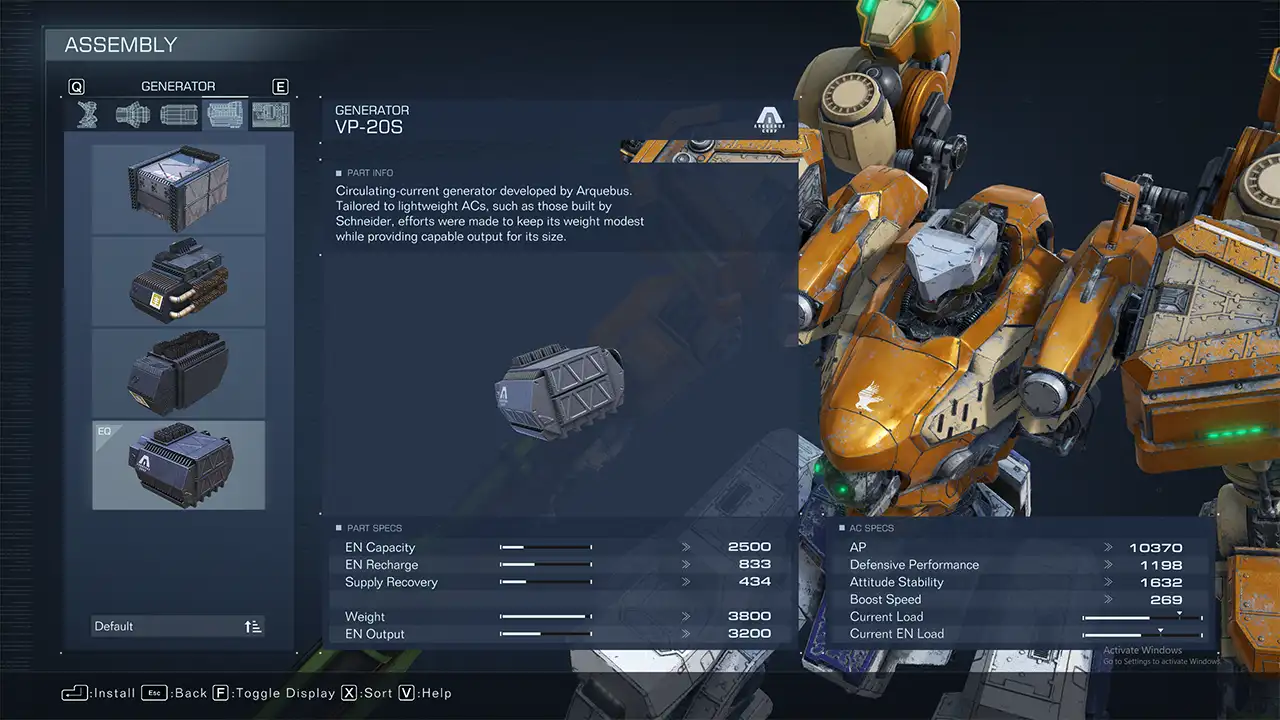
How to Change Booster Colors in Armored Core 6 (AC6)

  • Under that, you can find a Generator option.
  • From there, you can cycle through your unlocked Generators and equip one.

Once you have changed the Generator, start any game and you will see that there’s a change in your Booster Color in Armored Core 6.

You can also check out our video for a better understanding at it:

Besides this, if you are looking to customize your mech, then you will require more Parts. You can check out our guide to know the best ways to Get More Parts in AC6.

And now that you know how to change Boost Color in Armored Core 6, have a great time changing your AC’s aesthetics. For more such informative content, you can check out our dedicated section for Armored Core 6. We have stacked up plenty of helpful guides for you there.

  • Build an Ore Crusher Codes (July 2026)

    Build an Ore Crusher Codes (July 2026)

    Published Date :

    Building an efficient mining empire takes effort and in Build an Ore Crusher, your goal is to create a processing line that goes from Crushing ores to earning cash for profit. As your operation grows, you’ll unlock better equipment, automate production, and earn enough money to expand your factory even further. To add to it,… Read More

  • Build an ASMR Tower Codes (July 2026)

    Build an ASMR Tower Codes (July 2026)

    Published Date :

    If you enjoy satisfying building games, Build an ASMR Tower offers a relaxing experience where every upgrade helps you construct an even taller structure. As you continue stacking blocks and improving your tower, Gems become an important resource for unlocking new mechanics and progressing more efficiently. That’s where Build an ASMR Tower codes come in.… Read More

  • Excuse Me Sir Codes (July 2026)

    Excuse Me Sir Codes (July 2026)

    Published Date :

    If you’re looking for free Lucky rolls, Anime Crates, Cash potions and more boosts in Excuse Me Sir on Roblox, this list has all the codes you need to redeem. The developers disable rewards often, so it’s best to claim the goodies right away! Last checked for new codes on July 21, 2026 All Excuse… Read More

  • Speedsters Infinite Codes (July 2026)

    Speedsters Infinite Codes (July 2026)

    Published Date :

    Games based on speed and racing are always going to be a rage on Roblox, and if you’re a fan of leveling up your speed from zero to lightning fast, this one’s for you. In this game, getting faster means unlocking more Rebirths and better Speedsters, which will require Gems and MPH bonuses. This is… Read More