New Smoke Grenade in CS2 no longer allows you to hide completely as in the previous version. They can interact with bullets, explosives, and other weapons. Some strategy is required to use Responsive Smokes in Counter-Strike 2. Because enemies can shoot you directly through smoke clouds. It is more useful on the attacking side of CS2. It will provide a tactical advantage if used correctly. So here are some important tips on how to use New Responsive Smoke Grenades effectively in CS2.
How Does Responsive Smoke Grenade Works in Counter Strike 2?
To use the new CS2 Smoke Grenade just throw it nearby an object as it was in older versions. The keyboard controls are the same, it is mostly assigned to the numerical keys like 4. Or you can scroll using Mouse Wheel and press the Left click to throw it. But when to use Responsive Smoke Grenade matters the most in Counter-Strike 2. It can act as a shield for you and your team to hide from an incoming attack, or it can be used to confuse enemies. Here are some important strategies on how to effectively use this new smoke grenade in CS2.
1. Shoot through Smoke:
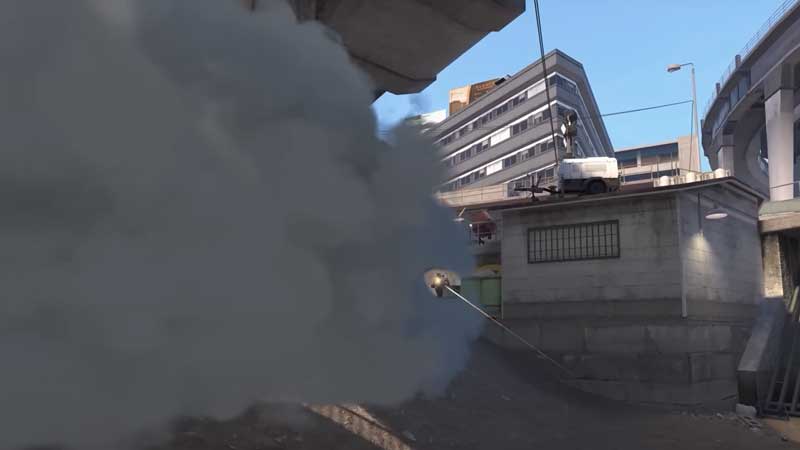
You can shoot through the cloud of smoke, and it will create a hole revealing anyone standing behind the smoke. In the older versions bullets can pass through but in the new CS2, this is changed. You can shoot a hole through the smoke with bullets and spot what’s on the other side. Along with that, a grenade explosion can remove a chunk of smoke this time around.
2. Explosives Clear Smoke:
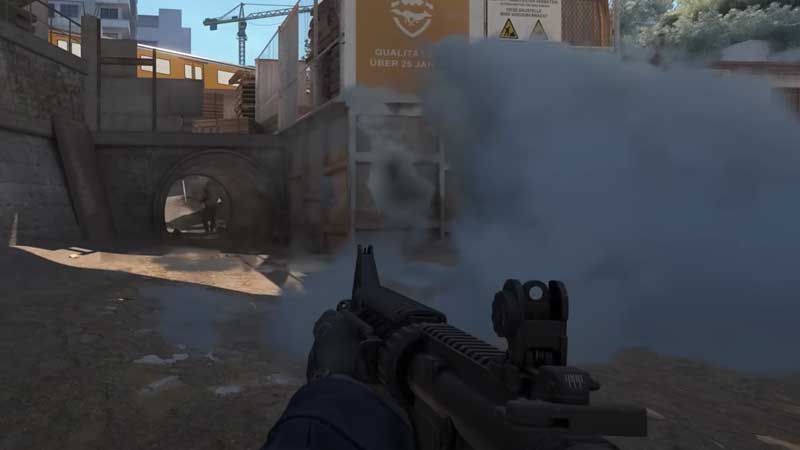
If you are using a Hand Grenade and throw it in the smoke it will clear the Smoke. This is useful on the defensive side of CS2. If the opposite team has smoked the entire region and you are unable to spot enemies, just throw a hand grenade. It will clear the path revealing anyone hiding in the smoke. It also interacts with the environment and light.
The second most important thing about using the new responsive smoke grenades is the way it is thrown. There is always a tactile advantage to using it properly. Counter-Strike 2 new game engine offers a wider range and longer throws. If used smartly you can confuse enemies by throwing one of them over walls.
Hence, smokes aren’t exactly the cover they once were and will be more realistic and responsive in nature. As a tactic players can now use a frag near the smokes and try to spot an enemy behind it. While all of these strategies would come as you play, it’s a good thing to know what to expect.
Apart from that, responsive smoke will now escape through doors and windows and even move up and down the stairs naturally. Additionally, smoke will now mix with other smoke and will have more realistic lighting and color. It’s safe to say that the new smokes look even better than it was before.
That’s all there is on the Responsive Smoke Grenades in Counter-Strike 2. If you are yet to try out the Counter-Strike 2 Limited Test, we recommend you give it a go. Since the game has a lot of upgrades, we recommend you check all Counter Strike 2 changes, right here at Gamer Tweak.