Home > Call of Duty: Modern Warfare II > Reload Cancel In Modern Warfare 2 & Warzone 2

MW2 & Warzone 2: How To Reload Cancel

Updated Date :

Reload Cancel has been a vital part of the COD series. The infamous Y-Y was used by players to get out of a sticky situation. In a fast-paced game like Modern Warfare 2, timing is everything. If you start reloading and encounter an enemy in between, you will most likely die. This mechanic allowed you to stop the reload animation and shoot right away. But COD veterans were in for a shock when it didn’t work in Modern Warfare 2 and Warzone 2. If you have the question whether this mechanic is still available in the game then look no further. In this article, we will tell you how to Reload Cancel in MW2 and Warzone 2.

How to Reload Cancel in MW2 and Warzone 2
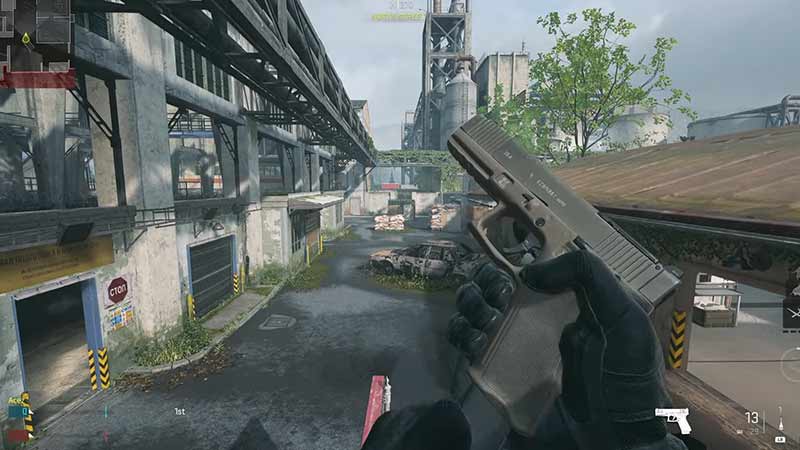
Reload Cancel before Animation in MW2 and Warzone 2

In the previous iterations of this game, you could do it by switching to your sidearm or sprinting. However, in MW2, you cannot use those techniques anymore. Now the mechanic is still in the game. But it’s a bit more difficult to execute it. You can reload cancel in MW2 by switching the weapon before the reloading animation begins. Here are some simple steps to do so.

  • Fire your weapon and start reloading it by pressing the corresponding button (R on PC; X on Xbox; Square on Playstation)
  • Just as the reload animation starts, switch your weapon by pressing the corresponding button (2 or Mouse Wheel on PC; Y on Xbox; Triangle on PS)
  • For reference, you have to switch before the magazine leaves your weapon.

The time window is very short to execute this technique and veterans will have to relearn it. The reason why this mechanic was changed is because of the DMZ mode. It was tweaked so it fits this hyper-realistic military stim mode. Having an easy quick draw in this high-stakes extraction shooter didn’t make sense. So practice it and you will be able to master it soon.

That’s all from us on how to reload cancel in MW2 and Warzone 2. For more helpful guides like How to do a Bunny Hop and How to Exfil, visit GamerTweak.
  • Lurking Giants Codes (July 2026)

    Lurking Giants Codes (July 2026)

    Published Date :

    The name of this game says it all – lurking giants are hunting you down, and surviving isn’t going to be easy. As you continue playing, you’ll earn Coins that can be spent on unlocking new Giants, perks, emotes, and other shop items. Fortunately, you don’t have to rely entirely on gameplay to build up… Read More

  • Shinobi Way Codes (July 2026)

    Shinobi Way Codes (July 2026)

    Published Date :

    Every shinobi starts as a rookie, but mastering powerful jutsu and defeating dangerous enemies is what separates legendary ninjas from everyone else. In this adventure game, you’ll complete quests, battle opponents, strengthen your character, and unlock new abilities. Redeeming Shinobi Way codes is one of the best ways to level up your character because you… Read More

  • Digimon Up Codes (July 2026)

    Digimon Up Codes (July 2026)

    Published Date :

    Digimon Up codes provide various freebies, including DigiEmeralds, that you can redeem right away! Once you’ve picked the right partner, fed and trained them, as well as Digivolved them, you will be ready for battle and victory. The steps to redeem these goodies can be slightly confusing if it’s your first time, so we have… Read More

  • Build an Ore Crusher Codes (July 2026)

    Build an Ore Crusher Codes (July 2026)

    Published Date :

    Building an efficient mining empire takes effort and in Build an Ore Crusher, your goal is to create a processing line that goes from Crushing ores to earning cash for profit. As your operation grows, you’ll unlock better equipment, automate production, and earn enough money to expand your factory even further. To add to it,… Read More