Home > Gaming Guides > Sea Of Thieves Crossplay: How PS5 Players Can Play With Xbox & PC Friends

Sea Of Thieves Crossplay: How PS5 Players Can Play With Xbox & PC Friends

Updated Date :

No matter if you have PS5, Xbox, or PC, using crossplay you can play Sea of Thieves together. This is a great feature which lets you enjoy the game regardless of whichever platform you are on, even if it is a Steam Deck. So whether it is exploring the vast open sea, looting some treasures, or maybe fighting some monster, you don’t have to be alone. The best part is the steps for it are quite easy and here is what you have to do:

How to Play Sea of Thieves Crossplay on PS5, Xbox, and PC
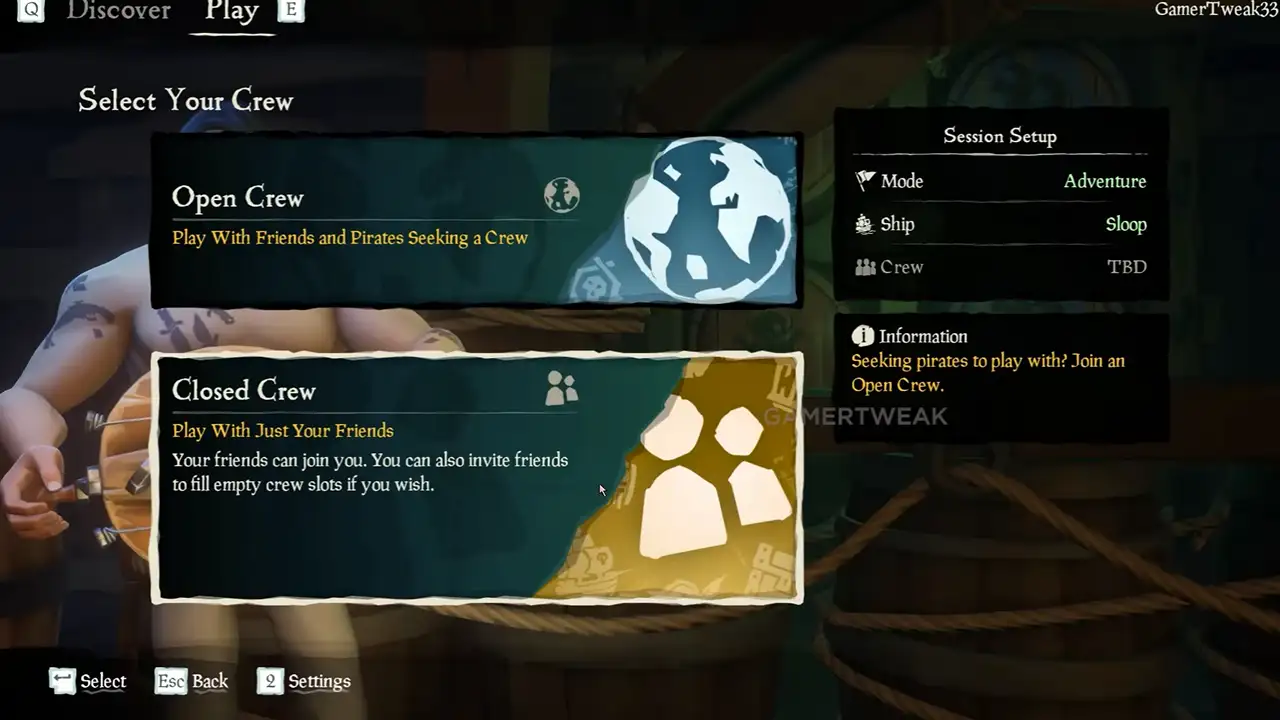
Screenshot: Gamer Tweak. Steps to set up crossplay and play with your Xbox, PC, and PS5 friends.

Before you can add your friends from other platforms make sure your accounts are linked. So for example, if you are playing on a PS5 you will still need to have your friends added from Xbox. Thanks to player Musicmee on the Sea of Thieves forums for sharing this solution, you can check the thread here.

  1. Start by linking your accounts. That is Xbox, PlayStation, and Steam with each other, or you can also link just the platforms you and your friends play on.
  2. Next, in the Play tab choose Closed Crew. This lets you just play with your friends.
  3. Now, in your Session setup choose “Confirm and Assemble a Crew”.
  4. Here, click on Invite a Friend.
  5. Now, your friends list should pop up.
  6. Next, select your friend and click on the Confirm button.
  7. In a similar way invite all your friends.
  8. Wait till everyone joins, once they do click on the Set Sail option.

Do remember that you cannot invite them after sailing so make sure you wait for everyone to join before you start. I suggest you also check our video for it below:

That is all for the crossplay setup on how you can play Sea of Thieves with PS5, Xbox, and PC players. If you need some help on other topics of this game you might find our guides useful on how to customize a ship, become a pirate legend, and save ship loadout.
  • GTA 6 Players in Australia May Need Age Verification Due to New Online Safety Rules

    GTA 6 Players in Australia May Need Age Verification Due to New Online Safety Rules

    Published Date :

    Australian players could have an extra requirement to meet before accessing Grand Theft Auto VI’s online features. Under the country’s updated online safety regulations, games classified as R18+ may need to verify that players are adults instead of relying on a simple age confirmation (as per news.com.au). If GTA 6 falls under those requirements, Rockstar… Read More

  • Tactical Swat Simulator Codes (July 2026)

    Tactical Swat Simulator Codes (July 2026)

    Published Date :

    This action-packed game is all about completing objectives, clearing the area, and stopping hostile suspects, and while you’re at it, you can earn plenty of cash. Luckily, Tactical SWAT Simulator codes also give you free Cash that can be put toward new gear and upgrades, helping you strengthen your loadout before heading back into the… Read More

  • Roblox Chameleon Codes (July 2026)

    Roblox Chameleon Codes (July 2026)

    Published Date :

    Meccha Chameleon’s virality is bringing similar games to Roblox, and this one’s called Chameleon! Blending into your surroundings is the key to staying hidden, but unlocking new cosmetics and customization options makes every match even more enjoyable. Roblox Chameleon codes give you free Coins that you can spend on new skins and other in-game items,… Read More

  • Reclone Codes (July 2026)

    Reclone Codes (July 2026)

    Published Date :

    Reclone is a sci-fi stealth horror game where you get on a research spaceship and survive the dangers that lurk. This means, you need all the boosts you can get which is exactly what Reclone codes provide! If you’re running short of Tokens or cash, make sure to redeem them quickly so that you have… Read More