Grav Jump is the best way to travel between Planets & Moons in Starfield if you have enough power in your Grav Drive. It ensures that you reach your destination without being involved in any space battles. In this guide, you will learn how to power up your Grav Drive and perform a Grav Jump between the Star Systems.
Most times, you can get a message before a Jump that says ‘Grav Drive Pending’. We will also explain how to fix this pending issue and successfully do a Grav Jump in Starfield. So check out below to get started.
How to Power Up Grav Drive in Starfield (& Do Grav Jump)
While in a Ship, you can see several system drives on the bottom left of the screen. The one that says ‘GRV’ is the Grav System. You can see the distribution of power between all the system drives there. In case there’s no power in your Grav Drive, you can take some from any other drive. For instance, you can borrow some power from LAS, MSL, etc., and fill it in the GRV. Even one grid of power is fine for you to do a Grav Jump in Starfield. Charging up the Grav Drive can be trickier, so check out the steps below to do it.
- Use the arrow keys or d-pad to toggle left, right, up, and down through the drives.
- To navigate between systems like LAS, BAL, MSL, ENG, SHD, and GRV, you can use the left and right keys.
- And to increase or decrease power, you can use the up and down keys.
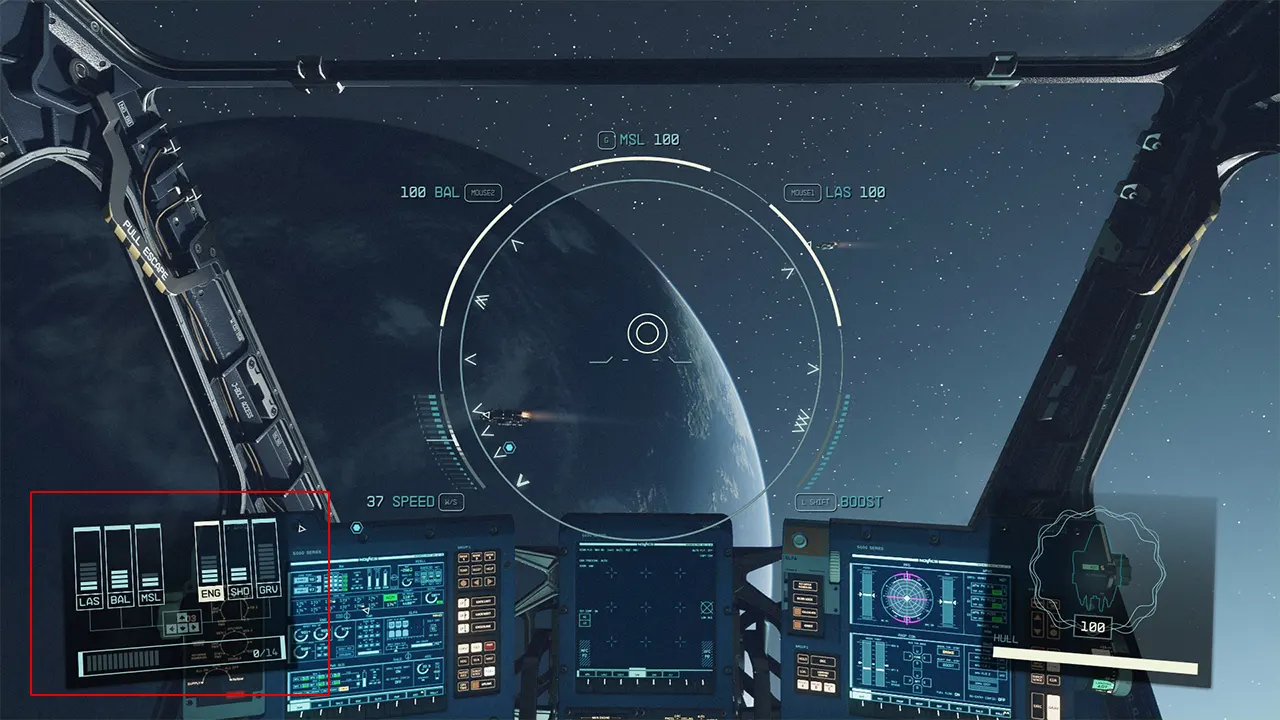
After allocating sufficient power to the Grav Drive, a countdown message will show up preparing you for a Grav Jump in Starfield. But before this, make sure that you have assigned a picked Planet to jump on to. You can do this by entering the Star System menu. Just keep in mind that the Planets you’re traveling should be within the range of your Ship. Otherwise, it will show up as ‘out of range‘ on the screen. To avoid getting such messages, you need to upgrade your Ship’s Grave Drive by visiting a Ship Technician.
Grav Drive Pending Issue (Fix)
A ‘Grav Drive Pending‘ message shows up only if you haven’t allocated power. As mentioned above, you need to power up your Grav Drive before performing a Grav Jump. Not fueling up your drive causes this message to show up. So to fix the Grav Drive Pending issue in Starfield, you simply need to power the Grav Drive using the above steps.
Starfield is a game with some mind-bending features that you need to master. It’s important that you know how to Mod Weapons & Equipment or how to use Cheats & Console Commands. To help you through this, we have covered guides to help you out.
And now that you know how to use Grav Drive and do a Grav Jump in Starfield, ensure to cover all corners of the Space. For more such informative content, you can check out our dedicated section for Starfield on Gamer Tweak. We have covered plenty of helpful guides for your reference there.