
Home > Pokemon GO > Pokemon GO Play With Buddy Not Working Fix

Pokemon GO Play With Buddy Not Working Fix

Published Date :

Many players are facing an issue where playing with buddy is not working in Pokemon GO. While this error has occurred for trainers before, the root cause this time seems to be different. This is a recurring bug but in its most recent encounter, players are getting an error message that says “buddy_phone_not_ar_compatible”, you may get it if your phone doesn’t have Gyro. But worry not, here is everything you can do to get rid of it.

How to Fix Pokemon GO Can’t Play With Buddy Error
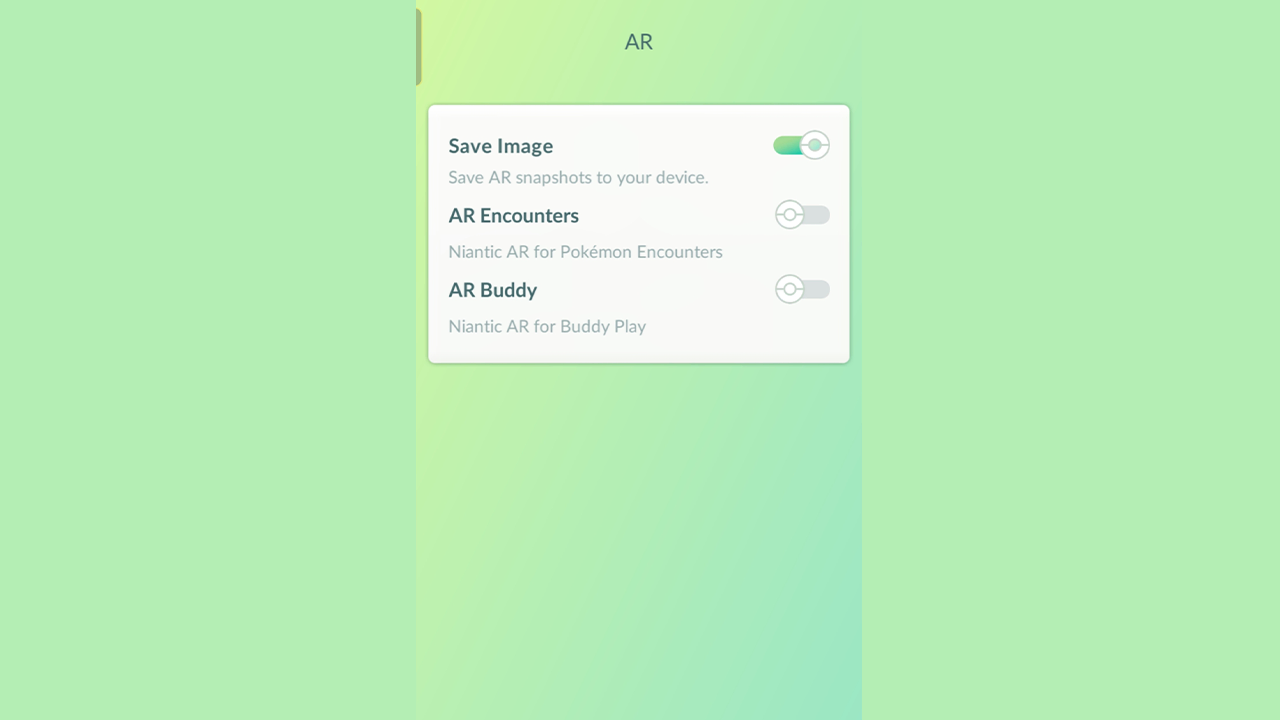
Screenshot: Gamer Tweak. Toggle off the AR Buddy in Pokemon GO to solve the can’t play with buddy error.
  • Disable AR Buddy: When you use AR, it lets Pokemon GO place Pokemon on your screen while adjusting to your surroundings. But this feature doesn’t work properly on phones that don’t have a Gyroscope. So turning this option off can do the trick for you.
    1. Launch Pokemon GO on your phone.
    2. Tap the Pokeball icon at the bottom center of the screen.
    3. Next, tap on the Settings button on the top right side.
    4. Here, scroll down until and tap on AR.
    5. Now, toggle off the “AR Buddy” option.
    6. Restart your app and try playing Pokemon GO and you should be able to play with your buddy.
  • Make sure you are swiping at your Buddy: This isn’t a fix rather a simple mistake you may be doing unknowingly. You have to swipe it and not just tap it. Do this a few times and you should be able to play with it and get your Hearts.
  • Reinstall the game: Since Pokemon GO makes you update your app it should already be on the latest version. This bug was solved some time ago, but if you still get it then reinstalling your game should help fix it.

Aside from the above solutions you can also try some of these other fixes.

  • Restart Pokemon GO.
  • Restart your phone.
  • Spam swipe your Pokemon until it works.
  • Clear Pokemon GO cache.

That is all for how you can fix playing with buddy not working in Pokemon GO. If you are facing other similar issues you might find our guide helpful on GPS signal not found fix, and how to fix stuck on the party challenge screen.


  • Grow a Chicken Fighter Codes (August 2026)

    Grow a Chicken Fighter Codes (August 2026)

    Published Date :

    In Grow a Chicken Fighter, you must help your chicken get stronger, train it, improve its abilities, and even fuse to help it take on tougher opponents. Building a powerful fighter takes plenty of time, so you might not want to miss out on the latest freebies. Redeem all of these Grow a Chicken Fighter… Read More

  • A Quiet Place Codes (August 2026)

    A Quiet Place Codes (August 2026)

    Published Date :

    Staying alive in A Quiet Place: Deadzone is all about keeping your cool amidst chaos. The world has been overrun by creatures with extremely sensitive hearing, so making too much noise can quickly turn a quiet moment into a fight for survival. You can level up by playing and winning, but codes can give you… Read More

  • 2 Player Evolution Tycoon Codes (August 2026)

    2 Player Evolution Tycoon Codes (August 2026)

    Published Date :

    The concept of 2 Player Evolution is quite interesting. You find a friend to play with and start your journey in the Caveman era, upgrade your base, get better gear and work your way to a futuristic world. Since upgrades can quickly become expensive, a little extra income can help you grow your base faster.… Read More

  • Snipers VS Runners Codes (August 2026)

    Snipers VS Runners Codes (August 2026)

    Published Date :

    Snipers VS Runners turns a simple race into a high-stakes battle where one side is trying to reach the finish while the other is waiting for the perfect shot. Runners have to ensure they reach the finish line, while snipers need to predict their opponents’ movements and pick them off before they escape. Cash from… Read More







