Outriders Multiplayer allows you to play with friends. You can invite them to your gamer to assist you in tough missions. But before you plan to play together it’s best to verify Outriders Server Status. You can check that instantly and make sure Outriders Servers are online. Without this, you can’t invite anyone to your game or you can play with others. Here is how to verify the server status and also some solutions on how to fix Outriders network connectivity issues.
How to Check Outriders Server Status?
You can follow Outrider’s Twitter account to get regular updates on the game. The developer updates all issues associated with network connectivity, server down, stuttering, lags, etc. Recently Outriders officially shared an update on an upcoming patch that will resolve game stuttering issues on the Steam platform. You can DM them or tag them to report Outrider Server issues.
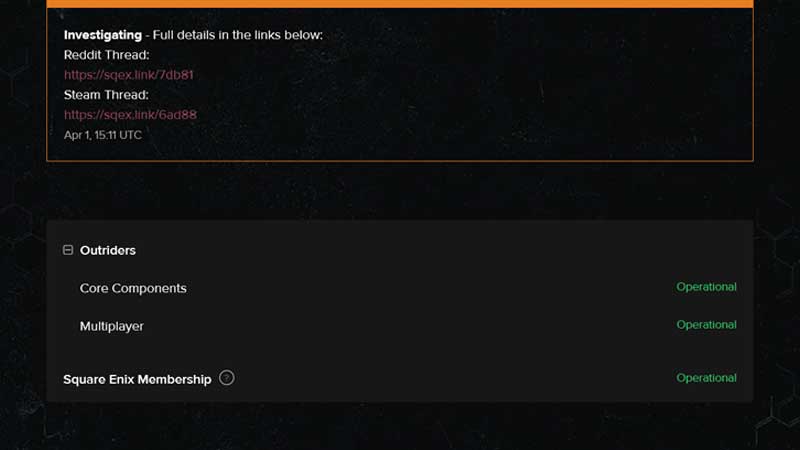
The second way to find out Outrider Server status is by visiting the game status link. From here you can verify two things, Outriders Core Components, and Multiplayer status. If it is shown in green as operation then you can move ahead with playing online or else wait for the Twitter update. Report Outriders PC – Console Crossplay Disconnection here.
For minor issues, you can troubleshoot the game on your own. For example, if there is no update on the server down, then the issue lies on your end. We have some tips to resolve the Outriders Server down issue. Second, if you are unable to resolve your connectivity due to the internet then refer to this guide.
A few users have reported a Win64-Shipping.exe error. It is also a common bug you will deal with and there are some basic fixes for the same. For the server, you will have to rely on Twitter updates. Refer to the post below where Outriders official account confirms the server is online, except in the US. So if you are facing a server issue in the US the fixations are on the way.
📣 We are now re-opening servers in two phases! 📣
We are BACK ONLINE GLOBALLY EXCEPT IN THE US.
As soon as we have confirmed stable server loads for the rest of the world, we will bring the US online.
This has been done to ensure login servers are not overwhelmed. https://t.co/djLzOSLiid
— Outriders (@Outriders) April 2, 2021
The same issue goes for PS5, PS4 console platforms. Also, Outriders PC and Console have some issues going on, you can refer to the link the above para’s to refer to report the same.