The modding community in Minecraft is huge and they are all wondering what is the Optifine 1.20 release date. As you know, a big update for Minecraft (in this case, the 1.20 Trails & Tales patch) may need a new version of Optifine for the mods to work efficiently. Here’s when it’s coming out as well as how to install the mod if you are a first-timer.
Optifine 1.20 Release Date Info & Updates
The good news is that Optifine 1.20.1 is 100% complete as of July 9, 2023.
This time needed for this update was crucial because every major update brings new biomes, mobs, and some backend coding changes that Optifine has to work on for compatibility.
Here’s the tweet by @optifinenews with the update:
(PREVIEW) #OptiFine 1.20.1 I6 pre1 has been released. #OFPRE
📥 Download: https://t.co/7QUD3exfJu (click on “Preview Versions”)
📄 Changelog: https://t.co/wZ60X3tV0A
If you find any bugs, please report them on GitHub! https://t.co/5TqNF1xNuB— OptiFine (@OptiFineNews) July 8, 2023
Why use the Optifine (Minecraft Optimization Mod)?
You can download the previous version of Optifine from the official link where you can read all about its features in detail.
Here’s a gist of what you can get:
- FPS boost in Minecraft
- HD textures
- Shaders support
- Dynamic lights
- Performance: VSync
- Variable Render Disstance
- Fog control and much more!
Sounds great? Here’s how to download this Minecraft mod on your PC easily.
How to Download and Install Optifine 1.20 on PC?
Follow these steps to download Optifine 1.20 (when it’s released) and install the mod on your computer.
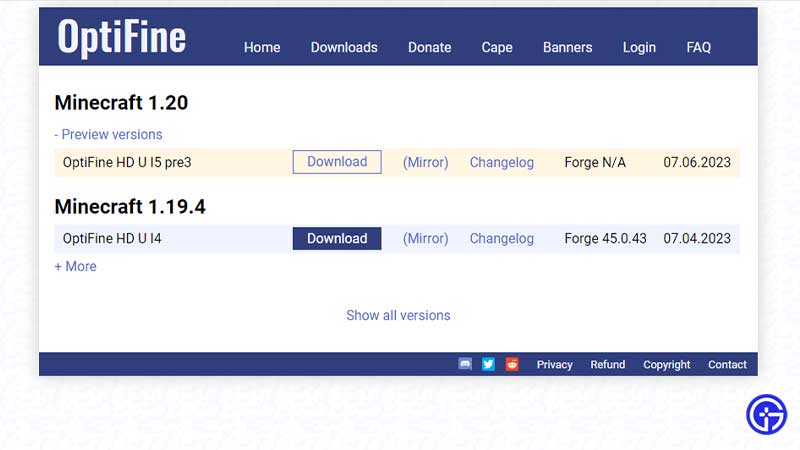
- Visit the official site here.
- Choose the version and click on the Download button.
- After the setup file is downloaded, right-click on it and choose open with Java.
- A pop-up will appear where you can choose the folder where you wish to install it and then click on Install.
- Once you see the “OptiFine is successfully installed” message, click on OK.
- Now launch the Minecraft launcher and click on the Installations menu.
- From here, find OptiFine and click on play.
Also Read | How to Add Optifine to Curseforge Modpack
That’s all there is to know about Optifine 1.20 release date and how to download and install the Minecraft mod. If you are wondering which is the better mod between Optifine and Sodium, we’ve got the answers for you right here.