
In Lethal Company, along with all the essential upgrades, players will be able to customize their ship with all the furniture and decor available. The ship serves as a permanent home for the players during their runs and furnishing the space can make things quite enjoyable in the game. However, you might accidentally place the ship’s decor in the wrong place making the ship cluttered with everything. And since you will want to access different parts of the ship for the use of Terminal, Radar, etc moving the furniture to a more suitable location is important.
While many might think that the furniture, once placed cannot be moved in the game, it is far from it as you will get the option to not only relocate the furniture but also rotate and store it if necessary in Lethal Company. With this, you will be able to place the decor the way you want and make the ship more aesthetic. So if you want to completely rearrange the furniture, here is a guide you should check out further.
How to Move Furniture in Lethal Company
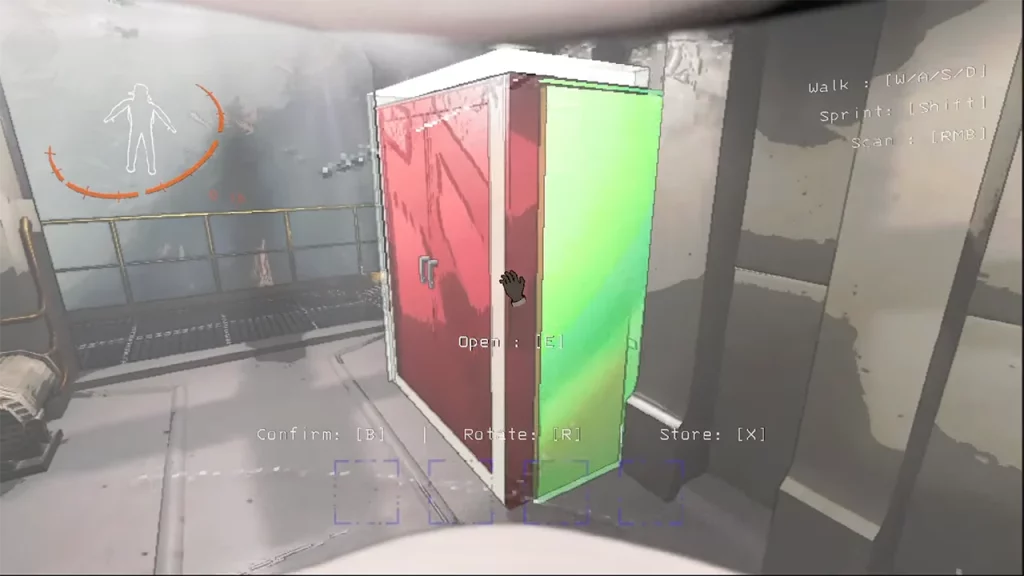
To move furniture in your ship and rearrange it the way you want, you will have to first approach and interact with it in Lethal Company. Players will have to press the B button to open the edit mode in the game. Once you press it, the furniture will be highlighted in green and you will be able to place it wherever you want on the ship.
It is worth mentioning that if the highlighted furniture appears red, then it overlaps with other decor or items. Here are all the options available for players once they are in the edit mode:
- Confirm (B) – Pressing the B key again will confirm the decor’s location and place it in the ship.
- Rotate (R) – You will be able to rotate the furniture by pressing the R key on your keyboard. This will help you find the perfect angle in the game.
- Store (X) – The edit option also allows players to store the specific furniture in the ship’s storage by pressing the X key.
For players looking to move furniture out of their storage, you will have to access the Terminal in Lethal Company. After which simply head onto the storage and type in the name of the furniture that you want back inside your ship. There are different decor items that you can purchase from the terminal and here is a list of all of them:
- Cozy Lights
- Jack O’ Lantern
- Record Player
- Romantic table
- Shower
- Table
- Television
- Toilet
That’s everything covered in this guide. If you find this guide helpful, be sure to check out our Team Roles guide to make the most out of your individual role while visiting different moons. And for more interesting guides like these, check out our dedicated Lethal Company section, right here on Gamer Tweak.











