Home > Gaming Guides > How to Remove Helmet in Mass Effect Legendary Edition

Mass Effect Legendary Edition: How To Toggle And Remove Helmet?

Updated Date :

The helmet is a crucial part of your armor in dangerous situations such as the ones you will encounter in Mass Effect games. But sometimes, you may want to remove the Helmet via the Toggle Helmet option to be able to see your character’s face. Some players are unable to find this option which is why we’ve created this quick guide on how to toggle helmet in Mass Effect Legendary Edition. If you are encountering a problem with this option, keep reading.

How to Toggle Helmet in Mass Effect Legendary Edition

Players can Toggle Helmet by pressing R1 on PS4/PS5 or RB on Xbox One/ Xbox Series X | S. You can use this option from the character menu and remove the Helmet from there.
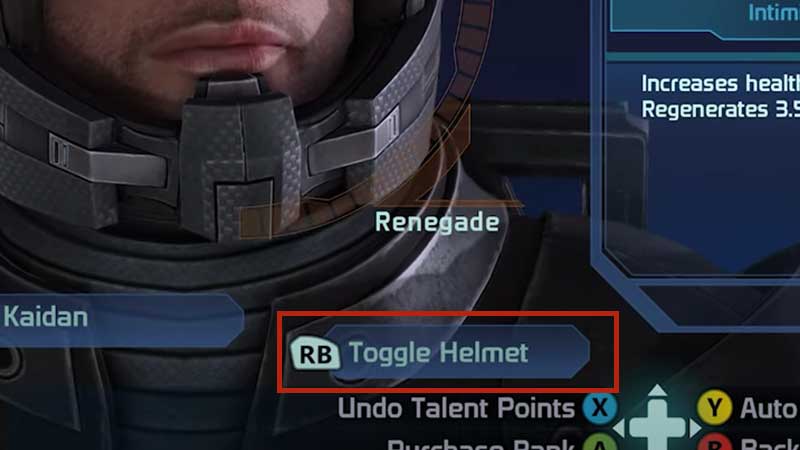
How to Toggle Helmet in Mass Effect Legendary Edition

Toggle Helmet Option Not Working?

Now, some players are reporting on EA forums that the Toggle Helmet option is not working as expected. What it is doing is that it is only toggling the helmet for Shepard despite having selected a different character. If this is happening to you, then you are not alone. A couple of users have mentioned what they have done to toggle this option here.

User voteDC commented that they had to connect their Xbox controller to toggle Helmets while brucesim2003 mentioned that using the Esc Key and changing it from the Squad menu will work. Try these out to see if it makes a difference. If not, then we have to wait for a patch from the developers to fix this bug.

Also Read: How to Get New Weapons and Armor in Mass Effect Legendary Edition

So, this is all there is to know about how to toggle helmet in Mass Effect Legendary Edition. We’ve covered many important topics that you must know while playing the game. Check them all out in our Mass Effect Legendary Edition guides on Gamer Tweak.

For example, here are all the Keeper Locations in ME 1, How to get More Grenades, How to Switch Weapons Fast, how to Use Biotics, and how to romance Ashley Williams by choosing the right things to do.

  • ZZZ Version 3.0 Is the Biggest Patch Yet: Here’s What Changed and Why It Matters More Than You Think

    ZZZ Version 3.0 Is the Biggest Patch Yet: Here’s What Changed and Why It Matters More Than You Think

    Published Date :

    Zenless Zone Zero 3.0 patch is the biggest patch since the launch of this game. With the introduction of a new element, a rarity tier, a free anniversary character, and an explorable region, you will find this patch launch exciting. It is necessary to learn what you should prioritize from all of these because of… Read More

  • Anime Duelists Codes (July 2026)

    Anime Duelists Codes (July 2026)

    Published Date :

    Anime Duelists follows the tried and tested formula of spinning stars to unlock fighters, sending them into battle and collecting rewards. If you want to get unique fighters, abilities, and progress through various realms, you need these code rewards! You can get anything from free Gems, Trait Rerolls, Stats Reroll, Super Luck, Star Speed potion,… Read More

  • Mini Cup Codes (July 2026)

    Mini Cup Codes (July 2026)

    Published Date :

    In Mini Cup, you open up packs to unlock footballers, build houses, and win matches against rival teams. This makes it a perfect mix of some of the most popular gameplay loops for soccer fans on Roblox. To grow your club, you’ll need cash, as well as special packs, which is where Mini Cup codes… Read More

  • Be The Final Boss Codes (July 2026)

    Be The Final Boss Codes (July 2026)

    Published Date :

    Now you can be the final boss! In this experience, you summon minions to fight for you and take down waves of heroes. To level up, you’ll need plenty of coins and various resources, which is where Be The Final Boss codes come in handy. If you wish to boost your character and stay one… Read More