
The account linking process acts as a safety net for gamers. As a result, many players want to learn how they can link email in Solo Leveling Arise. By completing this process, players will be able to take part in official forum events. Additionally, it also helps to prevent account and game data loss.
Consequently, understanding how you can do this becomes extremely important. If you want to know about the steps you need to take to start this process, here’s everything you need to do.
How to Link Email in Solo Leveling Arise
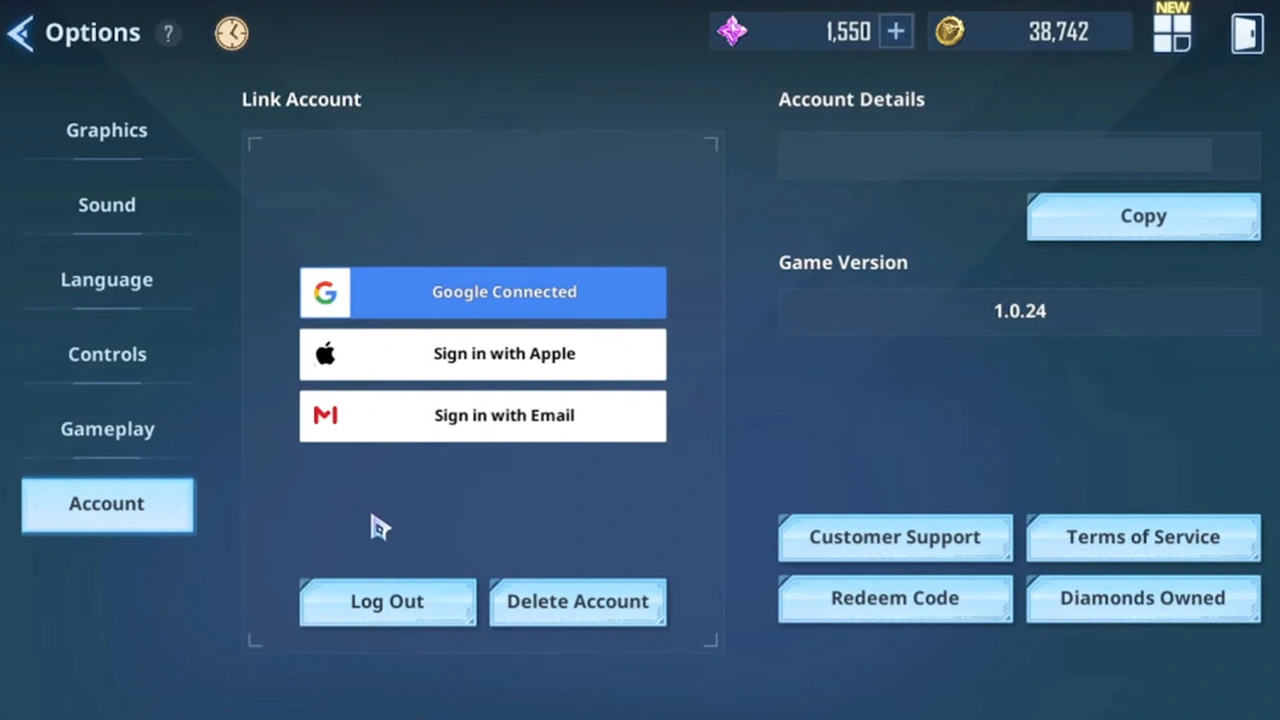
It is important to note that you can link email in Solo Leveling Arise immediately after you launch the game. All you need to do is click on the link icon that is located in the top right corner of the screen and then select the “Sign in with Email” option.
However, if you want to know how you can do this by accessing the in-game option, here’s what you need to do:
- Launch Solo Leveling Arise on your device.
- Go to your Menu and click on the settings cog icon that is present in the bottom right corner.
- From this menu, select the “Account” option.
- Click on “Sign in with Email.”
- If you have previously linked your account with a particular Email ID, you can enter it and continue. If you haven’t, click on the “Sign up with email” option that appears at the bottom of this window.
- Next, you will have to enter your correct Email ID and Password. Click on “Agree to Privacy and Policy and Terms of Services” to continue and select the “Next” option.
- You will then have to enter a recovery email.
- Once this is done, you will receive a verification email and you will then have to check it to finish signing up. After this, you can click on the “Confirm” button to complete the process.
This concludes our guide on how you can link email in Solo Leveling Arise and complete the account linking process. If you are interested in this game, check out our characters tier list, weapons tier list, reroll guide, and all Solo Leveling Arise Codes.











