
The camp is an extremely useful location in the game if you need to rest and heal, change allies, speak with NPCs and more. However, one of the troubles that players are facing is how to leave the camp in Baldur’s Gate 3. Since there is no exit or a dedicated button, players are finding it a little tricky to get out of the campsite. Nevertheless, it is a simple step and in this guide, we will show you how to enter and exit the camp.
How to Leave Camp in Baldur’s Gate 3
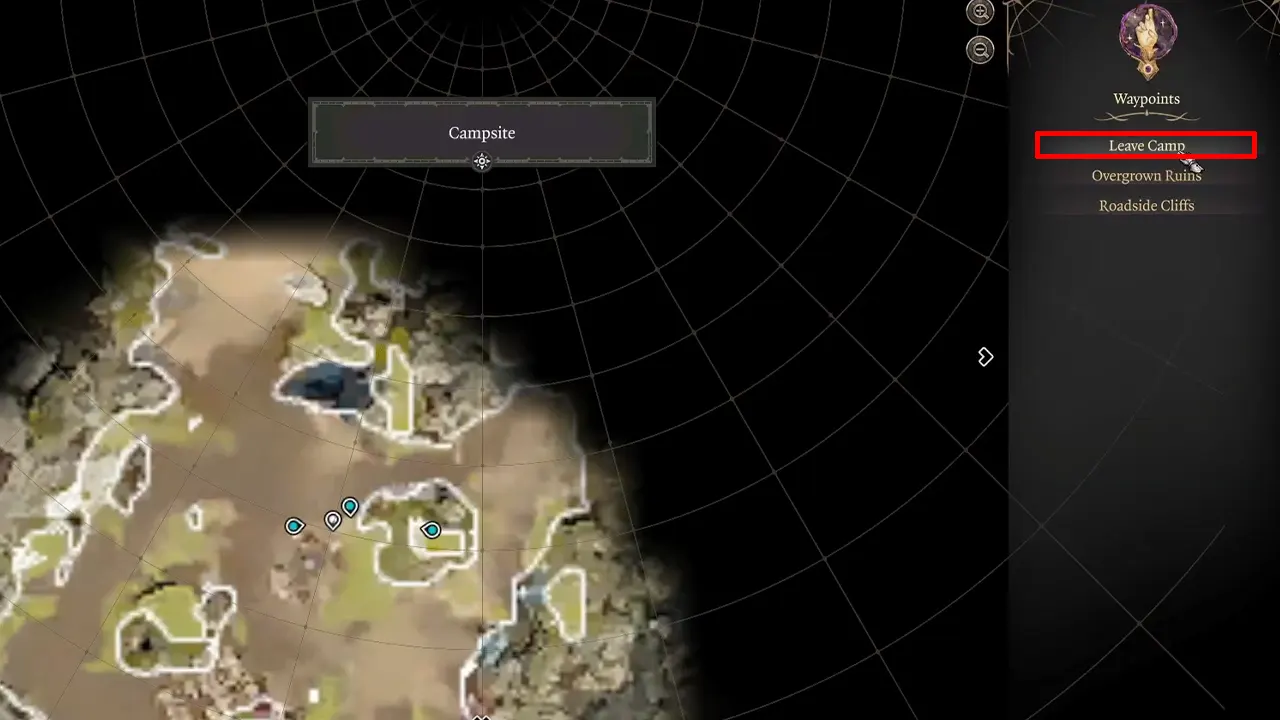
The camp is one of the most important parts of the game and players can enter it by simply accessing the Fast Travel option from the menu. All you have to do is press M and head to camp and you will be able to complete numerous activities. Players can interact with their allies, visit NPCs, but most important, they can get some much needed rest here in order to heal. As you progress in the game, you will understand how long breaks can also be helpful for your character. You can also swap out any of the party members or play with your inventory if necessary. Players can leave camp the same way that they entered in, using the Fast Travel option from the Baldur’s Gate 3 map or menu.
Once players pull up the Fast Travel option, they will notice that they can exit at the same location that they entered the campsite from or they can travel to any other place. This works perfectly if you are in need for supplies at some important location since you can get back to camp and then leave it quite easily. Also, many players have found that lying down on the bedrolls with other characters will allow them to completely heal and leave the campsite easily. However, if you want to leave the Baldur’s Gate 3 camp without ending the day, you should use the first option.
Hopefully, this guide helps you to enter or leave camp easily in Baldur’s Gate 3. If you found this guide useful, our Baldur’s Gate 3 section will be helpful to you. So make sure you check it out since we will be adding more such guides right here at Gamer Tweak.











