Home > Roblox Codes 2026 > KILLSPREE Codes (March 2026)

KILLSPREE Codes (March 2026)

Published Date :

KILLSPREE on Roblox throws you into high-pressure rounds where quick reflexes and smart movement decide whether you survive or get downed. While practice will make you better, redeemable Killspree codes can give you helpful bonuses that make progressing smoother.

These rewards often include XP boosts, in-game currency, or limited perks that help you level up faster and in this guide, you will find the latest confirmed working codes, along with the exact steps to redeem them.

Also Read | Bizzare Lineage Codes

New Killspree Codes Roblox

  • Ilovealphaplayers – Redeem this code to get freebies

Expired Codes

  • There are no expired codes as of now.

How to Redeem KILLSPREE Codes

The steps to claim rewards in this game are quite straightforward. Here’s what you need to do:
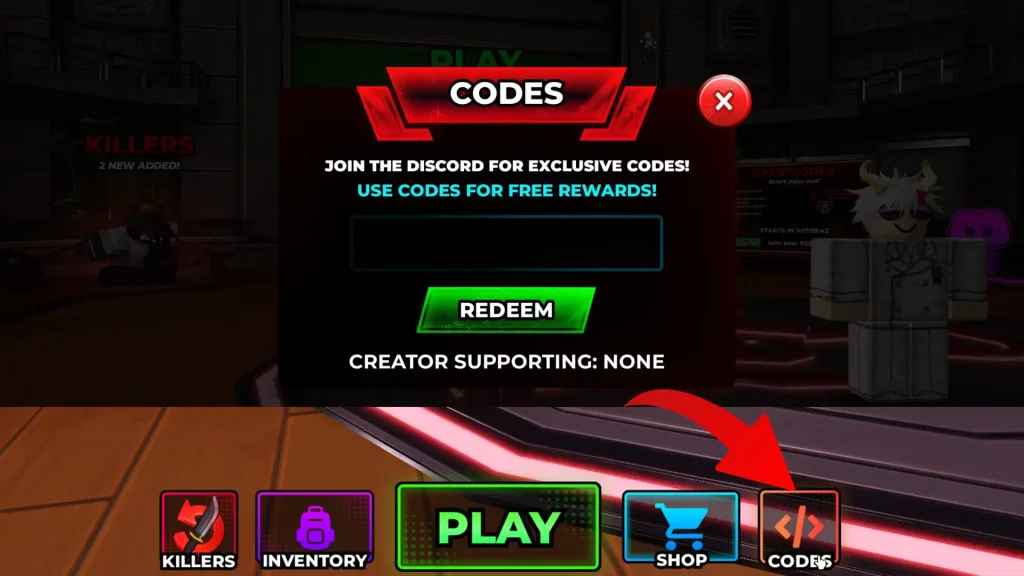
how to redeem killspree codes
  • Launch Killspree on Roblox and play the game until you reach Level 5, since the code redemption option unlocks only after this milestone.
  • Once you achieve it, click on the Codes button located at the bottom of your screen in the lobby.
  • Enter the active codes exactly as shown.
  • Click Redeem to receive your rewards instantly.

How to Find New Codes

Developers usually release new codes during major updates, seasonal events, or when the game reaches community milestones. The most reliable way to stay updated is by joining the official Discord server, following the game’s Roblox group, or checking developer announcements regularly. Codes often have limited validity, so you can also bookmark this page to see them all in one place.

FAQ

Why is my code not working?

It may have expired or been entered incorrectly. Copy and paste directly and check for any extra spaces before and after the code.

Do I need a specific level to redeem codes?

Yes. You must reach Level 5 before you can redeem codes.

Are codes case sensitive?

Yes. Make sure to type them exactly as shown in the code list above.

Leave a Comment

  • How to Change Time in GTA 6

    How to Change Time in GTA 6

    Published Date :

    Want to explore Vice City at night or finish an activity that only becomes available during the day? GTA 6 has a dynamic day-and-night cycle, but you don’t have to wait for the clock to reach your preferred time. You can use a simple feature at your safehouse to move the in-game clock forward and… Read More

  • GTA 6 Crashing on PS5: How to Fix Error CE-108255-1

    GTA 6 Crashing on PS5: How to Fix Error CE-108255-1

    Updated Date :

    Some GTA 6 players are experiencing repeated crashes on PS5, with the game suddenly closing and displaying error code CE-108255-1. For some, the problem occurs during the opening cutscenes, while others encounter it several hours into the story. Some players also report on social media that they get stuck at specific missions because the same… Read More

  • Who is Mandy in GTA 6? Voice Actor and Character Romance

    Who is Mandy in GTA 6? Voice Actor and Character Romance

    Updated Date :

    A visit to collect rent takes an unexpected turn when Jason Duval meets Mandy in GTA 6. It turns into an awkward encounter for him because we see some unwanted flirting (which indicates some history) and a rather disturbing discovery in the sink. So if you’re wondering who exactly is Mandy and the fan theories… Read More

  • Where to Buy Clothes in GTA 6 (All Clothing Stores)

    Where to Buy Clothes in GTA 6 (All Clothing Stores)

    Updated Date :

    Jason and Lucia have plenty of ways to change their appearance in GTA 6. Leonida has 67 dedicated clothing stores selling everything from everyday streetwear and sportswear to formal outfits, beachwear, and second-hand clothing. There are also 17 dedicated footwear stores if you’re looking for a new pair of shoes. You can find these shops… Read More