Close Menu
    Facebook X (Twitter) Instagram
    Gamer TweakGamer Tweak
    • GT Originals
    • Guides
      • AC Mirage
      • Starfield
      • Wordle
      • Mobile
      • GTA 6
      • AC Valhalla
      • Genshin Impact
      • Honkai Star Rail
      • Minecraft
      • Discord
      • Street Fighter 6
      • Project Slayers
      • The Sims 4
      • Lies of P
      • Zelda TOTK
    • Roblox
      • Roblox Codes
      • Blox Fruits
      • Type Soul
      • Grow a Garden
      • 99 Nights in the Forest
    • Review
    • Roblox Codes
    • BG3
    • CS2
    Gamer TweakGamer Tweak
    Home > Star Wars Jedi: Fallen Order > How to Interact with Red Glowing Objects
    Star Wars Jedi: Fallen Order

    How to Interact with Red Glowing Objects in Star Wars Jedi Fallen Order

    Prasad MoreBy Prasad MoreNovember 16, 20192 Mins Read

    As you play Star Wars Jedi: Fallen Order you will face many obstacles that will try to stop you in your tracks and though enemies can be dealt with, one of the most difficult is the red glowing objects and this guide will show you how to interact with red glowing objects in Star Wars Jedi: Fallen Order.

    How to Interact with Red Glowing Objects

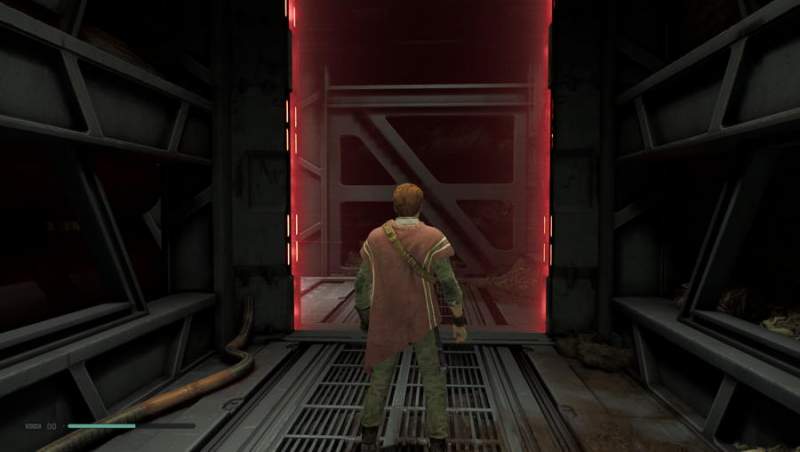
    As you begin Star Wars you will come across these red glowing objects which will force you to find another way around in the game, they can be barriers or other such objects which won’t let you go through unless you have acquired the proper skill for yourself and or for your trusty little droid BD-1.

    There are plenty of such objects which have a red glow to them, this simply means that at that particular moment you do not have the skill required to go through it.

    If you find a metal barrier with a red glow around it, you will need the Overcharge ability for your droid which you can only get in Kashyyk. Once you get this skill you can then make BD-1 overcharge terminals and this will override the systems and you can gain entry.
    how to interact with red glowing object

    To get this ability you will have to progress fair enough in the main storyline, another issue is the red wall that you face in certain areas. If you listen closely you can hear Cal say, “I can’t push it.” This is a reference to his Force push ability.

    This you can learn when you progress in the game, you will learn the Force Push ability and then only can you as you progress, so make sure that you keeping pushing in the main storyline.

    This is all there is to know about how to interact with red glowing objects in Star Wars Jedi: Fallen Order. Do check our other Fallen Order Wiki Guides for more tips, tricks, and cheats.

    PC Star Wars Jedi: Fallen Order Tips and Tricks
    Share. Facebook Twitter Pinterest LinkedIn Tumblr Email Reddit
    Prasad More
    • X (Twitter)
    • Instagram

    Prasad is a crazy writer, lazy gamer, usually depends on the time of the day for it to be in that order. Aside from indulging in excessive movie-binge sessions and gaming, he uploads reviews and impressions of the latest in film and gaming. You can Connect me at contactus@gamertweak.com

    Related Posts

    How In-Game Skins Shape and Strengthen a Player’s Personal Brand

    November 27, 2025

    Unwritten Helldivers 2 Rules – Don’t Make These Mistakes!

    November 20, 2025

    Where Winds Meet Codes (November 2025)

    November 19, 2025

    User Experience in Quick Online Games – How to Retain Players

    November 11, 2025
    Latest Codes

    The Forge Codes Roblox (December 2025)

    December 1, 2025

    Inazuma Strikers Codes (November 2025)

    November 26, 2025

    Deadly Delivery Codes (November 2025)

    November 26, 2025

    Roblox Hypershot Codes (November 2025)

    November 26, 2025

    SLAP Codes Roblox (November 2025)

    November 25, 2025

    Catch a Monster Codes (November 2025)

    November 25, 2025
    Trending
    • How to Change Race in The Forge
    • The Forge Codes Roblox (December 2025)
    • How to Get Twisted Relic in Fisch
    • How to Get Shard of Time in Fisch
    © 2025 Gamertweak.
    • Advertise With Us
    • About Us
    • Team
    • Contact Us
    • Privacy Policy
    • Terms
    • Open Critic

    Type above and press Enter to search. Press Esc to cancel.