
Home > Diablo 4 > How To Zoom Out More In Diablo 4

How To Zoom Out More In Diablo 4

Published Date :

One of the most challenging and annoying parts of Diablo 4 was dealing with off-screen damage. Since the zooming out was not an option earlier, players had to deal with enemies that would attack them even if they did not appear on the screen. Fortunately, after a lot of requests from players, there is a new option to zoom out in Diablo 4 that players can enable from the graphics settings.

With the new setting, the borders will now be widened which allows players to spot mobs of enemies nearby and take them out without depleting their health bar. While these enemy mobs wouldn’t be troublesome early in the game, players who have completed the campaign will find them quite annoying especially if they have to waste their health potions on such trivial matters.

How to Zoom Out Farther in Diablo 4
How To Zoom Out More In Diablo 4
Image via Blizzard

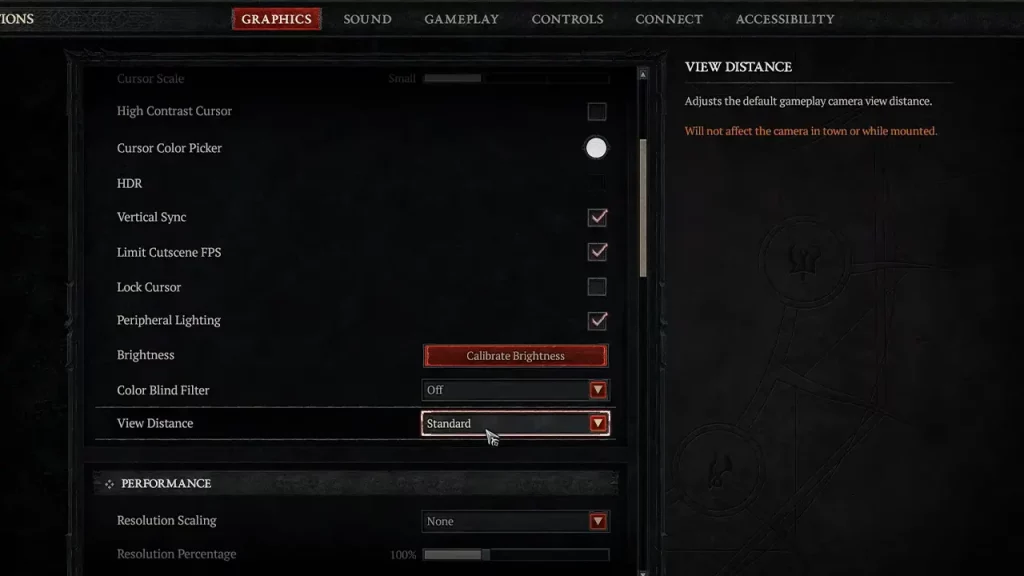
If you are looking to zoom out in Diablo 4, you will have to head to the graphics settings. This new option was added in the Season 4 update and players have been waiting for it to drop for a long time. Now that you can zoom out farther and spot enemy mobs earlier, here’s how you can enable that setting:

  • While in Diablo 4, open the game menu and then head to the Options tab.
  • In the options tab, scroll to the Graphics section.
  • Now, open the drop-down menu for View Distance.
  • Change the Standard option to the Far option here and that should help you zoom out.

Taking out nearby enemies is not enough if you are hit by a long ranged shot while your health is low. Diablo 4 players have been complaining about this for a while now and it is a good thing that the developers have responded well to it.

That’s all you will need to zoom out in Diablo 4. If you are looking for more Diablo 4 guides, look no further than our dedicated section here at Gamer Tweak.


  • Stream a Mukbang Codes (August 2026)

    Stream a Mukbang Codes (August 2026)

    Published Date :

    Mukbang games are gaining more popularity on Roblox these days, and Stream a Mukbang is where you eat food live, gain views, likes, followers, and earn cash for upgrades. As your live videos become more popular, you’ll need more resources to keep attracting new viewers, and that’s where free rewards can make a difference. Redeeming… Read More

  • Become an Anime Billionaire Codes (August 2026)

    Become an Anime Billionaire Codes (August 2026)

    Published Date :

    In Become an Anime Billionaire, you roll for anime characters, earn money, rebirth, climb the leaderboard and this journey becomes much easier when you have plenty of rewards. Thankfully, the developers release new Become an Anime Billionaire codes pretty regularly, such as free Units, Lucky Blocks, Cash, and more. Here’s the complete list of all… Read More

  • BikeLife Society Codes (August 2026)

    BikeLife Society Codes (August 2026)

    Published Date :

    Pulling off wheelies, upgrading your ride, and traveling across the city is what BikeLife Society is all about. As you unlock better bikes and customize them to match your style, you’ll need plenty of in-game resources to keep progressing. Free rewards can make that journey much easier, so it’s always worth redeeming the latest BikeLife… Read More

  • Coach a Fighter Codes (August 2026)

    Coach a Fighter Codes (August 2026)

    Published Date :

    In this boxing game, you don’t throw the punches yourself – you’re the coach who watches matches and helps train fighters. You’re tasked with upgrading your gym, improving your roster, and climbing through stronger leagues, which is why you’ll need every boost you can get. So, make sure to redeem these Coach a Fighter codes… Read More







