
As quoted by several COD veterans, communication is the key to success. Be it Modern Warfare 2 or Warzone 2, you need to have complete coordination with your teammates. While proximity chat and voice chat helps, sometimes you might need to rely on text chat. This could be to strategize the game plan or simply choose a game mode. But several players are confused about typing or using the text chat. Not to worry, check out our guide on how to type in Warzone 2 and MW2.
How to Type in Warzone 2 & Modern Warfare 2 (PC)
You can use the Lobby text chat feature to type in MW2 and Warzone 2 for all the supported platforms. You can hit the Enter button to open the text box in a match. Over here, you can switch between three different groups of chat using the Tab button. These include the Team, Match, and Party chats. Once you have entered the message, hit the Enter button to send your message.
But there is a different method for the Console players looking to type or chat. Scroll till the end to find out.
How to Use Text Chat on Consoles (PS4, PS5, & Xbox Series X | S)
Follow the below steps:
- Hit the Options button on your controller which would direct you to the Pause Menu.
- Head over to the Channels tab under the options menu. You can see all of your pending notifications in this section.
- Now, select your Squad and hit the X button to head over to the Text chat. You can find a messaging or text icon above this section.
- Hit the icon option to type or see all the chats from your friends or squads.
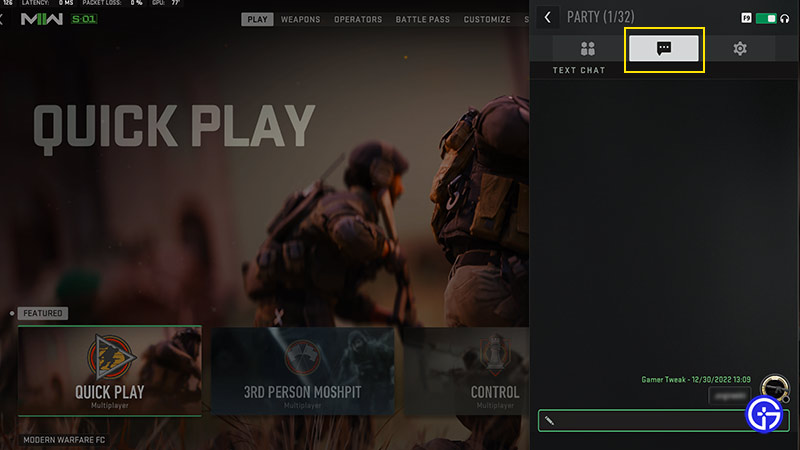
- Once you are in the text field, you can hit the R3 button or right thumbstick to switch between the chat groups.
- As mentioned earlier, you can find the Team, Match, and Party chats messages over here. You can hit the X button to send your chat messages in any of these chat groups in MW2 or Warzone 2.
That’s everything covered on how to type in Warzone 2 and MW2. If you liked this guide, check out our guides on our dedicated section for COD Modern Warfare 2 and Warzone 2.0 right here on Gamer Tweak.










