Animal Crossing New Horizons has so many realistic elements that you feel like you are living it, albeit virtually. To give you the full experience, you also have reactions that you can use whenever you want. In the winter update of this game, players will also get the ability to sit down on the ground. Wondering how to sit in ACNH (Animal Crossing New Horizons)? Here’s how to do it easily.
Animal Crossing New Horizons: How to Sit on the Ground?
Here are the steps you have to follow to sit in ACNH (Animal Crossing New Horizons):
- First, install the winter update.
- Go to the Resident Services.
- Over there, head to the Nook Stop Terminal.
- Select the option to Redeem Nook Miles.
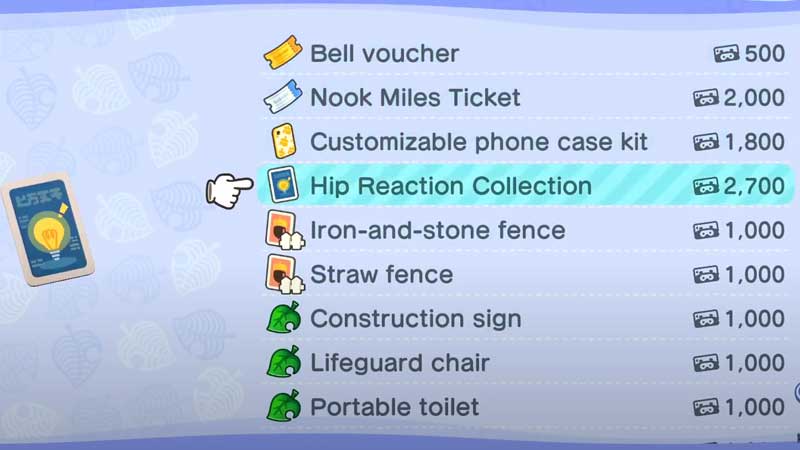
- Scroll to the Hip Reaction Collection which costs 2,700 Nook Miles. This includes the “Sit Down” Reaction.
- Purchase it.
You will get it immediately so all you have to do is press ZR to open up the Reaction wheel. Among your other reactions, you will get the option to Sit Down. When that is selected, your character will sit down on the ground. You can use this to sit under a tree or watch the waves while sitting on the beach sand. You can even sit next to villagers or just watch them walk around while you sit alone.
Hip Reaction Collection ACNH
The Hip Reaction Collection pack also includes more reactions (9 in total). They are:
- Yoga pose
- Here you go
- Excited
- Ta-da
- Sniff sniff
- Workout
- Wave Goodbye
- Take a picture
- Sit down
Animal Crossing New Horizons has constantly upped its level of realism through the addition of swimming, diving and much more. It’s like your own world where you can be as cute as you want and that’s why it has gained the popularity it rightfully deserves.
If this cleared things up for you, why don’t you read our guides on how to get Mushroom DIY items and Turkey Day Furniture set? Plus, here’s how to upgrade your house item storage to 2400 that was introduced in this winter update! Check out how to do it (it’s super easy).
If you are a new player, you’d love our extensive list of ACNH wiki guides that will clear all your doubts.