In the high-octane battles of Marvel Rivals, superior situational awareness is key. Quickly identifying enemy positions can mean the difference between a victory and a frustrating defeat. However, since the default enemy color is red, it can sometimes blend with the environment, making them harder to spot. If you’re struggling to keep track of opponents, these tips to see enemies better in Marvel Rivals will significantly help make enemy detection easy for you.
How to See Enemies Better in Narvel Rivals
Change In-game Enemy Outline Color Settings
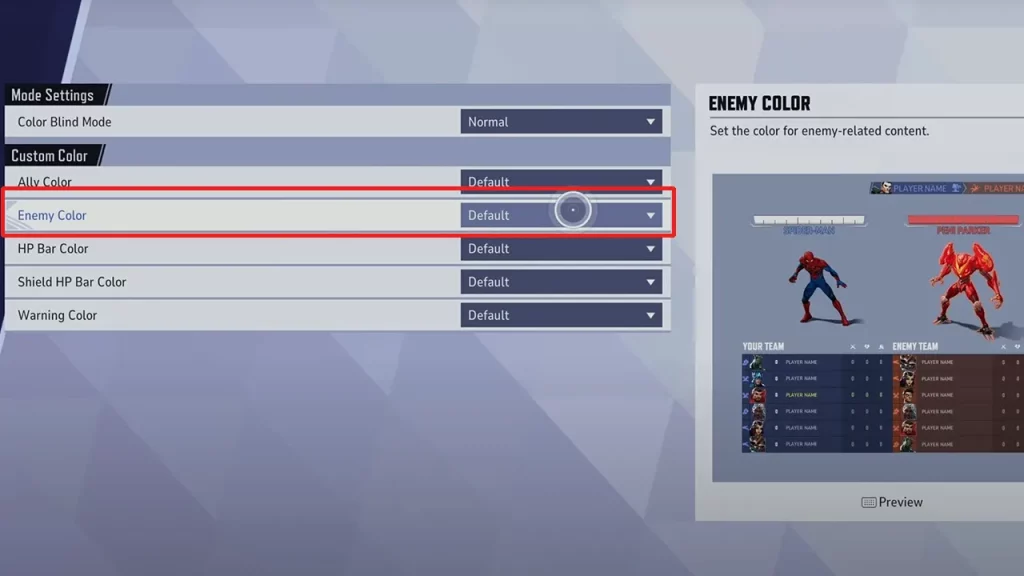
Go to the Marvel Rivals settings, and select the Accessibility tab. From here, you can choose custom colors for allies, enemies, as well as the HP bar, Shield HP bar, and Warning color. There’s also a color blind filter that can be added. You can choose yellow for the enemy outline so that they pop out clearly and you can easily differentiate between a blue ally and a yellow enemy, giving you the chance to make split-second decisions. But if yellow doesn’t work for you, try other options and see what fits best.
Also Read | Marvel Rivals Voice Chat Guide
Adjust Your Display Settings
To take things up a notch, tweak these monitor settings for the best clarity:
- Brightness: Increase it slightly to see more detail in darker areas.
- Contrast: Enhance contrast to make enemies stand out from the environment.
- If you’re playing on a high-refresh-rate monitor, ensure it’s set to its maximum refresh rate for smoother gameplay.
Use Audio Cues for Better Awareness
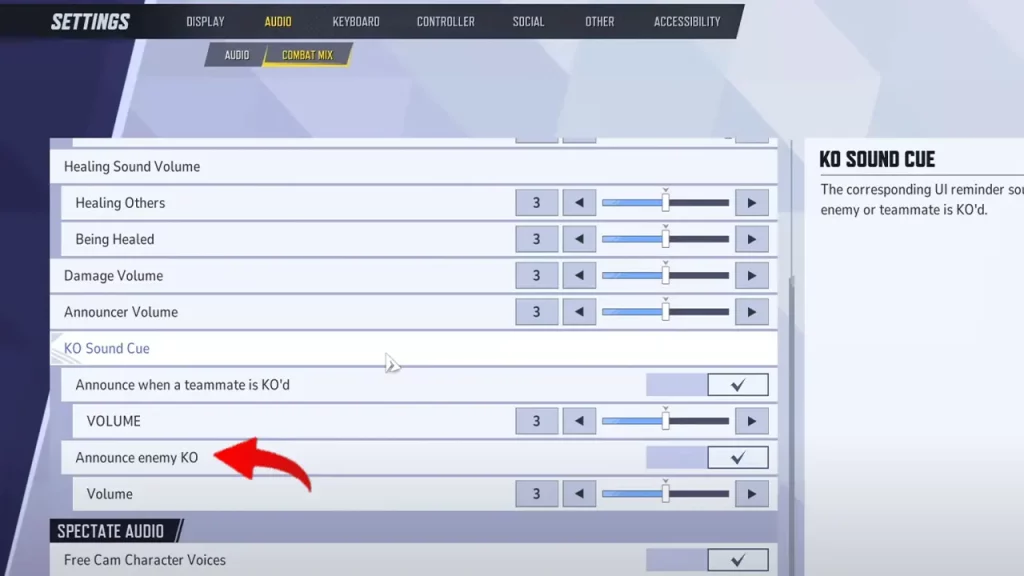
To make your team play even better, turn on two audio cues under Settings. You will find them under Audio > Combat Mix. Turn on the option to Announce when a teammate is KO’d as well as when an enemy is eliminated. This way, you can keep track of players in the team fight and decide whether you want to move forward or pull back.
That’s how to see enemies better in Marvel Rivals. Apart from visuals, investing in a good headphone will help you detect enemy footsteps and their general direction so that you can plan your next move faster.
While you’re here, be sure to also check out the best custom crosshair codes for various characters in this game.