Marvel Rivals is a team-based game where communication can make all the difference in the outcome. Having voice chat ON and conveying strategies, tactics, and updates in real time will help your team make split-second decisions. Of course, in a fast-paced game like this, it is much more efficient than text chat. So, if you’re planning on using it for your matches, here’s how to turn on voice chat in Marvel Rivals.
Marvel Rivals Voice Chat Guide
- Go to Settings: Click the gear icon located in the top-right corner of the main menu to open the settings.
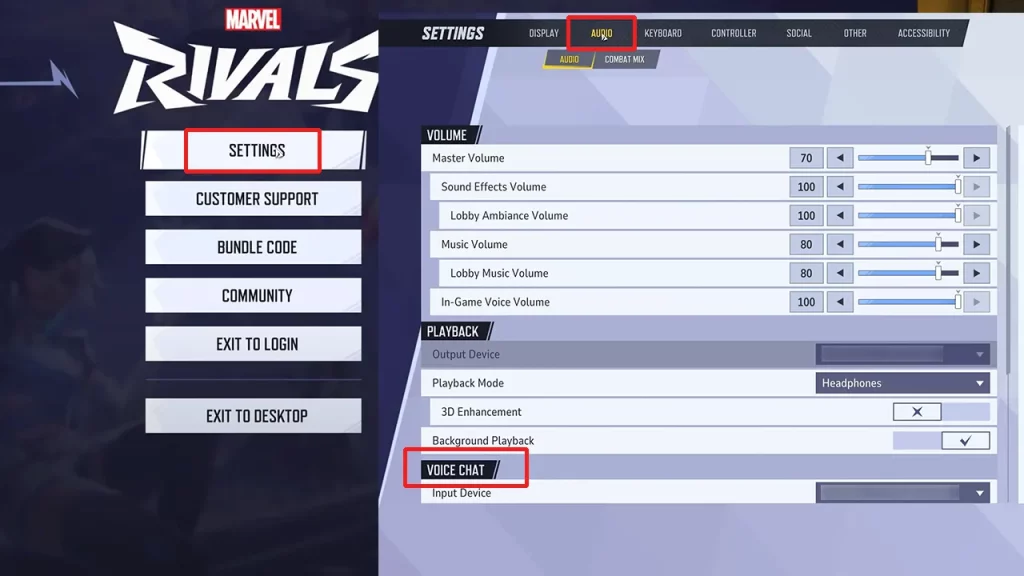
- Navigate to Audio: Within the settings menu, select the ‘Audio’ tab.
- Enable Voice Chat: In the ‘Voice Chat’ section, toggle the switch to ‘On’ to activate in-game communication. It should be x by default, and when you toggle it on, you will see a checkmark.
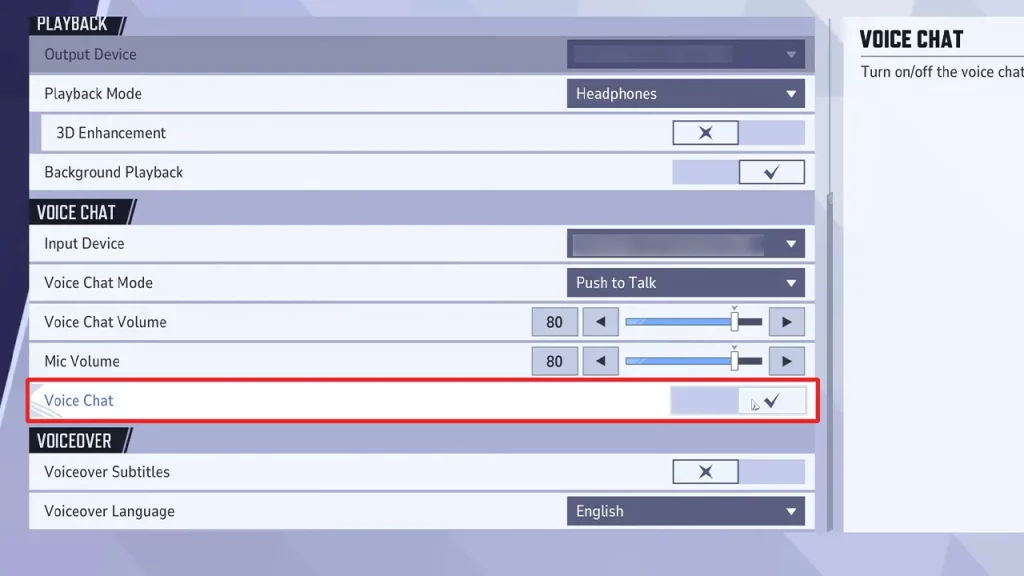
- Select Voice Chat Mode: Choose between ‘Push to Talk’ and ‘Open Mic’ depending on your preference.
- Push to Talk: Requires holding down a designated key to speak, minimizing background noise. To set up Push to Talk, go to the ‘Keyboard’ tab in the Settings. Find ‘Voice Chat’ under ‘Communication’. Click the box next to ‘Push to Talk’ and press your preferred key to assign it.
- Open Mic: Keeps your microphone active continuously, allowing for hands-free communication but it may pick up background noise and other sounds.
Marvel Rivals Voice Chat Not Working Fix
If you encounter issues with voice chat, such as being unable to connect or be heard, here are some troubleshooting steps:
- Clear Local Configuration Files: For PC users experiencing connectivity problems, clearing local configuration files has resolved the issue for many. Open the Marvel Rivals launcher and click on ‘Clear Local Configuration Files’ at the bottom left corner of the screen. This workaround resets your settings, including graphics configurations, but can fix voice chat issues. Note that this may not resolve ‘Push to Talk’ problems but has been effective for ‘Open Mic’ issues.
- Check for Conflicting Applications: Ensure no other applications are using the microphone simultaneously, as this can interfere with in-game voice chat. Running communication apps like Discord as an administrator may help resolve conflicts.
If problems related to voice chat in Marvel Rivals aren’t fixed with these troubleshooting tips, contact support for further assistance. While you’re here, be sure to also check out the best custom crosshair codes for various characters in this game.