Home > God Of War Ragnarok > How To Save In God Of War Ragnarok

God Of War Ragnarok: How To Save

Published Date :

The new God of War Ragnarok has a plethora of missions, side quests, and activities for you to do. You will face some of the fiercest warriors and creatures from Norse Mythology. The main storyline itself will take around 20-25 hours to complete. So it would be a disaster if you lost your progress. Although the developers at Santa Monica studios have made sure that it does not happen, having a backup save file is not a bad idea. In this article, we will tell you how to save in God of War Ragnarok.

How to Save in God of War Ragnarok
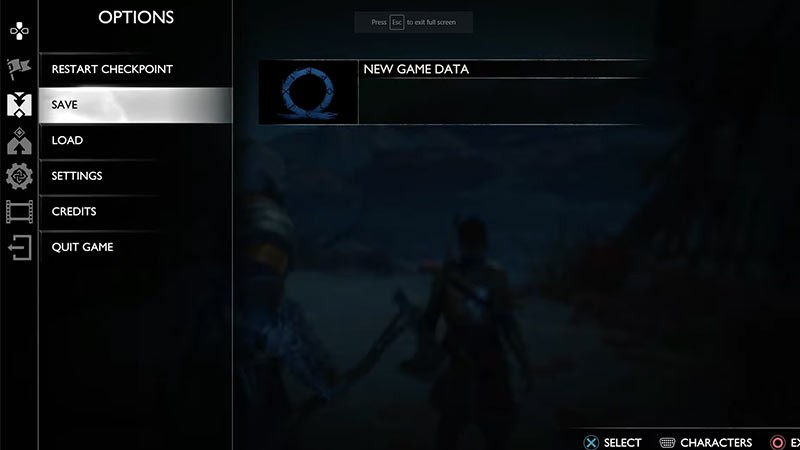
Manual Save option in GoW Ragnarok

The game has two features to save your progress. The first one is the standard Autosave feature, where the game itself will save your progress at certain checkpoints. But with this method, you won’t get to choose where the game is saved. Thankfully there is also an option to manually save the game. To save your game progression manually in God of War Ragnarok, simply press the Options button on your controller. Then, scroll down to the Save option and click on it. There, you can save by creating a new file or overwriting the existing one.

Creating Multiple Save Files

Apart from the fear of losing your progression, there can be many reasons to manually save the game. One of them is if you want to create multiple save files. For instance, you are sharing the console with someone and don’t want to lose your progress. Fortunately, the game has a feature to do so. To create multiple save files, do the following:

  • Launch the game and click on Continue
  • Then, create a Manual Save file
  • Now you can go to the main menu and start a New Game
  • To load your previous game, Open your Main Menu and scroll down to Load Game
  • There, under the Manual tab, you will find your previous save.

Just remember the name of your Save file and you are good to go.

That’s all from us on How to Save in God of War Ragnarok. For more helpful guides like Beginner Tips and Best Settings, check out our GoW Ragnarok Wiki Guide soon.
  • +1 Speed Evolve Codes (July 2026)

    +1 Speed Evolve Codes (July 2026)

    Published Date :

    Speed-based games on Roblox will always stay popular, and this particular experience is quite addictive! Here, you play as an animal and your goal is to evolve into stronger animals, unlock new worlds, and be the fastest player on the server! +1 Speed Evolve codes offer free Speed and Win Boosts that can make your… Read More

  • Yeet a Brainrot Codes (July 2026)

    Yeet a Brainrot Codes (July 2026)

    Published Date :

    If you’re annoyed at the Brainrot trend, this is your opportunity to “yeet” them into the distance! To launch Brainrots farther, you need better pets, potions, and more rewards, and thankfully, these Yeet a Brainrot codes will come to the rescue. You can easily unlock various Divine Relic Chests, Primeval Relic Chests, Coin/Luck/Power potions, exclusive… Read More

  • Build A Soccer Squad Codes (July 2026)

    Build A Soccer Squad Codes (July 2026)

    Published Date :

    To build your dream team, you’ll need plenty of rerolls and shop refreshes, which is how you can get better cards and complete your collection. Build A Soccer Squad codes can help with exactly that, giving you various freebies so you get more chances to improve your lineup without waiting. Here’s the complete list of… Read More

  • Aura Monster Simulator Codes (July 2026)

    Aura Monster Simulator Codes (July 2026)

    Published Date :

    Climbing an endless staircase might sound simple at first, but the higher you go, the more Aura you’ll need to keep progressing and unlock stronger upgrades. Thankfully, Aura Monster Simulator codes provide free Gems and Aura Boosts, helping you strengthen your character and reach new heights. More specifically, you can use these Gems to unlock… Read More