
Discord is a massive social platform where people from different communities can get together. It is used majorly by Gamers as it is easy to use and is compatible with Gaming but it is not exclusive to Gaming. Anyone can pick up and use Discord as it is very customizable to the user’s needs. One feature that is frequently used and present on many Social Platforms is the ability to make Polls. Now, by default, you cannot make a Poll in Discord but it is possible. In today’s guide, I will show you how to make a Poll on a Discord Server.
How to Make a Poll on Discord
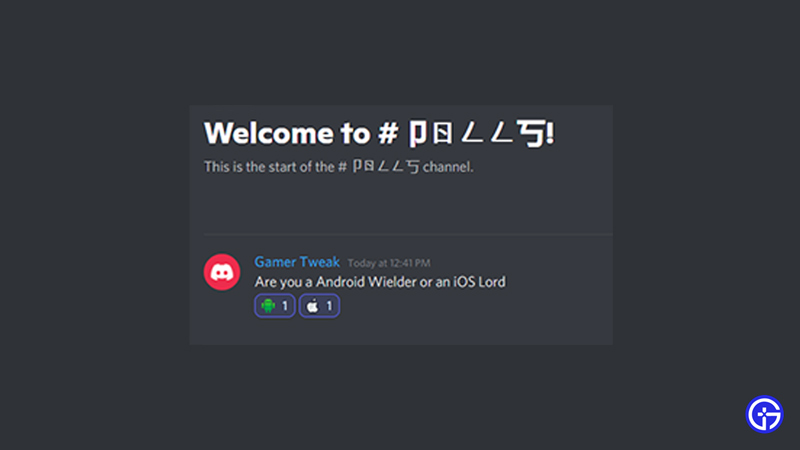
Before we can start making them, we will have to understand what is a Poll in a Discord Server. Unlike other Chatting Apps, Polls is not a built-in feature of Discord. So we will be using Reactions as our Poll making method. There are a few ways you can make a Poll in Discord.
Poll Channel in a Server
In your Discord Server, you can create a Text Channel that will be dedicated to Polls only. Here only you or your Mods/Admins have the rights to create a Poll. First, create a fresh Text Channel. In that Text Channel, set the permissions of Send Messages & Add Reactions to False. This will control any shenanigans within the Channel. Set this to all of the Roles that will be partaking in the Polls of your Discord Server. Now, just write a message and add a few Reactions like demonstrated in the image above. That’s how you can make a Poll in Discord.
You can also use Webhooks to make your Polls look nicer but it will be extra work. Since you are the one making the Poll, the looks and aesthetics are all in your control.
Poll Bots
Another way to make them in Discord is by using Bots. There are many Bots you can find and use like EasyPoll, Simple Poll, etc. All you have to do is invite these bots into your Discord Server and give them the proper Permissions. Once that is set up, you will have to just type in the respective command and the Bot will make a Poll very easily.
These were the ways on how you can make a Poll in Discord. Hopefully, this guide has helped you. You can also check our guides on Getting Discord on the Oculus Quest 2 and Discord PFP Ideas.











