
Home > Gaming Guides > Chained Together: How to Kick Players? (Answered)

Chained Together: How to Kick Players? (Answered)

Updated Date :

Chained Together is a game that needs a high level of coordination and communication between players to progress successfully and if you’ve ended up playing with randoms who are rude, inappropriate or disruptive, you might want to kick players. In case you’re playing solo, some players who join might even purposely make ‘mistakes’ to ensure you lose! So, can you remove players from a lobby/session in Chained Together?

How to Kick a Player in Chained Together?

Unfortunately, you can’t directly kick players within the game itself. There’s a chance that it might be added in the future, but there are no concrete announcements at the time of writing this article. To stay updated, you can join the official Discord server for messages from the devs. However, you have some options for dealing with disruptive players in Chained Together.

Leave the game: If the disruptive player is ruining your experience, you can simply leave the game and find another server.
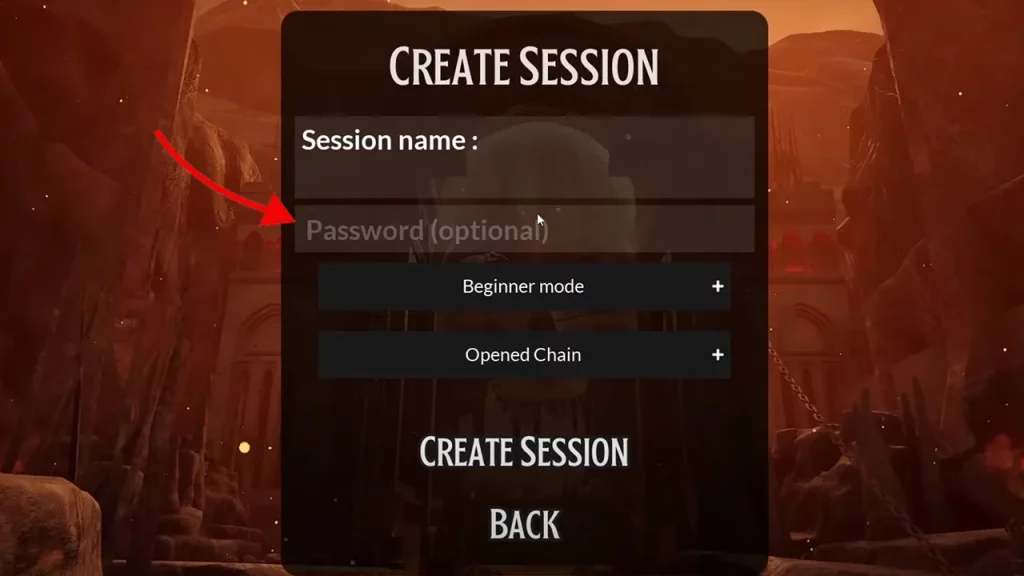
make a strong password while creating session

Play only password protected games: If you’re the party leader, you can set a password for your game. This way, only players with the password can join, ensuring you only play with people you choose. Make sure that the password is a strong one because if someone wants to troll, they can put in random common passwords and possibly still get in.
how to kick players chained together

Play with friends: Chained Together is a co-op game, so consider playing with friends who you know will be good teammates. This eliminates the chance of encountering random rude players.

Look for Players on Reddit or Discord: If you’re solo and want to find like-minded players who can join you for a proper game of Chained Together, ask for teammates on Reddit and the official Discord and you’re bound to find co-op partners.

And that’s everything you can do instead of kicking players in Chained Together, until the developers add the highly requested feature.


  • Roblox Lowball Codes (August 2026)

    Roblox Lowball Codes (August 2026)

    Published Date :

    Buying items below their market value and flipping them for a profit is the fastest way to get rich in Lowball. Every successful negotiation grows your cash, letting you take on bigger trades and expand your inventory even further. If you want an extra boost without waiting for your next big deal, redeeming the latest… Read More

  • Junk Mechanics Codes (August 2026)

    Junk Mechanics Codes (August 2026)

    Published Date :

    Turning piles of scrap into powerful cars is the key to progressing in Junk Mechanics. As you keep playing, you’ll start needing plenty of cash for purchases and upgrades, which is why free rewards are always worth claiming. Be sure to redeem the latest Junk Mechanics codes whenever they’re available and check out this complete… Read More

  • GTA 6’s Extended Look Will Debut on Netflix Before YouTube

    GTA 6’s Extended Look Will Debut on Netflix Before YouTube

    Published Date :

    Rockstar Games has revealed an unexpected way for fans to watch the next major Grand Theft Auto 6 showcase. Instead of heading straight to YouTube, the studio’s upcoming Extended Look presentation will premiere first on Netflix, which means subscribers get an early preview before it becomes available to everyone else. It is set to air… Read More

  • Stream a Mukbang Codes (August 2026)

    Stream a Mukbang Codes (August 2026)

    Published Date :

    Mukbang games are gaining more popularity on Roblox these days, and Stream a Mukbang is where you eat food live, gain views, likes, followers, and earn cash for upgrades. As your live videos become more popular, you’ll need more resources to keep attracting new viewers, and that’s where free rewards can make a difference. Redeeming… Read More







