
Over the years, Minecraft has been one of the best sandbox games of all time. But while creating and building an expansive world is fun, the different mods make the experience more enjoyable. Although when these mods keep on stockpiling over time, they can be a bit hassle to manage. If you are using the Java Edition, you can also use the Forge Mod installer. You can use this mod installer to manage, download, and install different Minecraft mods. Check out our guide on how to install the Minecraft Forge Mod installer right here.
How to Install Minecraft Forge Mod Installer (1.19)
You can install Minecraft Forge by downloading and installing the app from their official website. But note that you need to install Java for installation.
Follow the below steps to install and use the Forge Mod installer:
- Firstly, download Minecraft Forge from their official website. Over there, you will find different versions of the Forge mod installer.
- We recommend installing the latest or recommended Forge mod installer to avoid any issues. These versions have fewer bugs and less crashing issues.
- Launch the downloaded installer which will prompt the installation process.
- Then, hit the Install client option and hit the Ok button.
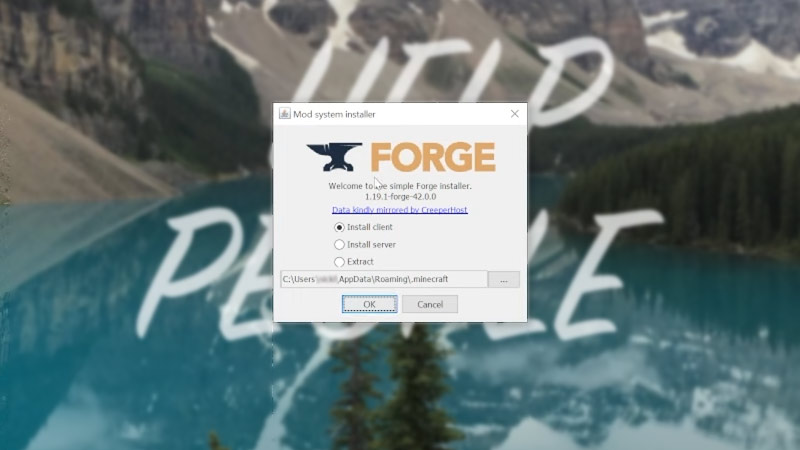
- Once Forge has been installed successfully, hit the OK button.
- Head over to the Minecraft launcher and select the drop-down menu next to it.
- You will see an option to select the Forge from the drop-down menu box.
- Select that option and hit the Play button.
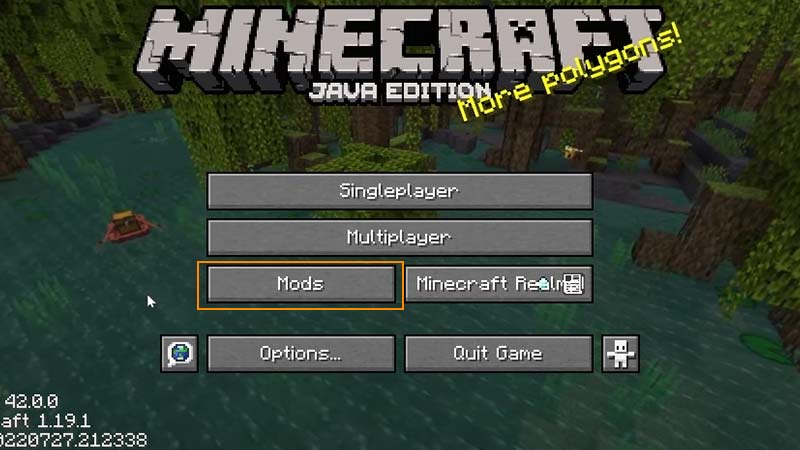
As you launch the game, you will find the Mods option in the Main Menu. Now, you can install and have access to all the Mods using the Minecraft Forge mod installer. If you like the FNAF series, you can check out the best FNAF Mods. You can also check out more Minecraft mods over here.
That’s everything covered about how to install the Minecraft Forge Mod installer. If you liked this guide, check out our guides on how to mod into Elden Ring, the best roleplay mods, what is enchantability, and more Minecraft Guides on our dedicated section right here on Gamer Tweak.











