Home > Minecraft > How to Activate Cheats in Minecraft

How To Enable Cheats In Minecraft – Java, Pocket (PE), Windows 10, Education Editions

Published Date :

Minecraft is one of those games which have a lot of console commands available to change up your gaming experience. You can change the weather, time of day, difficulty, teleport, change the game mode and much more. In case you are wondering how to turn on/enable cheats in Minecraft on various editions and platforms, check out this guide.

How to Turn On Cheats and Console Commands in Minecraft

Players can enable cheats on the following Minecraft editions:

  • Java Edition
  • Windows 10 Edition
  • Education Edition
  • Pocket Edition

How to Enable Cheats in Minecraft Java Edition?

Here’s how to turn on cheats in Minecraft Java edition:

  • Make a New World.
  • Choose More World Options… on the screen.
  • Click on Allow Cheats: ON to allow cheats in your world.
  • With this done, you will be able to use any cheat commands in it. Note that doing this will allow cheats only in the world that you have just created.

How to Activate Cheats in an Existing World
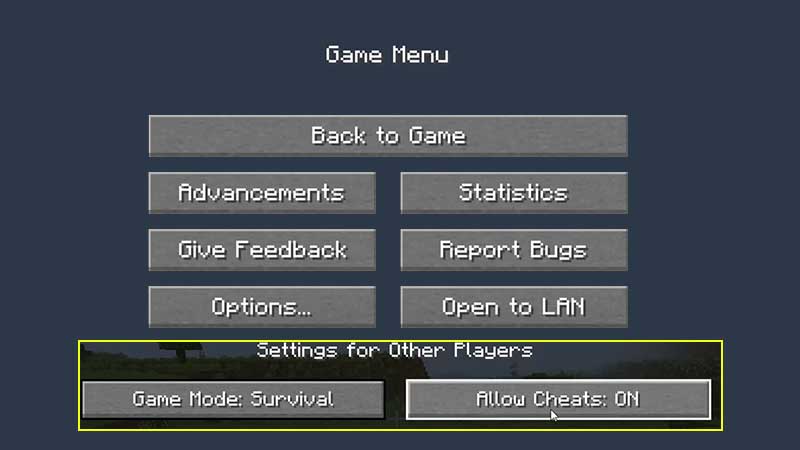
how to turn on cheats console commands minecraft

If you have already created your Minecraft world and want to activate cheats after doing that, follow these steps:

  • Open the Game Menu in your existing world.
  • Click on Open to LAN.
  • Set Allow Cheats to ON in your LAN world.
  • Click on Start LAN world.
  • This is how you can start using cheats in Minecraft Java edition after creating the world.

How to Activate Cheats in Minecraft Pocket Edition (PE), Windows 10 Edition, Education Edition?

For other editions like Minecraft Pocket Edition, Windows 10, Education Edition and more, here’s what you have to do:
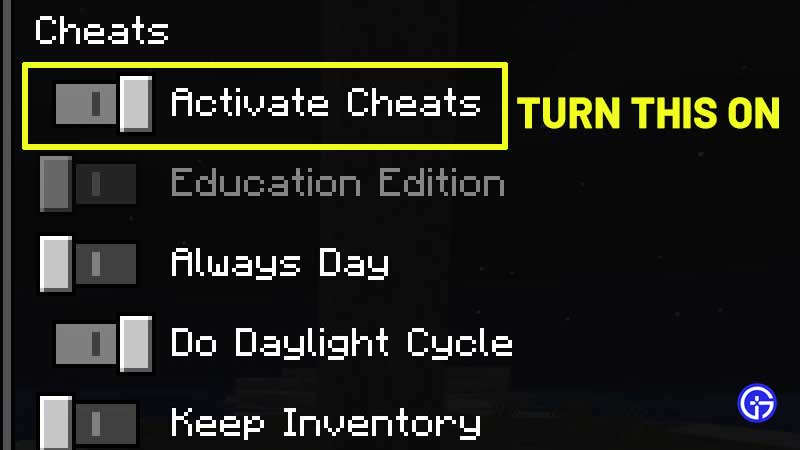
how to activate cheats minecraft

  • Launch it.
  • Create a new world.
  • Toggle the Cheats option to ON.
  • After following these steps, simply get into your world and use the cheats.

Note that you won’t be able to get achievements with cheats enabled so continue because with commands you are there to simply have fun.

Some of the best cheats you can use like /kill, /seed, /tp, /gamemode, /weather <type>, /time set <value> and more. Here’s our list of all Minecraft console commands. 
  • Build an ASMR Tower Codes (July 2026)

    Build an ASMR Tower Codes (July 2026)

    Published Date :

    If you enjoy satisfying building games, Build an ASMR Tower offers a relaxing experience where every upgrade helps you construct an even taller structure. As you continue stacking blocks and improving your tower, Gems become an important resource for unlocking new mechanics and progressing more efficiently. That’s where Build an ASMR Tower codes come in.… Read More

  • Excuse Me Sir Codes (July 2026)

    Excuse Me Sir Codes (July 2026)

    Published Date :

    If you’re looking for free Lucky rolls, Anime Crates, Cash potions and more boosts in Excuse Me Sir on Roblox, this list has all the codes you need to redeem. The developers disable rewards often, so it’s best to claim the goodies right away! Last checked for new codes on July 21, 2026 All Excuse… Read More

  • Speedsters Infinite Codes (July 2026)

    Speedsters Infinite Codes (July 2026)

    Published Date :

    Games based on speed and racing are always going to be a rage on Roblox, and if you’re a fan of leveling up your speed from zero to lightning fast, this one’s for you. In this game, getting faster means unlocking more Rebirths and better Speedsters, which will require Gems and MPH bonuses. This is… Read More

  • Dungeon Heroes Codes (July 2026)

    Dungeon Heroes Codes (July 2026)

    Published Date :

    Clearing dungeons and defeating bosses is quite fun in this game, but as every dungeon presents tougher enemies, surviving them often comes down to having the right gear and supplies. That’s why it’s important to redeem the latest Dungeon Heroes codes, which can provide free potions, boosters, food, and other valuable items to help you… Read More