
Chivalry 2 has four classes and each one certain specialization. They are Knight, Footman, Vanguard, and Archer. Each class has a specific set of skills that makes them different on the battleground. This also directly impacts their combat style. You will get a chance to choose a weapon during the start of the game from the Armoury. But if you are looking for an answer on how to switch weapons in Chivalry 2 in the battle then here is the answer.
How to Switch Weapons in Chivalry 2?
It is risky to change during the right, you can wait until you die. There will be a short break before you re-spawn back. This is where you can change weapons or class in Chivalry 2.
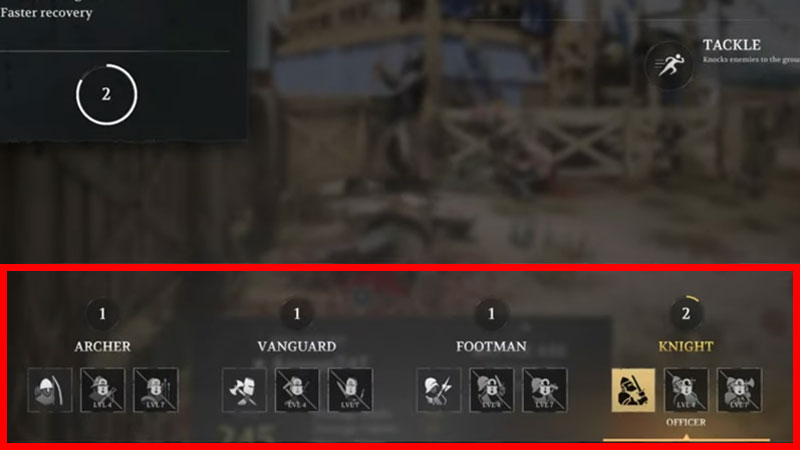
On PC press 1, 2, or 3 to switch weapons in Chivalry 2. But if you want to opt out of an entirely different set of methods then do this. Go to Game Menu after entering into the battle arena. The best time is to wait until you respawn. On the game menu, you will see the class along with three boxes between each of them. This will allow you to change weapons from the bottom menu. You can shuffle the weapons types from this menu. Also, the same menu allows you to change class in Chivalry.
If in between you think that you are not fit for the class or it has not good perks then you can switch to a new one and try out its combat style. So changing weapons is not really tough in Chivalry. But it is best you switch to a new weapon set after dying and while on the re-spawn screen.
There is one more way to switch weapons in Chivalry 2. You can do this by directly picking a weapon from the dead soldier. If someone dies you will see his weapon dropped on the floor. You can just walk over it and grab the new weapon. Entier combat system in Chivalry relies a lot on practice. For example the parry movement. This movement allows you to instantly defend yourself and enter into attack mode.
Want to know more about how to parry in Chivalry 2, then hit the link for details. The guide also has essential starter tips on combat moves.











