Home > Discord > Change Fonts Using Font Generator In Discord

How To Change Discord Fonts (2023)

Updated Date :

Discord is one of the best platforms to communicate with others be it via chat, voice or video. If you prefer texting more and like to keep things fun and interesting while chatting, why not use unique fonts while you are at it? Here’s how to change Discord fonts easily.

How to Change Discord Font Appearance?
How to Use a Different Font in Discord Messages

  • Launch Discord.
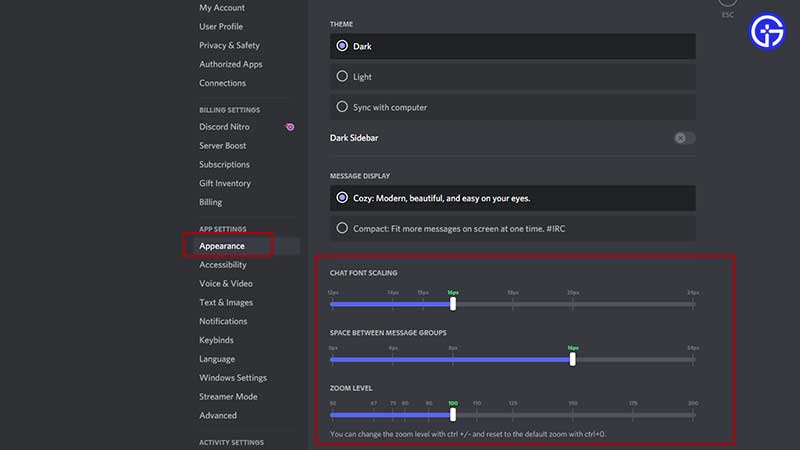
  • Find your username at the bottom left of the screen and click on the Gear icon (Settings).
  • From the menu on the left, click on Appearance.
  • Scroll to Chat Font Scaling and make your adjustments.
  • You can change the Chat Font Scaling, Space between Message Groups, and Zoom Level. Whatever changes you make will reflect in the dummy chat shown above on the same screen.

How to Use Different Fonts in Discord Messages
discord font generator
Use Font generators to use a different font in your Discord messages

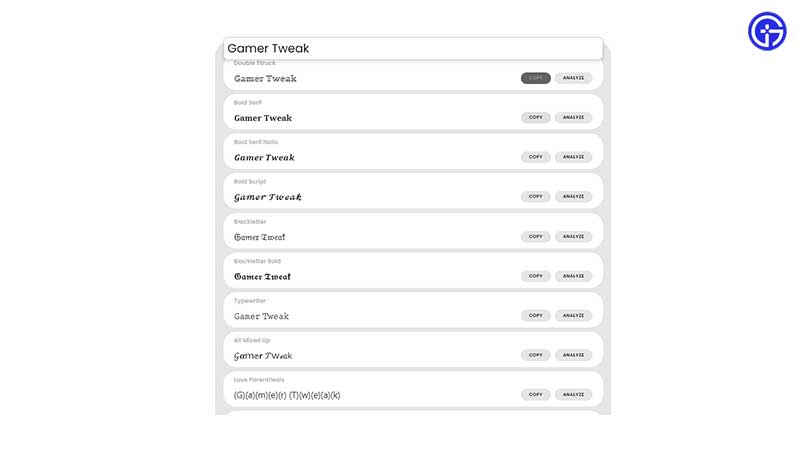
The above process does change the existing font’s appearance, it doesn’t give you brand new font options to choose from. Unfortunately, this feature is not yet available in Discord officially, but you can use external sites to copy sentences from. Here’s an example:

  • Head to Fontspace Font Generator (or any other Font Generator online like ExoticFonts, Lingojam or Bigbangram)
  • Type your desired sentence in the text field and you should get various font options for the same sentence.
  • Click on the copy button and paste it into your Discord chat.
  • This is basically how you can “change” Discord font using the Font generator.
  • There are lots of font options to choose from like mirrored, flipped, and even morse code. If you don’t wish to use any wacky fonts, there are many other common fonts available as well.

If this guide helped you out, we’ve got more tips and tricks for Discord that you might want to explore as well. And if you are a gamer, be sure to check out our coverage too.

  • Roll to Defend Codes (July 2026)

    Roll to Defend Codes (July 2026)

    Published Date :

    Roll to Defend codes can reward you with free Units, cash, and luck boosts to summon better Units to fight against zombies. Since upgrading your Backpack and unlocking new zones can take time, codes provide much-needed boosts, which is why we have a list of all the currently available rewards. Redeem them before they expire!… Read More

  • Anime Overseer Codes (July 2026)

    Anime Overseer Codes (July 2026)

    Published Date :

    Anime Overseer codes can give you free Gems, Gold, and Trait Rerolls to help you from the start. Since you’ll be summoning units, evolving them, and taking on challenging enemy waves, every free reward can make progression much easier. So, to help your journey, here’s the complete list of all the currently available codes. Last… Read More

  • Stay For Fortune Codes (July 2026)

    Stay For Fortune Codes (July 2026)

    Published Date :

    Stay For Fortune codes can give you free Cromerium, helping you unlock upgrades and progress without having to wait as long. Since the game revolves around staying in the server to earn rewards over time, every bit of free currency can help you get ahead faster. So, here’s the complete list of all the currently… Read More

  • +1 Speed Evolve Codes (July 2026)

    +1 Speed Evolve Codes (July 2026)

    Published Date :

    Speed-based games on Roblox will always stay popular, and this particular experience is quite addictive! Here, you play as an animal and your goal is to evolve into stronger animals, unlock new worlds, and be the fastest player on the server! +1 Speed Evolve codes offer free Speed and Win Boosts that can make your… Read More