As for all the online FPS multiplayer games, it is crucial to hear your enemies when they are close. COD Modern Warfare 2 is no exception to this as well. Listening to the footsteps of enemies better can allow you to make the next suitable move. But for that, you might need a bit of extra help with your audio settings. With the right settings, you can get an edge over your enemies. So, check out our guide on how to make or hear footsteps louder in MW2.
How to Hear Footsteps Louder in Modern Warfare 2
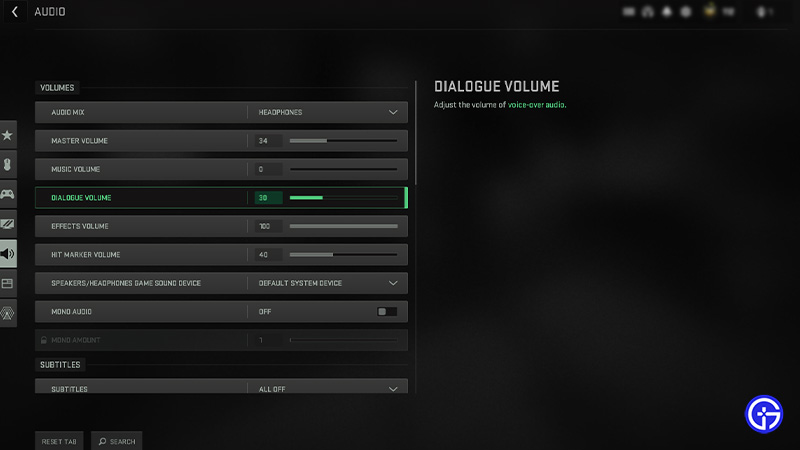
While the audio settings can differ for different MW2 players, the below settings would enhance the sound of your nearby enemies. Regardless, you can also tweak them according to your suitable choices. So, here are the audio settings to hear or make footsteps louder in MW2:
Volumes
- Audio Mix: Headphones (These are the different EQ modes that you can set according to your audio setup. If you have plugged in Headphones, the best option would be Headphones)
- Master Volume: 30-40
- Music Volume: 0 (This will help you listen to footsteps, grenades, and other sounds sharper and clearer)
- Dialogue Volume: 30-40 (This will help block the sound of enemies and other unnecessary noises)
- Effects Volume: 100 (To not miss any footstep sound from your enemies)
- Hit Marker Volume: 40-50
- Mono Audio: Off
Voice Chat Settings
- Voice Chat: On
- Last Words Voice Chat: Off
- Proximity Chat: On
- Voice Chat Device: Default System Device
- Voice Chat Recording Mode: We suggest setting it according to your preference.
- Voice Chat (Push to Talk): According to your preference.
- Voice Chat Volume: 50-60
- Microphone Test: Off
- Microphone Device: Default System Device
- Microphone Volume: 100
Advanced Audio Settings
- Juggernaut Music: Off
- Reduce Tinnitus Sound: On
As mentioned earlier, we recommend experimenting with these settings and trying out different values. But before that, we suggest trying out the above settings in a Bot or Private match in Modern Warfare 2.
That’s everything covered on how to make or hear footsteps louder in MW2. If you liked this guide, check out our more guides on how to G-Walk, how to Bunny Hop, aim assist tricks to get headshots, and more COD Modern Warfare 2 Guides on our dedicated section right here on Gamer Tweak.