
Halo Infinite lets you change your FOV like most first-person shooter games. But what happens when you want to customize your screen even more? Well if that customization includes moving your weapon around then don’t worry as Halo has you covered. You can change the position of your weapon to your liking. So in this guide let us take a look at how to change weapon offset in Halo Infinite.
How to Change Weapon Offset in Halo Infinite
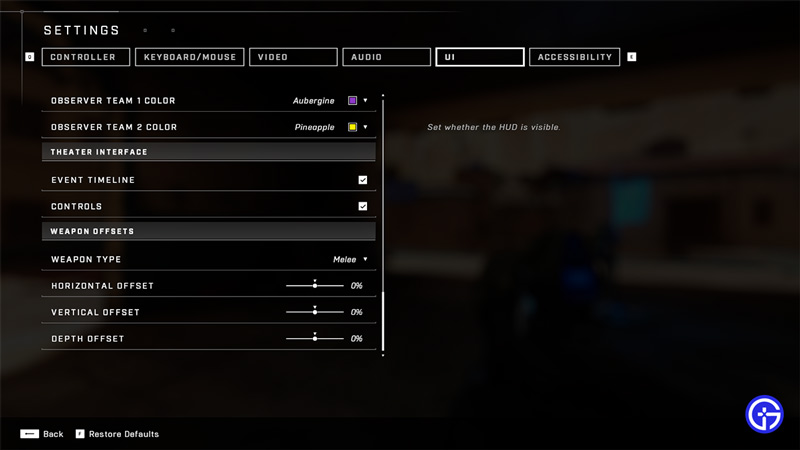
You can start a custom match with bots, as this will help you to easily check the changes after modifying the settings.
- Go to Settings.
- Here go to the UI tab and scroll down below to find Weapon Offsets.
- Weapons offset allows you to move your gun. You can move it left, right, up, down, or even make it move in or move out.
- You can change the offset of your Melee weapon, pistol, rifle, and heavy weapon through the drop-down.
- To modify the weapon position you can use the vertical, horizontal, and depth sliders. Here is the level of modifications that you can apply.
- Vertical: You can toggle the slider from -100% to 100%. The negative percentage moves your weapon to the bottom or down. And positive percentage moves it upwards.
- Horizontal: You can toggle the slider from -100% to 100%. The negative percentage moves your weapon to the left. And positive percentage moves it towards the right.
- Depth: You can toggle the slider from -100% to 100%. The negative percentage brings the weapon closer to your character’s chest. As for the positive percentage, you can use it to move your weapon away from the screen.
An important thing to remember is that you will have to change the offset of each weapon separately. Once you change them all you can get the same effect across all your weapons.
That covers everything you need to know about how to change weapon offset in Halo Infinite. If you like playing this game then be sure to check our other guides on how to fix offline bug and the user is banned error fix for Halo Infinite.











