
Due to the constant need for resources for crafting, it’s better to know the gatherable objects respawn interval in Palworld, instead of exploring out in the wild hoping to find a material you’re looking for. Here’s what we know about the respawn wait time, so you can head to the specific location frequently to harvest objects easily. Plus, learn how to change the interval via settings too.
What does Gatherable Objects Respawn Interval Mean in Palworld?
Gatherable objects respawn interval is the gap between the time when the objects are harvested and when they appear again. Knowing this is useful because if you’ve found a particular resource at a location near your base, you will know exactly when you can collect it again.
The interval between the objects reappearing in Palworld is a full in-game day. So, focus on the day night cycle while playing and after 24 hours in-game, the objects should respawn. The ‘gatherable objects’ respawn interval is the same for all harvestable resources, assuming there is space for them to regrow there.
How to Change the Objects Respawn Interval
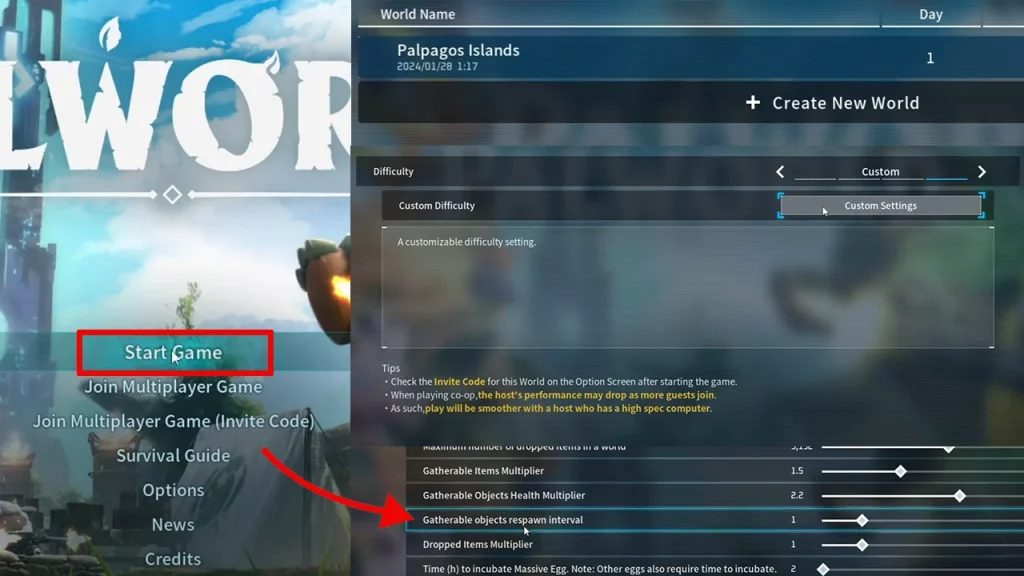
- Launch Palworld and click on Start Game.
- Click on your World where you want to change the gatherable objects respawn interval.
- There should be a button to Change World Settings at the bottom—click on it.
- Next to Custom Difficulty, click on Custom Settings.
- This is where you will see loads of customization options like changing the auto health regeneration rate, hunger depletion rate, damage to structure multiplier and more.
- Scroll down to Gatherable Objects Respawn Interval which should be 1 by default. Move the slider to the left and reduce it to whatever number you prefer.
- The lower the number on the slider, the faster the objects will respawn. So if you want to make Palworld easier with a steady supply of resources, reduce the number to its lowest possible value (0.5).
- But if you want to make it more challenging and make the objects respawn late, increase the number.
- Click on OK and save the settings.
- Then click on Start Game and you should see the applied changes.
If that helped out, be sure to explore more of our Palworld guides on Gamer Tweak to discover various hidden secrets! For example, here’s where to find the rare Medal Merchant, how to extract Crude Oil, capture unique Space Pals and how to farm Dog Coins efficiently.










