
Home > Roblox Guides > Fisch: How to Store Fish or Items and Equip Rod (PC, Mobile)

Fisch: How to Store Fish or Items and Equip Rod (PC, Mobile)

Updated Date :

If you’re a new ‘Fischer’, many in-game mechanics can be slightly confusing with the trickiest being the fishing mini-game. Through this guide, you will learn two very important things — how to favorite fish in Fisch, so that you don’t accidentally sell them, and how to equip better fishing rods that you earn or purchase.

Locking the rare or mutated fish is crucial because you might want to appraise it, give it to an NPC (Angler, Orc, etc.), or simply want to keep it in your inventory without selling it. Here’s the simple way to get it done on PC and mobile.

Also Read | How to Get the Aurora Totem and Rod

How to Favorite Fish in Roblox Fisch

To favorite fish or save items like bait crates, The Depths Key, diving gear, treasure map, and more, right-click on it with your mouse if you’re playing on PC. Mobile players need to double-tap on it. When a star appears on the block, you can rest assured that it’s favorited and won’t be accidentally sold when you’re selling your entire inventory to the merchant.
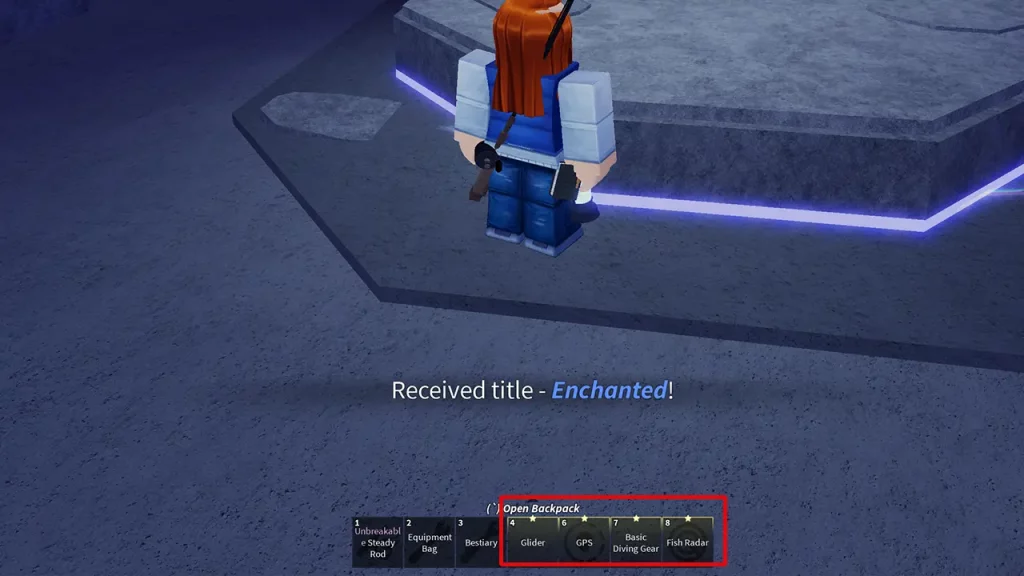
favorite and lock items and fish in roblox fisch

Unfortunately, at the time of writing, it appears that the option to favorite items has not yet been added to the console version.

How to Equip New Fishing Rods

  • Once you’ve purchased or obtained a new fishing rod, all you have to do is click or tap on the Equipment Bag in the hotbar at the bottom of the screen.
  • A new window will appear where you can see all the rods you’ve unlocked. Scroll to the right using the bar and look for the rod you want to equip.
  • Click on Equip under that rod and you’re done! Click on the Equipment Bag again to close the tab and you should be able to fish with the new addition now.

That’s everything to know about favoriting fish and equipping fishing rods in Roblox Fisch! Make sure to explore all our Fisch guides to know more about leveling up fast and earning a lot of money by selling rare fish.

  • Steal an Egg Codes (September 2026)

    Steal an Egg Codes (September 2026)

    Published Date :

    Steal An Egg is a Roblox game where you steal eggs from creatures, hatch them, and build a collection of pets. As you progress, you can also improve your base and race through different areas as you work toward rarer pets. Speaking of progression, many players are looking for Steal An Egg codes that can… Read More

  • Silk Road Trading Simulator Codes (September 2026)

    Silk Road Trading Simulator Codes (September 2026)

    Published Date :

    Silk Road Trading Simulator is a Roblox game where you take on the role of a merchant and travel between historic locations while trading goods. You can build your wealth, expand your trading operation, and customize your character along the way. Codes can give you free items, including cosmetics for your merchant. Here’s the complete… Read More

  • How to Play NoPixel V

    How to Play NoPixel V

    Published Date :

    NoPixel V is the newest version of the famous GTA 5 roleplay experience, and this time Rockstar Games is officially supporting the project. It comes with a complete rebuild of the server, new locations, updated visuals, and more tools for creating roleplay stories. However, the September launch is not an open release. Here’s what you… Read More

  • GTA 6 Sprint Control Change: Rockstar Ditches Button Mashing?

    GTA 6 Sprint Control Change: Rockstar Ditches Button Mashing?

    Published Date :

    Rockstar is making a small but important change to how players sprint in GTA 6. The new instalment appears to be moving away from the button-mashing controls used in earlier GTA titles and switching sprinting to the left stick. This means running around Vice City should require fewer repeated button presses when playing as Jason… Read More








