
EA Sports has released Madden 23 onto multiple platforms. The new American football video game is another great addition to the long-running Madden NFL series. Though the game brings fresh changes compared to Madden 22, your goal to win games should remain the same. Although the NFL teams are great on their own while playing the Franchise mode. But there is a certain element in getting to draft players from the league onto your team. This guide will help you do the same. So let’s check out this guide and see how to set up a Fantasy Draft in Madden 23.
How to Do a Fantasy Draft in Madden 23
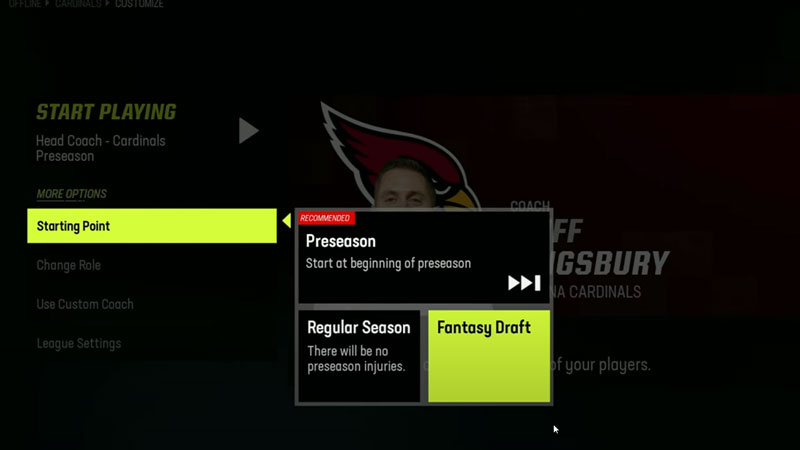
You can either choose the highest rated players or build a team with youngsters that will go on to win championships. Whatever you may choose, you need to be able to draft your own team. Follow the steps below and see how to set up and do a Fantasy Draft in Madden 23:
- Start by creating a Franchise as you would normally. Select the Create New League and then in the next window choose Use Active Roster for online and offline mode.
- After the Roster is Imported, you can select whichever team you want to play it with. Since it will not affect your choice of players to draft, why not play with your favorite team?
- In the next window, you will be able to spot the option of Starting Point. Select that option and then choose the Fantasy Draft option in the new window.
- Next, hit the Start Playing option, and then you will be able to start your Fantasy Draft in NFL from the new window.
- While you will have a time window for drafting your players, you can simply select Pause Draft to give you adequate time. The timer will be at the top left of your screen.
- Lastly, simply select the team you want and then enjoy the championship.
Also Read | How To Celebrate & Showboat In Madden 23
That’s all you need on how to set up a Fantasy Draft in Madden 23. While you are here, check out Lateral Pass, Stiff Arm, and more guides at Gamer Tweak.











