
Elden Ring is the latest RPG title released by FromSoftware. It is also an online game and will sometimes suffer from errors every now & then. One such error that has been recently plaguing the player base is the Failed To Acquire Parental Control Information Error. This has occurred to a lot of players and doesn’t allow them to play the game. In this guide, I will show you how to fix the Failed To Acquire Parental Control Information Error in Elden Ring.
How to Fix the Failed To Acquire Parental Control Information Error in Elden Ring
The Failed To Acquire Parental Control Information Error seems like a dire problem as it locks the player out of playing the game. Not to worry as the solutions to the problem are pretty simple. According to the Reddit user, u/Sidewinder0 & others like him have stated that changing your DNS servers manually to 1.1.1.1 and 1.0.0.1 fixed the problem. To do this, you will need to do the following steps:
- Press the Windows Key and select Settings.
- Now click on Network & Internet.
- Click on Change Adapter Settings.
- Right-click on your Network & select Properties.
- Now click on Internet Protocol Version 4 (TCP/IPv4).
- Below there will be a DNS section.
- In the Prefered DNS Server type 1.1.1.1 & in the Alternate DNS Server type 1.0.0.1.
- Click on OK & close all tabs.
- Now just restart your game and the error will disappear.
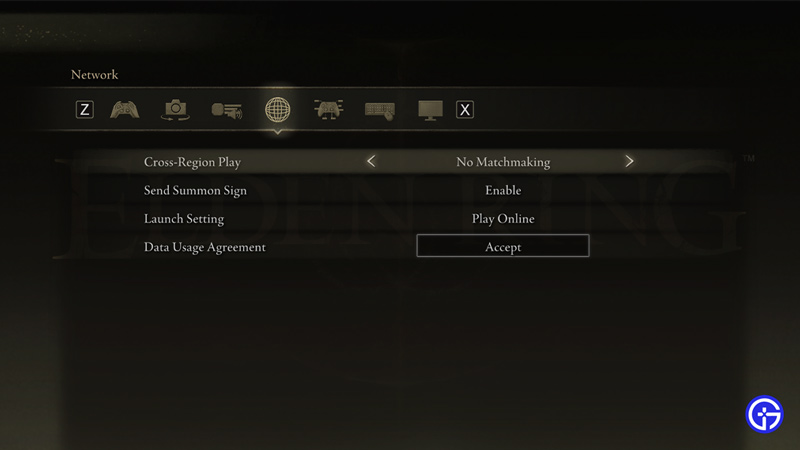
If these steps didn’t work then you can try another solution. Another Reddit user by the name u/nohead13 has suggested accepting the online agreement again & which will fix the Failed To Acquire Parental Control Information Error. To do this simply go to your Settings from the Main Menu and go to the Network tab. There will be an option of Data Usage Agreement. Click on it and accept the terms & policies.
This was all about the Elden Ring Failed To Acquire Parental Control Information fix. Hopefully, this guide has helped you. You can also check our other guides like Elden Ring Failed To Login To The Game Server Error Fix.











