
Home > Cities Skylines 2 > Cities Skylines 2: How To Expand City Limits (More Land)

Cities Skylines 2: How To Expand City Limits (More Land)

Published Date :

Your cities can keep on expanding, adding more land under their boundaries. With the industries, infrastructure, amenities, and transport becoming better, more citizens are attracted to settle in the city. However, issues like low and expensive residential areas can lead to overpopulation. To overcome these issues, you need to buy more land and expand city limits in Cities Skylines 2. Your City needs a hefty supply of money to maintain its facilities and infrastructure. Being overcrowded will not have a positive impact but rather negative consequences.

The maximum areas in CS2 are a lot bigger compared to the previous installment. You get to buy and expand your land to more than 61 square miles. And also get to purchase sets of tiles at once. But you’ll need two things to get the ownership of new land. Curious about what they are? Keep reading our detailed guide to know.

How to Expand City Limits in Cities Skylines 2
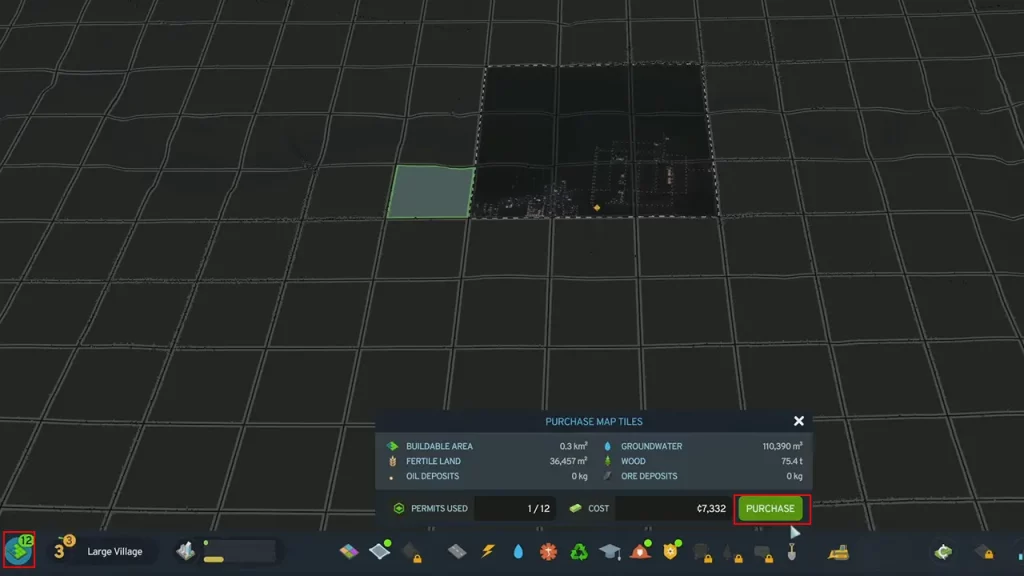
Buy More Land and Expand City Limits in CS2
Image Credit: BringTheParty on YouTube

You need two things to buy more land and expand city limits in Cities Skylines 2. Firstly, you need to get the money, which you can earn using our fast money guide. Secondly, you require a land permit which can be acquired by hitting different milestones. For the latter, keep on progressing CS2 to complete these milestones. Then, you can buy a Tile for every Land Permit you use depending on its cost.

So, follow the below steps to buy Tiles and expand your city’s limits:

  • Press the Map Tiles icon on the bottom left of your screen. It will show you all the lands you own and the ones available for purchase.
  • Drag and select the tiles you want to buy.
  • Then, hit the Purchase button with the required money and land permit.

That’s all on how to expand City Limits in Cities Skylines 2. If it helped you out, check out our more CS2 Guides in our dedicated section right here on Gamer Tweak.


  • Heal your Injuries Codes (August 2026)

    Heal your Injuries Codes (August 2026)

    Published Date :

    Heal your Injuries is a JJK-inspired game, where you need math to heal yourself as you get hit by bombs, weapons and more. While playing, you will need EXP and Energy to progress, and thankfully, Heal your Injuries codes drop exactly that! Here’s a complete guide with all the latest rewards and how to claim… Read More

  • Steel Crossfire Codes (August 2026)

    Steel Crossfire Codes (August 2026)

    Published Date :

    Steel Crossfire is a thrilling PvP robot-fighting game inspired by Transformers, so yes, you can change into a vehicle, get into Jet mode, and get into some explosive battles. To make things interesting, you can unlock more characters and skins using Shards, which is what Steel Crossfire codes frequently drop! Here’s the complete list of… Read More

  • CookieRun: Crumble Codes (August 2026)

    CookieRun: Crumble Codes (August 2026)

    Published Date :

    The Devsisters Corporation is back with another Cookie adventure, and like other games, there is a code redemption system in CookieRun: Crumble too! This means we can expect to get regular rewards as drops to help you assemble a team of adorable yet powerful Cookies. Here’s a list of everything currently available. Last checked for… Read More

  • Smiles Codes (August 2026)

    Smiles Codes (August 2026)

    Published Date :

    Smiles is a multiplayer survival mascot horror game where you join other players, complete objectives and survive the dangers lurking in the dark. To make the game more interesting, you can unlock emojis, animations, and more that require in-game currency (Fluff), but it can be quite a grind to earn. Don’t worry, you can redeem… Read More







