
If you are looking to equip USP-S in CS2 instead of the regular p2000 while playing Counter Terrorist, then don’t worry we have got you covered. The newest development in the FPS Shooter franchise brings back all the weapons and pistols from the old loadout. This includes the USP-S Pistol which you might not have as your starting pistol at first. While the pistol may not deal extensive damage like other handguns such as Desert Eagle, Dual Berettas, etc., it still is preferred by many players out there. So if you are looking to equip it as your spawn pistol for CT, here is a guide you should check out further.
How to Equip USP-S Pistol in CS2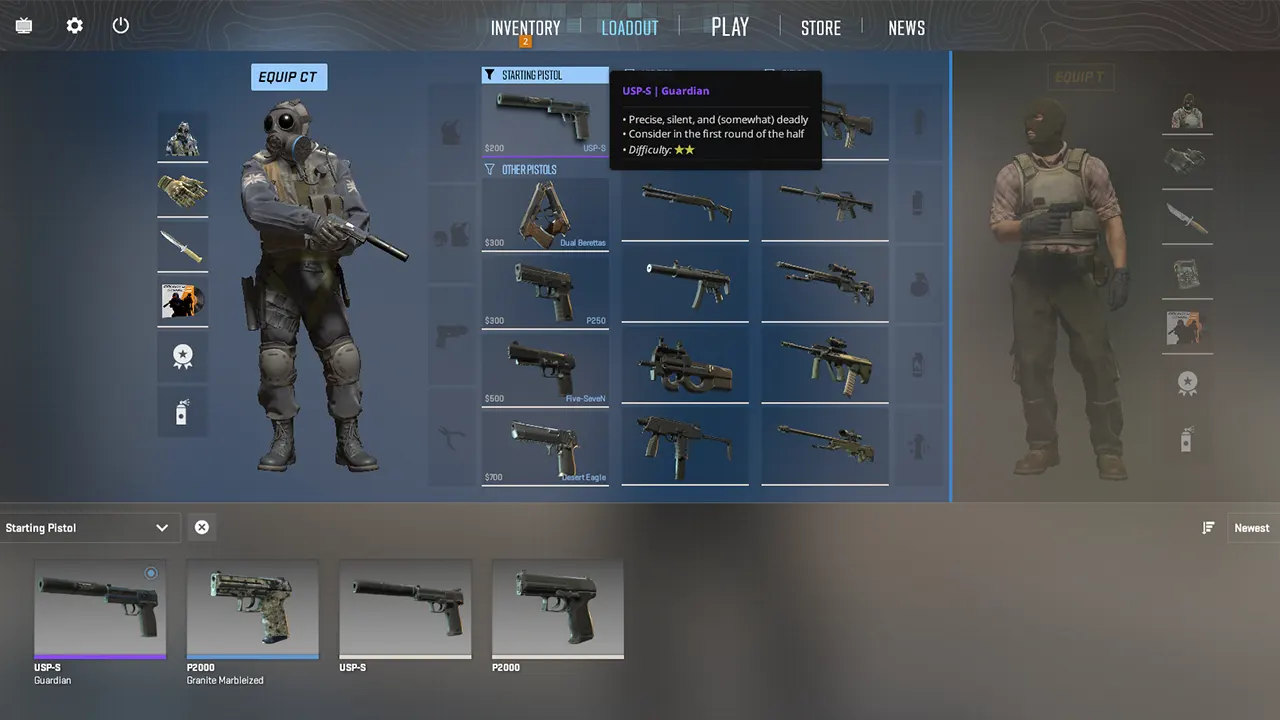
To equip USP-S in CS2, players will have to first swap it with the p2000 in the loadout. Here are the steps you can follow to change your starting pistol for Counter Terrorist:
- Head over to the loadout menu by selecting it from the upper bar.
- Once done, here you will see all the weapons equipped for both Terrorist and Counter Terrorist.
- You will have to select the CT side by clicking on it.
- After which, select the slot that says Starting Pistol on the top.
- Once done, you will see all the USP-S skins you have at your disposal.
- Click on the USP-S you want to equip in CS2.
- Hold and drag the pistol in the starting pistol slot.
- Once done, you will successfully equip the USP-S.
It is worth mentioning that the pistol is available only for the Counter Terrorist side in CS2. With that being said, the pistol will be available for players at the start of the round. And it would cost around 200 dollars to buy it from the buy menu in the game.
That’s everything covered on how to equip USP-S in CS2. If you find this guide helpful, check out our guides on best console commands and cheats, how to apply and remove stickers, and how to get ranked in Counter Strike 2. For even more interesting guides go through our dedicated CS2 section, right here on Gamer Tweak.











