Home > Elden Ring > How To Equip Quick Items In Elden Ring?

Elden Ring: How To Hotkey Items For Quick Access

Updated Date :

While playing Elden Ring, you may have noticed four hotkey items in the bottom left corner. These are the quick items that are easily accessible. You need to assign these items according to the items you use the most. If not, you might need to head to the Equipment section every time, which is not recommended, of course. In addition to that, it can also be quite helpful in the middle of combat. So, here’s our guide on how to equip quick items in Elden Ring.

How to Hotkey Items in Elden Ring?

Follow the mentioned below steps to equip hotkeys or quick items:

  • Press the default keybind to open the main menu.
  • Since the game does not pause, go to a place with fewer or no enemies around.
  • You will see a section of the pouch to the right.
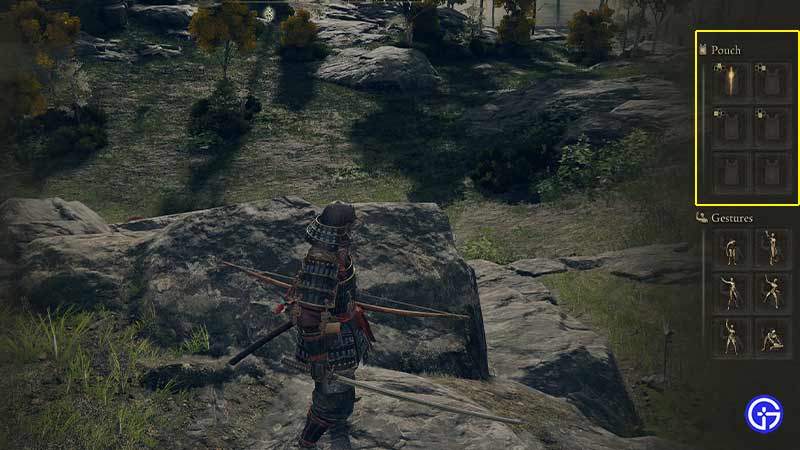
elden ring pouch equip quick items

  • There are four to six slots in your pouch.
  • To assign the items, click on the empty or equipped slot.
  • You can either remove or switch the item assigned to a slot.
  • Your quick items or hotkey items are the first four items in your pouch.
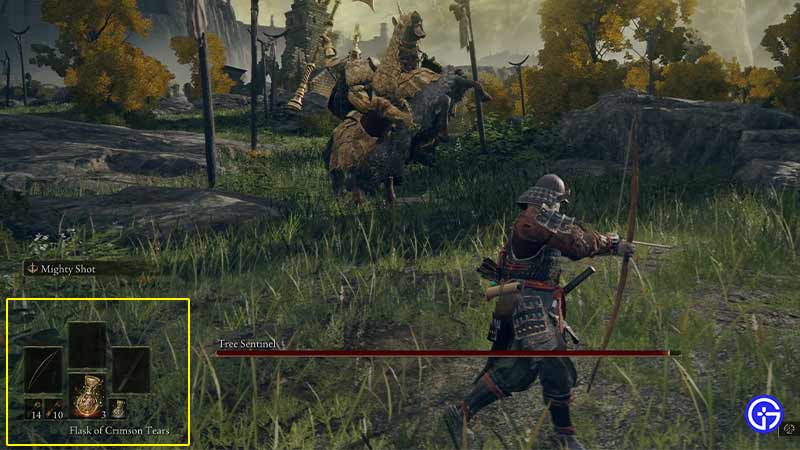
equip quick items elden ring

How to Use Quick Items in Elden Ring?

  • Press the default keybind with the assigned directional keys to access them.
  • These are the default keybinds:
    • For PC – Hold E button and the assigned directional key to access the item.
    • For PS – Hold Triangle button and the assigned directional key to access the item.
    • Xbox players – Hold the Y button with the directional key you have assigned.
  • As mentioned, you can assign whichever items you use the most. That can be the spirit ashes, weapon skills, incantations, Spectral steed whistle, and more to your quick use.

That’s all on how to equip quick items in Elden Ring. If you liked this guide, you can check out our other guides on how to use Talisman pouch, and how to switch arrows in Elden Ring right here on Gamer Tweak.
  • Roll to Defend Codes (July 2026)

    Roll to Defend Codes (July 2026)

    Published Date :

    Roll to Defend codes can reward you with free Units, cash, and luck boosts to summon better Units to fight against zombies. Since upgrading your Backpack and unlocking new zones can take time, codes provide much-needed boosts, which is why we have a list of all the currently available rewards. Redeem them before they expire!… Read More

  • Anime Overseer Codes (July 2026)

    Anime Overseer Codes (July 2026)

    Published Date :

    Anime Overseer codes can give you free Gems, Gold, and Trait Rerolls to help you from the start. Since you’ll be summoning units, evolving them, and taking on challenging enemy waves, every free reward can make progression much easier. So, to help your journey, here’s the complete list of all the currently available codes. Last… Read More

  • Stay For Fortune Codes (July 2026)

    Stay For Fortune Codes (July 2026)

    Published Date :

    Stay For Fortune codes can give you free Cromerium, helping you unlock upgrades and progress without having to wait as long. Since the game revolves around staying in the server to earn rewards over time, every bit of free currency can help you get ahead faster. So, here’s the complete list of all the currently… Read More

  • +1 Speed Evolve Codes (July 2026)

    +1 Speed Evolve Codes (July 2026)

    Published Date :

    Speed-based games on Roblox will always stay popular, and this particular experience is quite addictive! Here, you play as an animal and your goal is to evolve into stronger animals, unlock new worlds, and be the fastest player on the server! +1 Speed Evolve codes offer free Speed and Win Boosts that can make your… Read More