
Wondering if Evil Dead the game supports voice and text chat? Well, you are not alone, there are many players that are looking to know about the same. The simple reason for it is that communication is a must for this game. Thus the players want to learn if the game allows you features like push to talk. So in this guide let us learn how to enable and use voice chat in Evil Dead the game and if supports push to talk.
How to Enable & Use Voice Chat in Evil Dead the Game
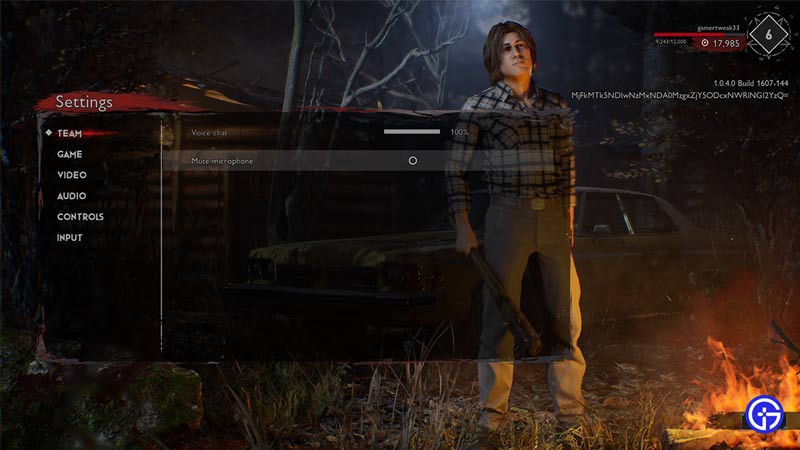
You can use the voice chat in this game by enabling it from the Team Section in settings.
- Go to the Title screen of the Game.
- Click on the Settings option. It is the second last option in the game.
- Under Settings the first option is Team.
- Here you get to increase and decrease the volume of your teammates.
- The second option you get is Mute microphone. If you choose to mute then you won’t be able to give information to your teammates.
- Once, you are done with the changes go back and save the Settings.
Remember, if you choose to not mute your microphone, then it will be in use during the entire match. So there is a good chance it will pick up any noises in the background, so you might want to keep that in mind if you plan on using the voice chat.
Can you use Push to talk in Evil Dead the Game?
At the time of writing this article, the game does not support the push to talk. Even the PC players can’t use push to talk. Although the game might not have it now they can add this feature in the future with some updates. But there is no confirmation for the same so we can only hope.
Can you use Text chat in this game?
No, there is no support for any form of text chat in this game at the time of writing this article. And just like push to talk we can hope that the developers add this feature in the future with an update.
That covers this guide on how to enable and use voice chat in Evil Dead The Game. Since you like playing this game be sure to check out our Evil Dead the Game section. Here you can find guides on topics like how to change resolution, how to get & use Pink F, and more.











