In Cities Skylines 2, the underground electric cables and power lines can enhance energy supply efficiency and accessibility. Cities’ subterranean networks, including transportation systems, rely on a continuous electricity supply. The disastrous placement of power lines can lead to an unsightly and inefficient infrastructure. Thankfully, these lines can be strategically repositioned to optimize energy distribution across all sectors and areas of the city once you remove them.
You can learn how to remove underground electric cables and power lines in Cities Skylines 2. Different zones within a city have varying electricity demands, which can fluctuate with the introduction of new transportation systems and amenities. Managing these dynamic requirements can be challenging. However, CS2’s newest feature to delete and reconfigure these cables streamlines this process. On the brighter side, this process also provides a refund for the removed lines or cables.
How to Remove Cities Skylines 2 Underground Electric Cables and Power Lines
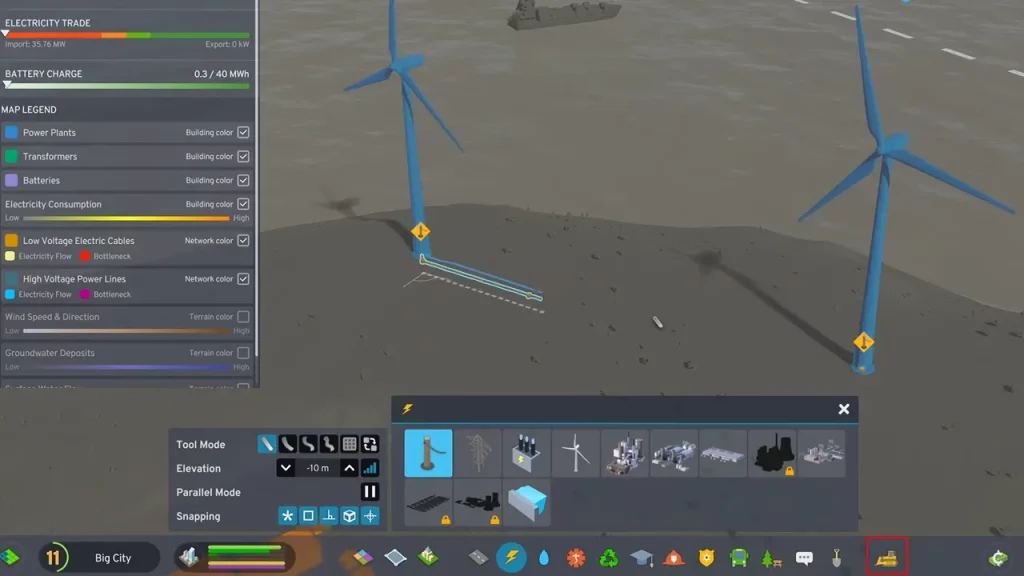
To delete or remove the underground electric cables and power lines in Cities Skylines 2, follow these simple steps:
- Access Underground View:
- PC: Click the bulldozer icon located at the bottom right corner of the screen. Alternatively, press the “B” key on your keyboard.
- Console: Press and hold the left stick and simultaneously press the “B” button.
- Select Underground Mode:
- From the left-hand side of the screen, choose the “Underground” mode.
- Identify and Select Cables:
- The underground view will display all the underground structures, including roads, pipes, tunnels, and electrical cables.
- Click on the specific electrical cable or power line you want to remove.
- Demolish and Receive Refund:
- Click the “Bulldoze object” button to remove the selected cable or power line. You will receive a refund for the demolished item.
- Remove Multiple Cables:
- To delete multiple cables simultaneously, click the mouse cursor to select the desired cables. Then, click the “Bulldoze object” button to remove them.
That’s all about how to remove Underground Electric Cables and Power Lines in Cities Skylines 2. If you found this guide useful, check out other Cities Skylines 2 guides. You can start by learning how to delete underground pipes in CS2 and then find ways to deal with garbage piling up.