
Home > Cities Skylines 2 > How To Delete Underground Pipes In Cities Skylines 2

How To Delete Underground Pipes In Cities Skylines 2

Published Date :

If you are confused about how to delete Pipes in Cities Skylines 2, you might want to remove any unneeded underground pipes for effective management. Since these pipes directly affect the water supply and the sewage outlet, not maintaining them can result in numerous issues. These include sick, unhygienic, and unhappy civilians as your city population declines gradually. The main cause of these issues is due to the underground pipes not being placed correctly.

But as you can remove these pipes in Cities Skylines 2, you can organize your sewage and manage your water supply systematically. Luckily, you are also refunded a certain amount in exchange for removing them. So, check out our guide to find out how to remove the pipes.

How to Delete & Remove Pipes in Cities Skylines 2
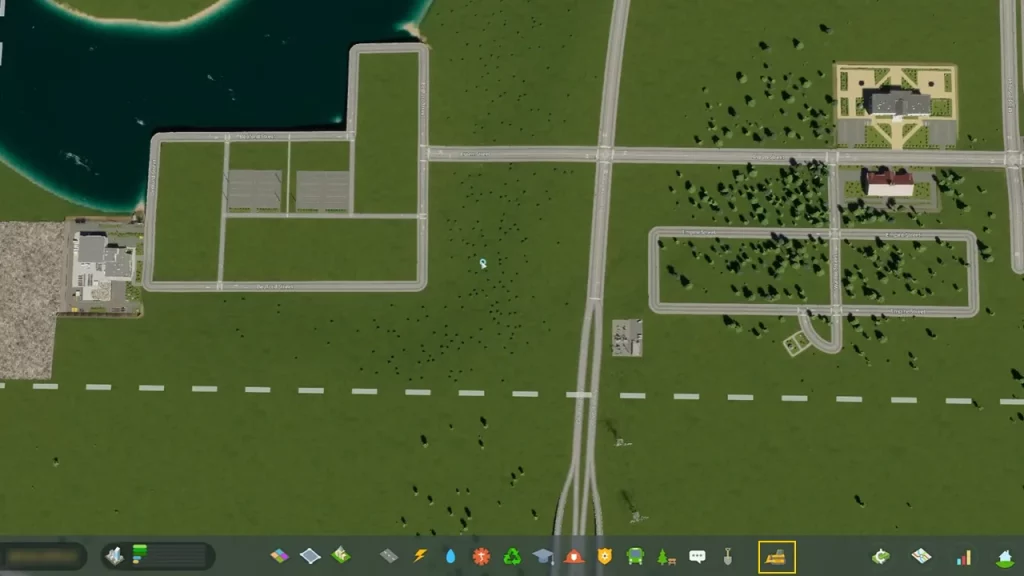
city skylines 2 delete remove underground pipes
Image Source: Cities: Skylines on YouTube.

You can delete pipes in Cities Skylines 2 by toggling the underground view of your city. For that, press the Bulldozer button to the extreme right of your screen.

So, follow the below steps to remove the underground pipes:

  • Press the Bulldozer button to open the Bulldozer menu. Alternatively, you can hit the B button to open the Bulldozer menu box.
  • Select the Underground mode option on your left to switch the view of your city. This would display all the underground sewage and water pipes.
  • Then, select the underground pipes you want to remove.
  • Lastly, press the Bulldoze object option to delete it and get refunded an amount.

In addition to individually deleting the pipes in CS2, you can also select multiple of them. To do so, click and hold the starting point of your underground pipes. You must move the cursor or controller stick depending on the direction of the underground path. Using this method, you can remove multiple pipes easily and save time.

That’s all about how to delete pipes in Cities Skylines 2. If you found this guide helpful, check out our more Cities Skylines 2 Guides in our dedicated section right here on Gamer Tweak.


  • Heal your Injuries Codes (August 2026)

    Heal your Injuries Codes (August 2026)

    Published Date :

    Heal your Injuries is a JJK-inspired game, where you need math to heal yourself as you get hit by bombs, weapons and more. While playing, you will need EXP and Energy to progress, and thankfully, Heal your Injuries codes drop exactly that! Here’s a complete guide with all the latest rewards and how to claim… Read More

  • Steel Crossfire Codes (August 2026)

    Steel Crossfire Codes (August 2026)

    Published Date :

    Steel Crossfire is a thrilling PvP robot-fighting game inspired by Transformers, so yes, you can change into a vehicle, get into Jet mode, and get into some explosive battles. To make things interesting, you can unlock more characters and skins using Shards, which is what Steel Crossfire codes frequently drop! Here’s the complete list of… Read More

  • CookieRun: Crumble Codes (August 2026)

    CookieRun: Crumble Codes (August 2026)

    Published Date :

    The Devsisters Corporation is back with another Cookie adventure, and like other games, there is a code redemption system in CookieRun: Crumble too! This means we can expect to get regular rewards as drops to help you assemble a team of adorable yet powerful Cookies. Here’s a list of everything currently available. Last checked for… Read More

  • Smiles Codes (August 2026)

    Smiles Codes (August 2026)

    Published Date :

    Smiles is a multiplayer survival mascot horror game where you join other players, complete objectives and survive the dangers lurking in the dark. To make the game more interesting, you can unlock emojis, animations, and more that require in-game currency (Fluff), but it can be quite a grind to earn. Don’t worry, you can redeem… Read More







