In this game, players will have full control over the lives of their characters. This entails customization options concerning the physical appearance of their Sims. Similarly, many players have been wondering how they can edit their Sims in Sims 4. To help you with this, here are all the steps you will have to take whether you want to make a few minor tweaks in the appearance of your character or if you are looking to make multiple changes and fully edit your Sims.
Also Read: Sims 4 Career Cheats
How to Edit Existing Sims in Sims 4
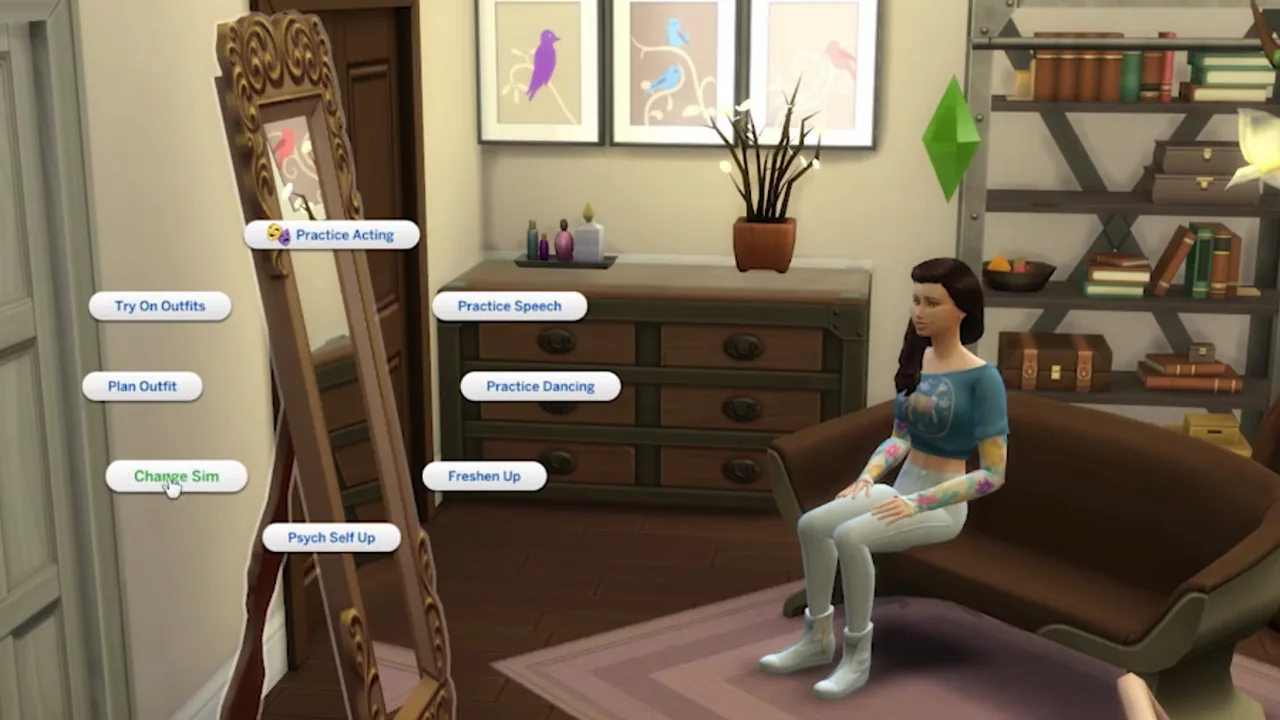
Here’s everything you need to know if you want to make a few tweaks or minor changes in your Sims. This option can help you customize your character hairstyle, accessories, and outfits. As a result, you can quickly access it to change the look of your Sims by just using these few simple steps:
- Once you are in the game and your character is with its family, hold the ‘Shift‘ key and left-click on your Sim, simultaneously.
- By doing this, the ‘Modify in CAS‘ option will pop up.
- Additionally, you can also access this option by clicking on a mirror, wardrobe, or dresser and selecting either the ‘Plan Outfits‘ or the ‘Change Sim‘ option that appears on the screen. Moreover, this option will open the CAS menu as well.
- After you have accessed this menu, you will be able to make a few minor changes in the appearance of your Sims.
How to Use Sims 4 CAS Cheat Full Edit Mode
Since the customization options are heavily limited while opening the CAS option, players can get access to the full edit mode by using cheats in Sims 4. Here’s the complete process you need to follow to access this editing option:
- Firstly, enable cheats by pressing “CTRL + SHIFT + C” on the keyboard and pressing all 4 bumper buttons for consoles.
- Once the cheat box window opens up, enter the command “testingcheats true“.
- Now, you will have to type in “cas.fulleditmode” and press ‘Enter‘.
- After exiting the cheat box window, press ‘Shift‘ and left-click on your character (O + X simultaneously on the PlayStation and Xbox players can hold down B + A, and press B). Now, click on “Edit in CAS” to freely make all the changes you want and edit your Sims.
That’s all you need to know to edit Sims in Sims 4 so that you can change your character’s appearance. If you are interested in this game, make sure to check out how you can do Space Missions and how you can write songs in Sims 4, here on Gamer Tweak.