Credits in Halo Infinite is a form of premium currency that you can use to get cosmetic items. And you can also use it to purchase the Battle Pass. Now you might be wondering why would you need the battle pass, and that is a good question. Since the multiplayer in Halo Infinite is free to play. You can use the Battle pass to make your character stand out from the crowd. So in this guide let us learn about how to get and earn credits in Halo Infinite and fix for can’t buy credits.
How to Get & Earn Credits in Halo Infinite
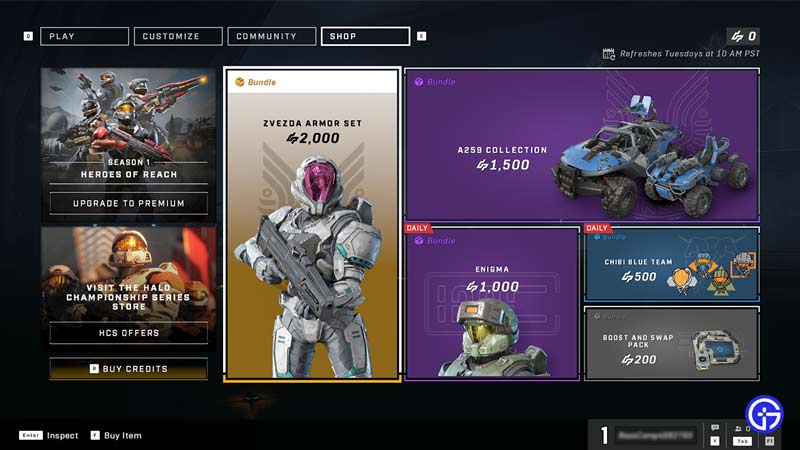
You can get Credits from the store in Halo Infinite. It costs real money and below is the cost of each bundle.
- $4.99: 500 Credits
- $9.99: 1000 Credits
- $19.99: 2000 Credits and 200 Bonus Credits
- $49.99: 5000 Credits and 600 Bonus Credits
- $99.99: 10000 Credits and 1500 Bonus Credits
As seen above the bigger bundle you purchase, the more bonus credits you get. To buy them open the store and on the bottom left you will see the option to buy credits. You can purchase it from there.
And as of now, there is no way to earn credits. Maybe the game may give this option some time in the future but right now the only way to get credits is by buying them.
How to Fix Can’t buy credits in Halo Infinite
If you are not able to buy credits in Halo Infinite there are two fixes.
- Enable Steam in-game Overlay: Go to your Steam settings and enable Steam in-game overlay. After this step, restart your PC, launch the game, and try buying credits again. Thanks to user u/SpinDrill on Reddit for sharing this fix in the following thread.
- Uninstall Steam version: Basically, uninstall the game from Steam and instead download from the Microsoft Store. Thanks to user u/ai_Locker on Reddit for this fix.
That covers this guide on how to get credits in Halo Infinite and fix for unable to buy credits issue. If you are looking to play this game then check our guide on how to fix Slow Download speed on Steam and fix crashing on Startup on PC for Halo Infinite.