The Landmines and turrets are the two types of traps in Lethal Company. You can find them lying across different rooms in random locations. Since this is based on RNG, it can be almost impossible to spot these traps. This has got several players looking for ways to turn off the Sentry traps and deactivate them.
However, there is a way to temporarily defuse them for a short time. So, check out our guide on how to disable Landmines in Lethal Company. In our guide, we solely focus on the ways to deactivate these mines.
How to Disable Landmines in Lethal Company
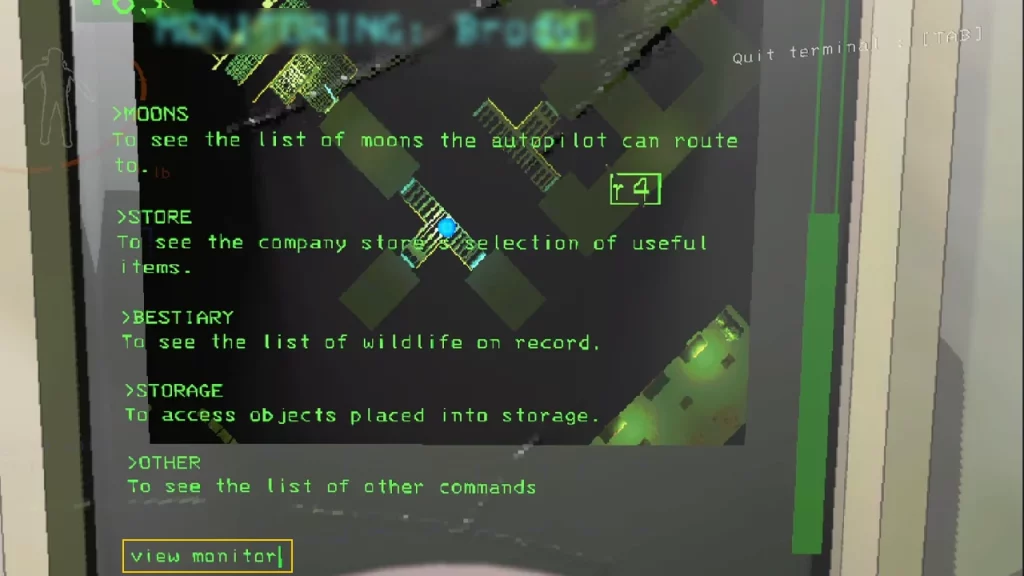
You can disable the Landmines by entering its corresponding code on your ship’s Terminal. To do so, you must have at least one of your teammates on your ship base. Speaking of which, you can see the code of a mine by typing in the “view monitor” on the Terminal. Once typed in, it will enable the radar cam to give you an overview of all traps. This code will be a number and letter indicating the Sentry traps in every terminal.
You need to type the exact code in the terminal to turn it off temporarily. For example, if the code displayed on the monitor is r4, type in r4 to deactivate the landmines. That said, it will defuse them only for a few seconds. So, you can continuously type the code to keep on disabling these mines.
Considering this process only presents a short time window, you or your teammate must be fast to run past them. Note that communication is the key. So, it would be best if you communicated with your friends.
Alternatively, you can also defuse the landmines using a Shovel. As you hit them with a Shovel, it will cause a fire erupting from them. Note that this process can also result in them randomly firing at you and your teammates. So, like other players, you can also use this opportunity to kill monsters by drawing them closer to the firing range.
That’s everything covered about this topic. If you liked this guide, check out our guides to find out how to get and use Air Horn, how to deal with Ghost Girl, and explore more Lethal Company Guides in our dedicated section right here on Gamer Tweak.